

Visible & Outlined Waxed Blocks
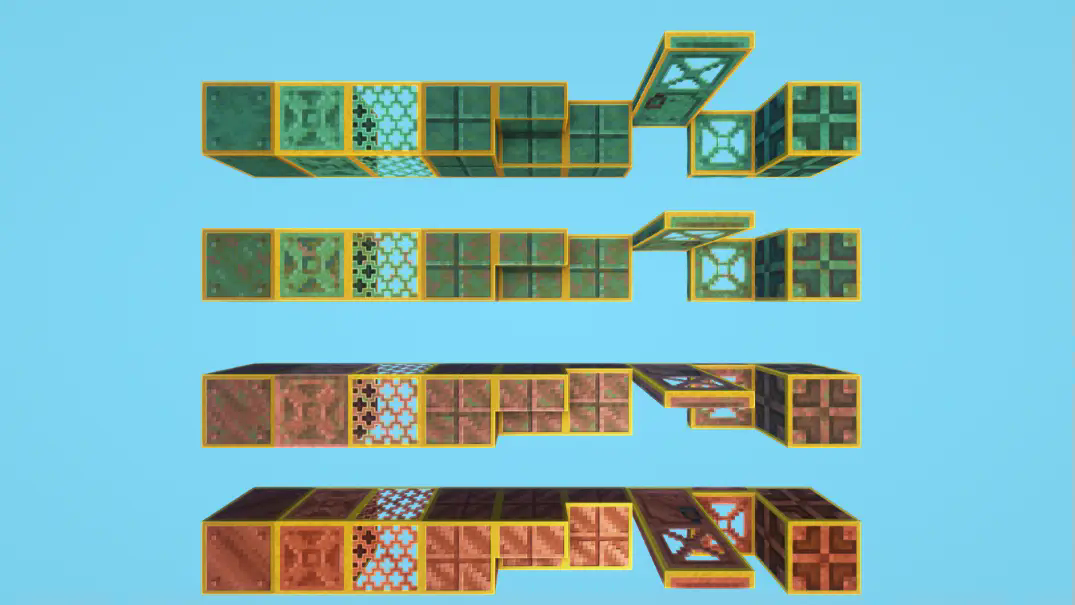
Add an outline to ALL the waxed copper blocks in order to distinguish the waxed from the non-waxed ones more easily.
 1,28k
1,28k
Quick challenge
How far can you run before the mobs catch you?
Minecraft check
Confirm your run
Complete the quick check to get your code.
Visible & Outlined Waxed Blocks
Indicate / Highlight which blocks are waxed with a clean yellow outline. No more need to use the f3 menu to distinguish the waxed blocks from the non-waxed ones!
Got an issue or a question? → Send me a message on Discord: enigmusse
By the way, I'm also on the Modrinth and CurseForge Discord servers.
How to use it?
1. Copy it into the resource packs folder of your Minecraft instance. 2. Open the escape menu, click "Visible & Outlined Waxed Blocks", and select "Visible & Outlined Waxed Blocks"!
Compatibility Notice
The resource pack functions correctly despite the compatibility warning. Simply confirm by selecting Yes when prompted.
To suppress this notification completely, install the mod:
- No Resource Pack Warnings (Modrinth)
Without this solution, I'd need to create and upload a separate archive for nearly every minor Minecraft version — even though the textures remain unchanged — leading to unnecessary extra work.
