

VinURL
A mod that allows you to write Youtube and File-Hosting URLs on a custom music disc to play on a Jukebox
 226,67k
Quick challenge
How far can you run before the mobs catch you?
Rotate your phone
Dino Mine is ready when your screen is landscape.
Minecraft check
Confirm your run
Complete the quick check to get your code.
Your code
Expires in 5 hours
VinURL
# About
VinURL is an exciting fork of the popular [URL Music Discs](https://modrinth.com/mod/url-music-discs) mod by [Hoofer](https://github.com/HooferDevelops).
With the Custom Music Disc, players can download and play any cloud-hosted audio file directly in Minecraft or download
them from YouTube or other supported [Sites](https://github.com/yt-dlp/yt-dlp/blob/master/supportedsites.md), all via a URL, creating a personalized musical experience like never before.
# Usage
# Commands
`/vinurl update` manually checks/installs updates for all the external executables that are required for the mod
`/vinurl delete` deletes all downloaded audio files that are not being used at that moment for the player
`/vinurl config` to open the config-screen
# Recipe
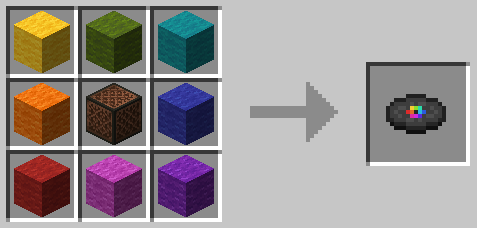
it's shapeless, no need to align the colors with the shown image
# Config
Various client-side settings can be made. The config-screen can be accessed through [Mod Menu](https://modrinth.com/mod/modmenu) or the slash command (see
Commands Section)
# Disclaimer
This mod automatically downloads the following external programs in the background to ensure proper functionality. By using this mod, you agree to the automated download and use of these external programs.
- [yt-dlp](https://github.com/yt-dlp/yt-dlp) ([Unlicense](https://github.com/yt-dlp/yt-dlp/blob/master/LICENSE)): Downloads media from supported providers.
- [deno](https://github.com/denoland/deno) ([MIT](https://github.com/denoland/deno/blob/main/LICENSE.md)): Javascript engine to run [yt-dlp-ejs](https://github.com/yt-dlp/ejs) solver scripts.
- [FFmpeg binaries](https://github.com/Tyrrrz/FFmpegBin) ([MIT](https://github.com/Tyrrrz/FFmpegBin/blob/prime/license.txt)): Extracts audio from media files.
Please note that it is the sole responsibility of each user to comply with applicable copyright laws and the terms of service of any music provider when using this mod. The developers of this mod do not assume any liability for unauthorized use or violations of such laws and regulations.
| Enter URL | Use Disc |
|---|---|
| 1. Right click the Custom Music Disc | 1. Insert the Disc into a Jukebox |
| 2. Enter a valid URL | 2. Wait until the download completes |
| 3. Press Enter or Escape to set the URL | 3. Enjoy the music :) |
/docs/.assets/enter_url.gif?raw=true) |
/docs/.assets/insert_disc.gif?raw=true) |
