

Velocity Friends
VelocityFriends is a fully customizable friends system built for the Velocity Minecraft proxy. It allows players to easily add, remove, and manage friends across your network using a suite of intuitive commands.
 482
482
Quick challenge
How far can you run before the mobs catch you?
Minecraft check
Confirm your run
Complete the quick check to get your code.
Velocity Friends
Velocity Friends
VelocityFriends is a lightweight and fully customizable friends system built for the Velocity Minecraft proxy. It allows players to easily add, remove, and manage friends across your network using a suite of intuitive commands.
Benefits of VelocityFriends ✅
- Fully customizable (colours, messages, command names, etc) - Secure private messaging between friends - Ability to add/remove friends - Friend requests system - Ability to hot-reload configs and commands. - Ability to use placeholders inside of the chat messages (messages.yml config file), such as %player_name% - Ability to see all friend requests you've been sent - Ability to see all friends you've added and their online status (what server they're playing on) - Ability for staff members to use '/fspy' to view player's /fmsg's for better network moderation - Feature which sends a message to your friends telling them whether you've joined or left the network - Integrates with PremiumVanish (if installed) so staff members can remain anonymous across your friends list too!
Permissions ⚠
all players = should be given to all players
DO NOT GIVE TO ALL PLAYERS = should be given to developers/admins who need access to "/friends reload" which reloads the commands and configs. DO NOT GIVE TO ALL PLAYERS
DO NOT GIVE TO ALL PLAYERS = should be given to DO NOT GIVE TO ALL PLAYERS who need access to "/fspy" which allows them to view players private /fmsg's. DO NOT GIVE TO ALL PLAYERS
Commands 🔨
Message
Message a friend that you have added.
Usage: /fmsg <username> <message>
Reply
Reply to the person who most recently messaged you.
Usage: /freply <message>
Spy
Allows staff members to view all the players /fmsg's. This command toggles the ability to do so.
Usage: /fspy
Friends List
View all the friends you've added. If that friend is online, it'll also display which server they're playing. Otherwise, will show they're offline.
Usage: /friendslist <optional: page>
Add/Request Friend Command
Send a friend request to another player on the network.
Usage: /friends request <username>
Remove Friend Command
Remove a player as a friend.
Usage: /friends remove <username>
Request Accept Command
Accept a friend request that you have been sent.
Usage: /friends accept <username>
Request Decline Command
Decline a friend request that you have been sent.
Usage: /friends decline <username>
Requests List Command
View all the friend requests you have been sent.
Usage: /friendrequests <optional: page>
Reload Command
Reloads the configuration files, and also re-registers all the commands.
Usage: /friends reload
Showcase
Reload Command

List of all subcommands under the 'parent' node
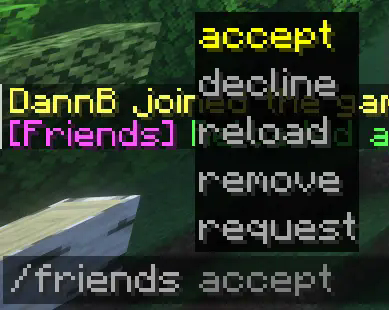
Friend Requests (sent and received)


Friends List

Friend Requests List

Message on Login

Contact
For suggestions, bug reports, or general help; join the discord: https://discord.gg/v5hU7kBp2S
