

Velocity Web API
A plugin to expose web API endpoints for Velocity proxy servers. Display player and server information easily.
 68
68
Quick challenge
How far can you run before the mobs catch you?
Minecraft check
Confirm your run
Complete the quick check to get your code.
Velocity Web API
Velocity Web API


Lightweight HTTP API for Velocity proxies. Expose player lists, per-server counts, per-player details, etc. Ideal for websites, bots or other monitoring applications. I built it for my own uses, but it might help someone else out too.
Quick Install
- Drop the compiled plugin JAR into your Velocity `plugins/` folder. - Start (or restart) your proxy; the plugin will create its data folder and a `config.cfg` (if missing) in the plugin data directory.
Configuration
- The plugin creates a `config.cfg` in its data folder on first run. Available keys: - `port` : port the HTTP server listens on (default `25576`). - `bindAddress` : interface/address to bind the HTTP server (default `0.0.0.0` to listen on all IPv4 interfaces; set to `127.0.0.1` for local-only access). - `checkUpdates` : enable automatic Hangar update checks (default `true`). - `snapshotUpdates` : include snapshot/unstable updates in checks (default `false`). - `debugEnabled` : show debug messages (`logger.debug`) in the proxy console when `true` (default `false`). - `allowedOrigins` : CORS allowed origins for HTTP API access (comma-separated, or * for all) (default `*`).
Tested With
- Velocity 3.x (expects `velocity-api` on the runtime classpath)
Endpoints
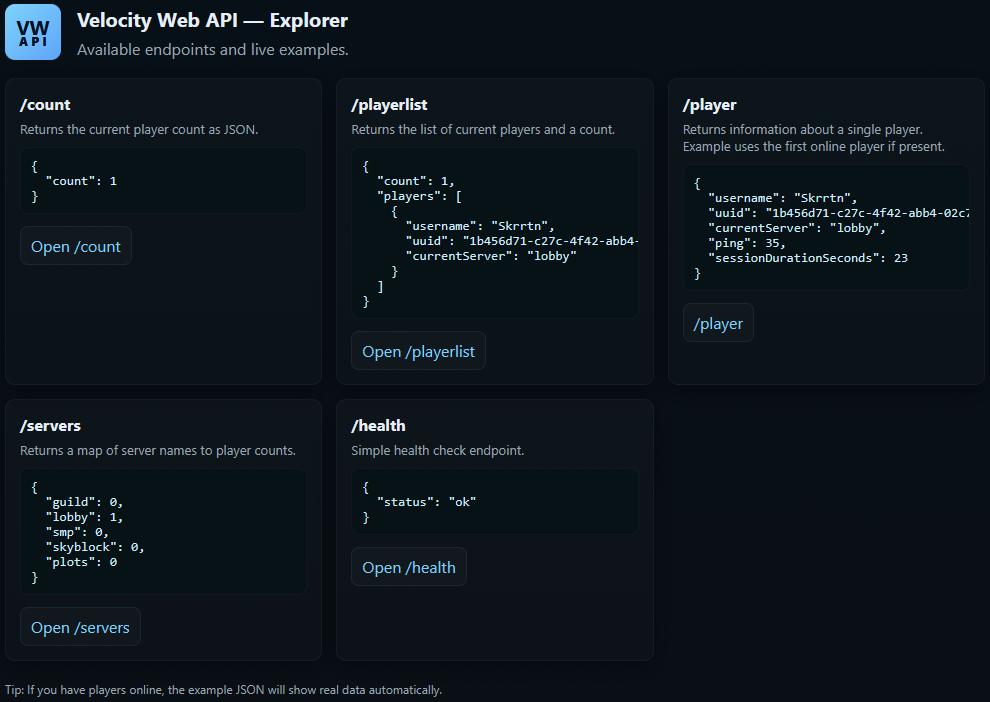
All JSON endpoints return `Content-Type: application/json; charset=utf-8` unless otherwise noted.
- `/` - Serves the embedded `index.html` (browser-friendly). - Example URL: `http://localhost:25576/`
- `/playerlist` - Purpose: list connected players with basic metadata and a total count. - Example URL: `http://localhost:25576/playerlist` - Sample response:
```json { "count": 2, "players": [ {"username":"Alice","uuid":"...","currentServer":"lobby"}, {"username":"Bob","uuid":"...","currentServer":"minigames"} ] } ```
- `/count` - Purpose: return the total number of connected players. - Example URL: `http://localhost:25576/count` - Sample response: ```json { "count": 42 } ```
- `/player/<username>` or `/player?username=<name>` - Purpose: fetch detailed info for a connected player (exact-case lookup). - Example URLs: - `http://localhost:25576/player/Notch` - `http://localhost:25576/player?username=Notch` - Notes: returns `400` if username is missing; `404` if the player is not connected. - Sample response:
```json { "username":"Notch", "uuid":"...", "currentServer":"lobby", "ping":42, "sessionDurationSeconds":360 } ```
- `/servers` - Purpose: returns a mapping of server names to player counts. - Example URL: `http://localhost:25576/servers` - Sample response: ```json { "lobby": 5, "minigames": 12 } ```
- `/health` - Purpose: lightweight health check for monitoring. - Example URL: `http://localhost:25576/health` - Sample response: ```json { "status": "ok" } ```
Commands
- `/vwapi reload` : reloads the `config.cfg` from the plugin data directory and restarts the HTTP server if the `port` or `bindAddress` have changed. - `/vwapi version` : prints the plugin version (from the plugin metadata). - `/vwapi debug [on|off]` : toggle or explicitly set debug logging at runtime. When enabled, the plugin prints detailed debug messages and HTTP access lines to the console. - `/vwapi status` : shows the current HTTP server status (running/not running), the bound host and port, and an example URL you can visit (falls back to `localhost` when bound to all interfaces). - `/vwapi help` : prints a short help listing the available `/vwapi` subcommands and usage examples.
Permissions
- `vwapi.admin` : required to use the `/vwapi` commands.
Notes & Behavior
- Player lookup is exact-case and only returns connected players. - The HTTP server binds to `bindAddress`; by default this is `0.0.0.0` (all interfaces). Change to `127.0.0.1` for local-only access or a specific IP if desired. - When you change `bindAddress` or `port` and run `/vwapi reload`, the plugin will restart the HTTP server automatically to apply the new bind/port (a full proxy restart is no longer required for those changes).
Troubleshooting
- If the HTTP server does not start, check the proxy logs for errors about port binding or resource issues. - Ensure `velocity-api` is available at runtime and that the plugin is placed in the correct `plugins/` folder.
License & Support
- Licensed under the MIT License. - If you need any help or support, please contact me on our Discord.
