

Vanilla Replays
Record & Playback system in vanilla Minecraft!
 1,41k
1,41k
Quick challenge
How far can you run before the mobs catch you?
Minecraft check
Confirm your run
Complete the quick check to get your code.
Vanilla Replays
Vanilla Replays - Youly

Version 1.1.0 Overview
📇 PRESENTATION
Vanilla Replays is a datapack giving the ability to record and playback player actions, such as position, equipped items, used items and more.
Each actor can be a mannequin entity or a mob wich can be customized (profile, name, skin customization, data values etc), and belongs to a scene. Every actor in the same scene can play their record together (using "Scene Manager" screen)
⚒️ UTILS
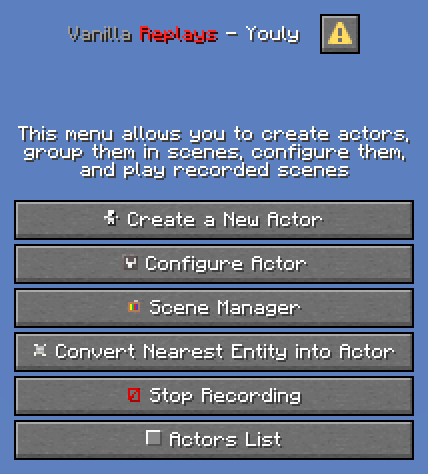
- next "quick actions" key (default to "G"), or click on "Vanilla Replays" button in pause menu, to open Main Menu. - next + next on the actor you are looking at to open his Configuration Menu - Be next to an actor to view his name, ID and scene, above actionbar.
📜 INSTRUCTIONS
- Click on "Create a New Actor" to summon a new actor, by specifying entity type, his name, profile data (it can be player's name, or a profile component), and the scene he belongs to. If the name/profile is a player name and contains digits or spaces, put it in quotes ("name 123" instead of : name 123). Profile works only for "mannequin" entities - Click on "Configure Actor" and specify Actor'ID to configure actor : playback, record, remove, customize and teleport to. - Click on "Convert Nearest Entity into Actor" to convert the nearest entity within a radius of 50 blocks, some entity types can't be converted (marker, minecarts & boats, etc) - Click on "Scene Manager" and specify Scene Name to playback the specified scene name, change its name and pause/resume it. - Click on "Stop Recording" or Click _"trigger vanilla_replays.trigger.stop_recording" in chat to stop the actor you are currently recording. - %%MD0%% on "Actors List"_ to view all loaded actors from nearest to furthest. Click on any actor to open his configuration screen.
⚠️ LIMITATIONS
- For now, all modifications applied to the world (placing/destroying blocks, interacting with entities/blocks) are not recorded. - You can record interactions between actors if several players each start a recording of an actor at the same time, but doing everything alone is more difficult. - Mannequin entities & Mobs don't have all animations of held items (aiming with bow/trident, reloading crossbow, etc). - Mannequin entities & Mobs don't have attack destroy/punch animations. - Riding pose is recorded but the position and rotation of the vehicle are not.
🚫 KNOWN ISSUES
- ✅ FIXED: Scene names containing spaces cannot be paused/resumed using the "Scene Manager" screen.
