
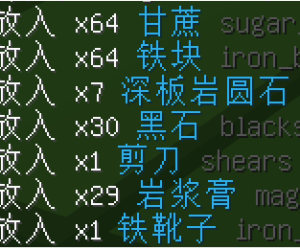
useTranslatedNames
用于翻译 CoreProtect 物品名称消息的插件
 5,17k
5,17k
Quick challenge
How far can you run before the mobs catch you?
Minecraft check
Confirm your run
Complete the quick check to get your code.
useTranslatedNames
useTranslatedNames
JSON string replacement plugin with built-in translation name fetch function, which can be used for message replacement and translation of CoreProtect and other plugins.

download: https://modrinth.com/plugin/usetranslatednames
---
Functions and commands
- `/utn` Show plugin information and statistics - `/utn json <JSON>` - Test JSON string - `/utn reload` - Reload configuration - `/utn debug [Level]` - debug mode
The plug-in will capture the corresponding server message according to the configuration, then replace the item name in it and resend the message. For details, please refer to the "Configuration" section.
Config
```yaml
更新插件后, 需要手动修改配置版本号, 才能使用一些具有较大改动的功能
更新发布页面会显示版本号和新功能示例
configVersion: 4
dev:
选择解析消息的方式, 修改这部分以调整兼容性
ChatComponents = 支持 1.20.4 和 ProtocolLib 5.2.0
GetStrings = 支持 1.20.2 及以下版本
parser: ChatComponents
是否对输入的 JSON 进行序列化, 修改它可能影响现有的配置
CreatePacket = 使用 protocolLib 创建新数据包再解析, 这没有意义
ComponentSerializer = 这会使 JSON 内部的顺序发生变化, 并可能丢失部分原版消息
NONE = 不进行序列化
serializedInput: NONE
将玩家消息转换为系统消息
Convert = 转换消息并进行替换
ConvertBypass = 转换消息并绕过替换
NONE = 禁用此功能
convertPlayerMessages: NONE
list: # 替换列表
翻译实体名 :: 24.03/m 前 #苦力怕 破坏 草方块
- inspectLength: [240, 1024] get: '{"text":"#([a-z0-9_]+)§f([^"]+)","color":"#31B0E8"}' set: >- {"text":"§8#"}, {"translate":"$1:TranslatedName","color":"#31b0e8"}, {"text":"§f_$2_","color":"#31B0E8"} inherit: LINK
翻译物品 :: 24.03/m 前 #苦力怕 破坏 草方块
- inspectLength: [240, 1024] get: '{"text":"(?:§m)?([a-z0-9_]+)(?:§f.{0,3})?"(?:,"strikethrough":true)?,"color":"#31B0E8"}' set: >- {"extra":[ {"translate":"$1:TranslatedName"}, {"text":" §8_$1_", "hoverEvent":{ "action":"show_text", "contents":{"text":"§7点击复制IDn§8minecraft:$1"} }, "clickEvent":{"action":"copy_to_clipboard","value":"$1"} } ],"color":"#31b0e8","text":""}
[示例] 所有可用配置
[可选] 仅对拥有该权限的玩家处理这条消息, 默认所有玩家
- permission: 'minecraft.command'
[必选] 检查消息长度是否在此区间内
[50, 64] = 大于等于 50 且小于等于 64
[64] = 等于 64
inspectLength: [50, 64]
[必选] 使用正则表达式匹配
get: '^{"text":"","extra":["Missing required argument (d+)"]}$'
[必选] 将消息替换为
$1 = 正则匹配到的变量 1, 也可以是 $2 (第 2 个变量)...
$1:ItemType = 将 $1 用于获取物品类型, 提供给 JSON hoverEvent 使用的物品类型 show_entity, show_item(block)
$1:TranslatedName = 将 $1 用于名称翻译, 返回与语言路径对应的 KEY, 例如 `entity.minecraft.allay`
$1:Words:组名 = 将 $1 用于词替换, 需要配置 words.yml
其他示例:
set: >- # YAML 语法中使用 `>-` 可以编写换行的文本, 效果如上
set: '' # 如果为空, 则取消发送这条消息
set: _USE_GET_ # 将 get 匹配到的消息原封不动的搬下来
set: '{"text":"§bIpacEL §f> §b此指令需要至少§a_$1:Words:中文数字_个参数"}'
[可选] 修改消息显示位置
ACTION_BAR = 这条消息将会显示在操作栏
displayPlace: ACTION_BAR
[可选] 修改消息显示对象
$1 = 正则变量, 消息仅发送给匹配到的玩家名称, 其他玩家不会收到消息
ALL = 将自己收到的消息广播给所有玩家
EXCLUDE = 将自己收到的消息广播给所有玩家, 但不包括自己
CONSOLE = 将消息转发到控制台, 自己不会收到
COPY_TO_CONSOLE = 将消息复制到控制台
displayObject: ''
[可选] 继承和其他配置. 将多个配置合并为组, 同时处理来提高性能
LINK = 与下一条配置合并为组, 将此配置处理完毕的内容传递给下一条配置, 请确保存在下一条配置
LINK_SER = 使 LINK 传递序列化后的 JSON 文本, 需要开启序列化功能
CLOSE = 如果匹配, 则停止处理这条消息, 可用于排除一些被高频发送的消息
inherit: ''
```
```yaml
词替换配置文件
words:
创建一个组, 组名不应包含下划线 "_"
中文数字:
添加一个词替换
如果多个词的配置重复, 将会被忽略
- get: '1' # [必选] 需要匹配的词 set: '一' # [必选] 替换为 lang: 'zh_cn' # [可选, 默认直接替换] 当客户端语言与其匹配时进行替换
- get: '2' set: '二' lang: 'zh_cn'
- get: '3' set: '三' lang: 'zh_cn'
```
depend
- ProtocolLib
