

Trusted Colors
Adds a sophisticated name-color switching system to the game, complete with live and rec tags as well as an RP tag.
 190
190
Quick challenge
How far can you run before the mobs catch you?
Rotate your phone
Dino Mine is ready when your screen is landscape.
Minecraft check
Confirm your run
Complete the quick check to get your code.
Your code
Expires in 5 hours
Trusted Colors
Color Selection
Using the command:
``` /trigger color ```
Will bring up a menu to select a color and status for your in game name
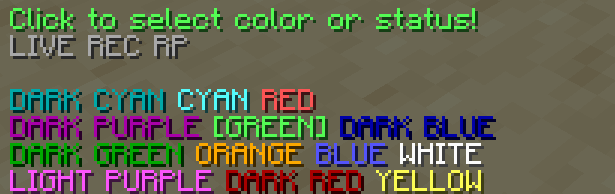
Clicking on the colors will select them and change the actual color of your name.
Status Selection
In the menu there are 3 buttons for different statuses. Clicking on these will make them show up next to your name in game:

Extra Features
An operator can use the command:
``` /tag add <playername> mod ```
This will make their name in chat show up with an [OP] tag

The OP tag is compatible with all other tags and colors!
