

TreeChop
One or Multiple Cuts? Vanilla or Custom Tree? Optimized and Configurable! Configure it however you like and Use your axe on the trees! : ) V2.0.1
 6,05k
6,05k
Quick challenge
How far can you run before the mobs catch you?
Minecraft check
Confirm your run
Complete the quick check to get your code.
TreeChop
TreeChop
Want to cut down trees more easily? With TreeChop you can do it! - Do you need the tree to be chopped down after one or multiple cuts? - Supports any custom trees added by datapacks such as William Wyther's datapack. - Optimized - Configurable - *By default, it is configured that trees must be hit multiple times to be chopped down.* (You can also make it work similar to the TreeCapitator. Details at the bottom of the page).
No, your base will not be accidentally destroyed, unless the base is a tree, use ```/tc toggle```
Use your axe on trees as you want! : )

Chop an Oak Tree
NOTE:
Original project created on CrashPlugin API The plugin has a system for detecting updates using the CrashPlugin API. In the future, is planned some implementation of (when it will become possible) (optional) (when it will become possible). %%MD2%%
Commands:
TreeChop commands are only visible if you have the appropriate permissions, mentioned above. ```/treechop``` alias: ```/tc```
- ```/tc toggle [on/off] [player]``` command for a player to toggle TreeChop. - ```/tc help ...``` for help on the commands. - ```/tc enabled <true/false>``` to enable or disable the plugin. - ```/tc pluginInfo``` for plugin information (plugin version...). - ```/tc reloadconfig``` if you have edited the config file, use this. - ```/tc config <...>``` to edit or view the configuration.
Permission:
- ```g031.command.treechop.*```: permission for all TreeChop commands. - ```g031.command.treechop.config```: operator command to configure plugin. (default on only op) - ```g031.command.treechop.enable```: operator command to enable or disable the plugin. (default on only op) - ```g031.command.treechop.self_toggle```: command for a player to toggle TreeChop. (default on all players) - ```g031.command.treechop.toggle```: command for a player to toggle TreeChop for players. (default on only op) - ```g031.treechop.chop```: used to start chop event. (default on all players)
You need to use a permission plugin, such as luckperms, to manage permissions. To decide who can use this mechanic, you can disable the ```g031.treechop.chop``` permission and give it to players with some reward system or manually.
Config File V3 (old):
Spoiler
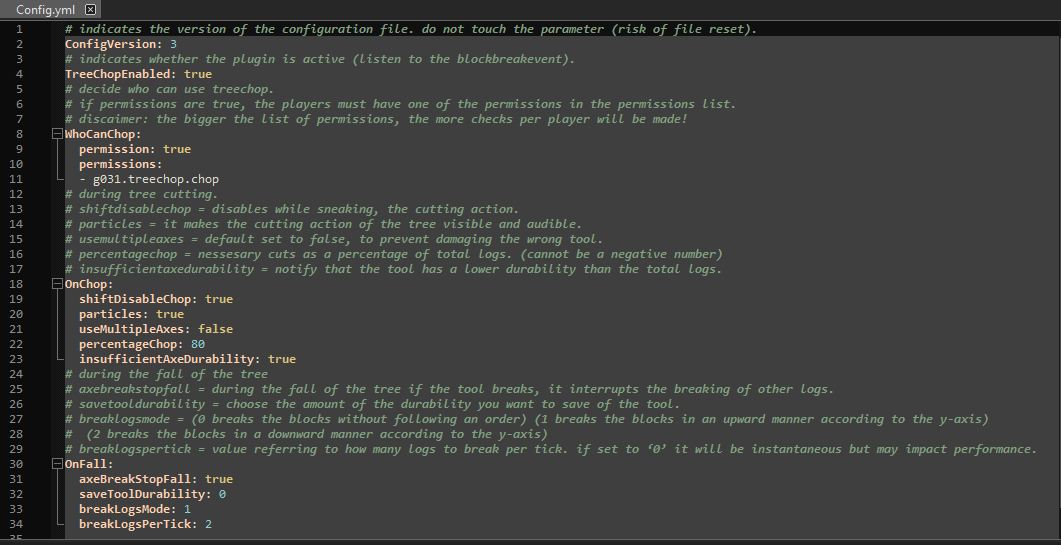
How do i make the TreeChop chop the full tree with one swing? You can, by setting in the config: ```OnChop/percentageChop: 0``` ```OnChop/chopAllLogs: true```
For any problems or suggestions, write on discord. - Gustruy
