

Traveler's Compass
A compass that will help you find any mob, block or item nearby
 155,39k
Quick challenge
How far can you run before the mobs catch you?
Minecraft check
Confirm your run
Complete the quick check to get your code.
Traveler's Compass
About:
The compass can search for mobs (based on their drops or spawn eggs), villagers (based on their goods), blocks or containers (like chests or furnaces) by their contents, and more
How it works:
- Open the search mode(s) with search mode(s) - Put the block or item you want to find into its inventory - Choose the desired search mode(s) - Wait while it searches for the item you placed
Features:
- JEI/REI/EMI on a block or mob to add it to the compass inventory - JEI/REI/EMI on an item in the compass inventory to mark it as priority - Priority items are searched first - Configure HUD, ping sound, search range, and more in the compass menu - Use JEI/REI/EMI to drag and drop items into the compass inventory
Configuration:
- Most values are synchronized from travelerscompass-cost.toml - Any search mode can be enabled or disabled - The search range (number of scanned chunks per tick) can be set per compass or globally - Filtering by item travelerscompass-cost.toml, travelerscompass-cost.toml, or travelerscompass-cost.toml is available - Define search costs in XP levels in travelerscompass-cost.toml - Costs can be set per item ID or per tag
Recipe:
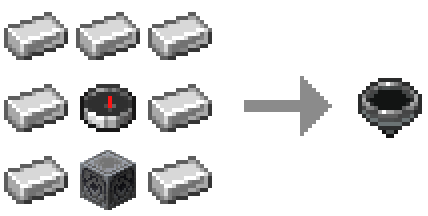
Target position markers (below / same / above): regular & priority


Compatibility with other mods:
JEI / REI / EMI
- Drag & drop items into the compass inventory - Filtering and XP costs apply - Can be disabled in config
Lootr
- Search Lootr containers by contents - Options: only opened / only unopened / any - Can be disabled or restricted
Jade / The One Probe
- Tooltips show filter restrictions - Display XP search costs (if set) - Can be disabled in config
