
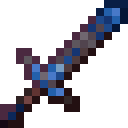
Tools Trim Pack By Delta
It adds simple and better looking toll trims by only changing the sword name
 1,58k
1,58k
Quick challenge
How far can you run before the mobs catch you?
Minecraft check
Confirm your run
Complete the quick check to get your code.
Tools Trim Pack By Delta
🎨 What it does Adds decorative trims to your vanilla tools—swords—matching the material you're using.
Materials supported include: Diamond, Gold, Iron, Emerald, Redstone, Lapis, Amethyst, Copper, Quartz, Netherite
🧰 Compatibility prerequisites Requires Optifine or a compatible mod (such as Sodium with Iris) to enable CIT functionality
.
Works across versions 1.20–1.21 (and older packs cover down to 1.13) .
✅ Why use it? Stays true to Minecraft’s vanilla look while adding sleek, material-themed accents .
Performance-friendly—there’s no impact on FPS, unlike heavy high-res packs .
Enhances immersion by visually tying a tool’s look to the materials it’s been enhanced with.
📦 Installation Overview Download the .
Place the .zip file in your resourcepacks/ folder.
Activate it in Minecraft’s resource pack menu.
Rename your tool in an anvil with the trim material name (e.g., “fsr(meaning name and r for ores like r- redstone”) to apply a trim.
🚀 Quick Notes Torrezx’s version focuses on Netherite tools with 5 trim designs—Gold, Diamond, Amethyst, Iron, Redstone, Emerald
Vixel’s Tools & Trims adds CIT-based trims for all tools, enabling names sword name fsr fsl frq fsd fsi fsc fsg fse fsa fsn .
✨ Final Thoughts If you’re looking to give your tools a touch of class with minimal setup and zero performance hit, Tool Trim is a perfect fit. It keeps Minecraft’s charm intact while providing subtle, material-based visual flair. Ready to stand out next time you mine or fight?
