Tier Tags for Flow PVP
Shows Flow PVP Ranks next to any players name on any Server.
 609
609
Quick challenge
How far can you run before the mobs catch you?
Minecraft check
Confirm your run
Complete the quick check to get your code.
Tier Tags for Flow PVP
Tier Tags for Flow PVP
---
Functionality:
* Display the rank of any player next to their name. * Cycle which kit the rank is shown for using a hotkey or "Mod menu" settings. * Automaticly pick the shown kit based on your inventorys contents. * Show all of your own ranks using a hotkey. * Show any Players ranks with /tiertags. * Works on any Server.
---
How to use:
Keybinds
You can set all the keybinds in your controls settings just as usual. | Keybind name | function | Category | default keybind | | :--- | :---: | :---: | ---: | | Cycle Kits | Switch, which kit the Elo/Sr is displayed for | Tier Tagger (Flow PVP) | none | | Show Stats | Opens the stats screen for yourself | Tier Tagger (Flow PVP) | none |
Settings
You can acces the settings menu through Mod Menu. | Setting | function | | :--- | ---: | | Kit: | Switch, which kit the Elo/Sr is displayed for | | Auto Pick Displayed Kit: | Automaticly switches which kit the Elo/Sr is displayed for, based on your inventorys content |
Commands
| Command | function | | :--- | ---: | | /tiertags <name> | Lookup any players stats, match history and skin |
Statistics Screen:
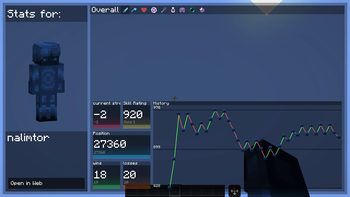
Customize Rank Diplay
You can completly customize how any players ranks get displayed. 
just use the nametag customization menu in the settings.

---
I am also open for ideas and issue fixes, for both just create a new issue on github.
(This project is unofficial and not associated with Flow PVP)