

TabTPS
Monitor your server's performance in the tab menu, boss bar, and action bar
 279,72k
Quick challenge
How far can you run before the mobs catch you?
Minecraft check
Confirm your run
Complete the quick check to get your code.
TabTPS
TabTPS 
Minecraft server mod/plugin to show TPS, MSPT, and other information in the tab menu, boss bar, and action bar.
Current supported platforms: - Paper - Sponge 8+ - Fabric (requires Fabric API) - NeoForge
Features
Live information displays
- Configure what information will be shown using display configs (`/plugins/TabTPS/display-configs/`) - Each display config has a permission associated, and players with that permission will use that display config. - The default display config uses the permission `tabtps.defaultdisplay`, and allows for using all three display types. - Only one display config can be assigned to each player, even if they have permission for multiple. Set priorities for different display configs in the main config (`plugins/TabTPS/main.conf`)
- Configure colors for displays using theme configs (`/plugins/TabTPS/themes/`)
Tab menu
* Command: ``/tabtps toggle tab`` * 
Action bar
* Command: ``/tabtps toggle actionbar`` * 
Boss bar
* Command: ``/tabtps toggle bossbar`` * 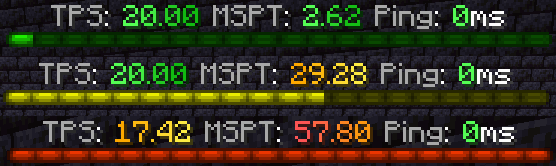
Commands
Improved TPS command
* Command: ``/tickinfo`` or ``/mspt`` * Permission required: ``tabtps.tps`` * 
Memory command
* Command: ``/memory``, `/mem`, or ``/ram`` * View information about the current memory pools of the server jvm. * Note: the output and usefulness of this command varies depending on the type of garbage collection used, garbage collection settings, and many other factors. * Permission required: ``tabtps.tps`` * 
Ping command
* Commands: ``/ping``, `/ping [username]`, or ``/pingall`` * View the ping of yourself, or another user. ``/pingall`` will show a summary of all connected player's pings. * Permissions: ``tabtps.ping`` to view your own ping, ``tabtps.ping.others`` to view other users ping and the ping summary. *  *
* 
Reload command
* Command: ``/tabtps reload`` * Permission required: ``tabtps.reload``
