

SoulBurstFX
When a player defeats another player (or mob), spectacular particle effects appear at the victim’s death location. These effects are customizable, unlockable, and configurable.
 95
95
Quick challenge
How far can you run before the mobs catch you?
Minecraft check
Confirm your run
Complete the quick check to get your code.
SoulBurstFX
✨ What is SoulBurstFX?
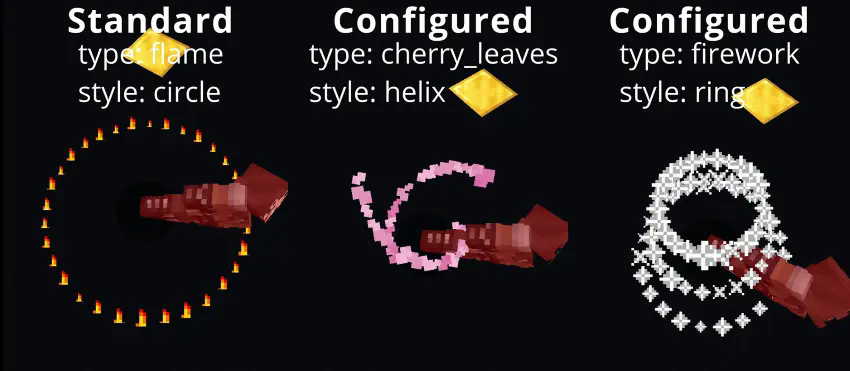
SoulburstFX turns every kill into a visual spectacle: When a player defeats another player or mob, stunning particle effects appear at the exact death location. These effects are fully customizable, unlockable, and stylishly animated — from flames and explosions to flowers and spirals.
🎮 Features
- ✅ Toggle kill effects on/off per player - ✅ Wide selection of particle effects (flame, explosion, heart, angry villager, …) - ✅ Style effects like “circle”, “spiral”, “flower”, “helix” and more - ✅ Unlock & lock system for effects and styles - ✅ Effects appear precisely at the enemy’s death point - ✅ JSON-based storage: settings persist across server restarts - ✅ Simple commands with tab-completion and permission control
🛠 Commands & permissions
1. /killeffect on - Enables kill effects (killeffect.use) 2. /killeffect off - Disables kill effects (killeffect.use) 3. /killeffect effect <name> - Sets the particle effect (killeffect.use) 4. /killeffect list [page] - Lists all available effects (killeffect.use) 5. /killeffect style <name|on|off> - Configures style effects (killeffect.style.use) 6. /killeffect styles - Lists all available styles (killeffect.style.use) 7. /killeffect unlock <effect|style> <name|all> - Unlocks effects or styles (killeffect.unlock) 8. /killeffect unlock player <player> <effect|style> <name|all> - Unlocks for another player (killeffect.unlock) 9. /killeffect lock <effect|style> <name|all> - Locks effects or styles (killeffect.lock) 10. /killeffect lock player <player> <effect|style> <name|all> - Locks for another player (killeffect.lock) 11. /killeffect reload - Reloads kill effect data from JSON (killeffect.reload) 12. /killeffect help - Shows help menu (killeffect.use)
⚙️ Configuration & storage
Java (persistent – permanently stored)
All player settings are automatically stored in plugins/SoulburstFX/soulburstfx_playerdata.json. Format (JSON structure): { "player-uuid": { "enabled": true/false, "effectType": "effectname", "style": "style", "styleEnabled": true/false, "unlockedEffects": [ "effectnames/*" ], "unlockedStyles": [ "styles/*" ] } [...] }
The file is loaded at startup and saved when changed/stopped.
📸 Showcase
📂 Installation
1. Download SoulBurstFX-<pluginversion>-<minecraftversion>.jar. 2. Place it in your server's plugins folder. 3. Restart the server.
📜 Terms of Use – SoulBurstFX
✅ You may
- Use SoulBurstFX server packs on private and public servers. - server packs as long as the credits remain intact. - Include the plugin in server packs if “wolfwriter” is named as the author.
❌ You may not
- the author SoulBurstFX the author. - Pretend to be the author of the plugin. - Upload manipulated versions as “official.”
⚠️ Disclaimer
- SoulBurstFX is provided without warranty. - Use at your own risk. - No liability for data loss or server problems.
ℹ️ License
License: GNU General Public License version 3 (GPLv3)
💬 Support & Contact
Do you have questions, feedback, or want to report bugs? Join my Discord and chat directly with the author: 👉 Join Discord server: https://discord.gg/TJgzq9aCxN
