

Soul-Keeper
SoulKeeper automatically creates virtual tombs when you die, protecting your items with holograms and anti-hopper protection. Never lose your items again!
 282
282
Quick challenge
How far can you run before the mobs catch you?
Minecraft check
Confirm your run
Complete the quick check to get your code.
Soul-Keeper
🏺 SoulKeeper Plugin - User Manual 📖 Description SoulKeeper automatically creates virtual tombs when you die, protecting your items with holograms and anti-hopper protection. Never lose your items again! ✨ Key Features
🏺 Automatic tombs on death 🛡️ Temporary protection against other players 🚫 Anti-hopper - Blocks automated extraction 👻 Informative holograms with remaining time 🎮 Intuitive GUI for collecting items 🔧 Configurable - Change block type, times, limits 🌍 Multi-language (Spanish/English)
🎯 How It Works 💀 On Death
Your items are automatically saved in a virtual tomb A representative block appears (LODESTONE by default) A hologram is created with tomb information The tomb is protected for 5 minutes (configurable)
🖱️ Tomb Interaction
Right click → Opens GUI to take individual items Shift + Right click → Collects all items instantly Break block → Drops all items to the ground
🎮 Tomb GUI
📦 45 slots for your items ⏰ Time info remaining 🛡️ Protection status 📍 Location coordinates 🏃♂️ "Collect All" button for quick collection
⚙️ Configuration 🏺 Tombs yamltomb: block_type: "LODESTONE" # Block type max_tombs_per_player: 5 # Maximum per player lifespan_seconds: 1800 # 30 minutes lifespan protection: duration_seconds: 300 # 5 minutes protected block_automated_extraction_always: true # Anti-hopper 👻 Holograms yamlhologram: enabled: true lines: - "&6&l⚰ TOMB ⚰" - "&7Owner: &e%player%" - "&7Time remaining: &c%time_remaining%"
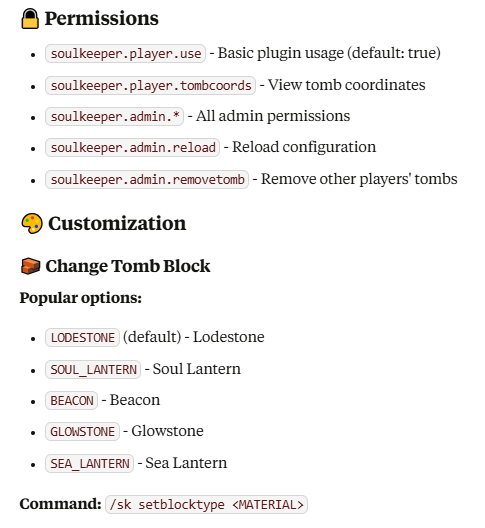
🏗️ Custom Resource Packs ✅ Compatible with custom textures/models
Use CustomModelData in your resource pack Plugin automatically detects base Material
🌍 Languages
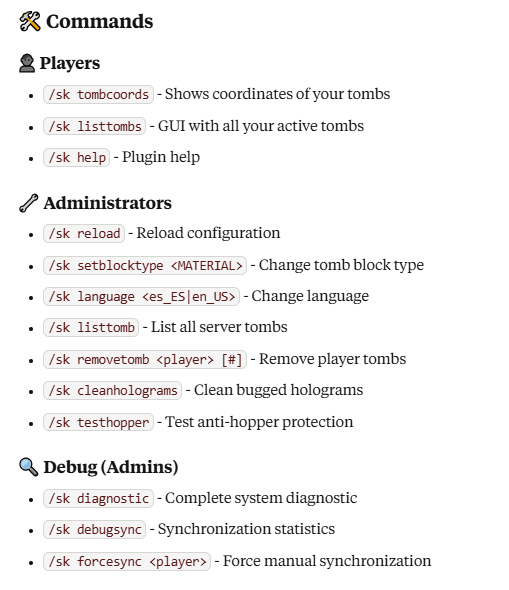
Spanish (es_ES) - Default language English (en_US) - Change with /sk language en_US
🚨 Anti-Hopper Protection
🚫 Blocks extraction by hoppers/hoppers 🛡️ Works on protected and unprotected tombs ⚙️ Configurable in block_automated_extraction_always
📊 Technical Information
Minecraft Version: 1.16.5+ API: Spigot/Paper Storage: Virtual with file persistence Performance: Optimized for large servers
🐛 Troubleshooting ❓ Tomb doesn't appear
Verify keepInventory is set to false Check player permissions Review that you haven't reached tomb limit
👻 Holograms not visible
Use /sk cleanholograms to clean bugged holograms Verify hologram.enabled is set to true
🔧 Items don't synchronize
Use /sk forcesync for manual synchronization Run /sk diagnostic to see system status
💡 Tips
🏃♂️ Shift+Click is the fastest way to collect everything 📍 Save important coordinates with /sk tombcoords 🕐 Collect quickly - Tombs have limited time 🛡️ First 5 minutes are completely protected
🔗 More information: Modrinth 👨💻 Developed by: DeLaRosaPlay 📝 Version: 1.0.0
