SimpleMusic
Simple and easy-to-use music player
 1,85k
1,85k
Quick challenge
How far can you run before the mobs catch you?
Minecraft check
Confirm your run
Complete the quick check to get your code.
SimpleMusic
simplemusic
This is a so~~~~~ simple music play mod that supports mp3 and midi, as well as displaying lyrics.
How to use
Remember to install the depends mod Fabric Language Kotlin or Kotlin for Forge
Open the `music` folder in the game directory, and then you will find the `midi` and `mp3` folders. Just put your midi files or mp3 files into the corresponding folders.
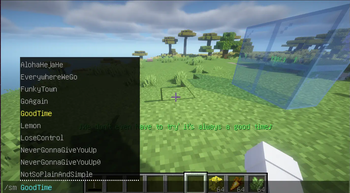
After entering the game, enter the `/simplemusic` or `sm` command + the music name to play it.
If you want to stop playing music, enter `/simplemusic stop` or `/sm stop`
If there is a problem with the lyrics display, just stop playing.
Settings
This mod have no config file or pages. It's just some simple commands or shortcuts. You can use 3 shortcuts to plus or minus volume,and switch lyrics' color.
The shortcuts are equal to `/simplemusicsettings` or `/sms` command!
Lyrics display
Just put the `.lrc` file and the music together (the file names must be the same). If lyrics are found when playing music, they will be displayed at the bottom of the screen. The file format is roughly as follows *(just like most of `.lrc` files you found in Internet.)*: ```lrc [00:00.000] 作词 : 米津玄師 [00:01.03] 作曲 : 米津玄師 [00:19]あの日見渡した渚を [00:24]今も思い出すんだ ```
It looks like: