

SimpleItemGenerator
Featureful custom items plugin for any version. Supports custom NBT, ItemsAdder, HeadDatabase, PlaceholderAPI and more!
 1,23k
1,23k
Quick challenge
How far can you run before the mobs catch you?
Minecraft check
Confirm your run
Complete the quick check to get your code.
SimpleItemGenerator
Description
SimpleItemGenerator(SIG) is an open-source plugin with easy config, but powerful features.
Wiki
More information about the plugin you can find here.
Important
Simple item generator is still in its early stages, it means that any feedback would be appreciated.
Also if you are unsatisfied with the plugin. Please tell me what were you expecting from the plugin or how I could adjust it.
If you are encountering issues with the latest version, please let me know about it here, instead of downloading the older versions of the plugin!
Plugin overview
Commands and permissions
To be able to see `/simpleitemgenerator` command, you need to have the permission `simpleitemgenerator.commands.general`
`/simpleitemgenerator reload` - reloads the plugin. Requires `simpleitemgenerator.commands.reload` permission
`/simpleitemgenerator give <item> [player] [amount]` - item is your key of the item that you configured earlier, player and amount are optional. Requires `simpleitemgenerator.commands.give` permission
`/simpleitemgenerator set_slot <item> <slot> [player] [amount]` - sets the custom item to a specific slot. Player and amount are optional Requires `simpleitemgenerator.commands.set_slot` permission
Features
DeluxeMenus support
Since DeluxeMenus 1.14.1 you can use SimpleItemGenerator in DM menu configurations. Check wiki. Example:
DeluxeMenus config
```yaml open_command: basicsmenu size: 9 menu_title: 'Basics Menu' items: 'teststone': material: STONE slot: 0 display_name: "&aThis is a special stone" lore: - "&aTest1" - "&cTest2" - "&eTest3" 'sig-item': material: simpleitemgenerator-item0 slot: 1 lore_append_mode: BOTTOM # Appends lore to the end of original item's lore. Optional lore: - "&aTest4"
```
SimpleItemGenerator's config
```yaml items: item0: item: material: IRON_INGOT name: '<gold>I am a SIG item' lore: - '<gold>Sig lore'
```
MiniMessage support
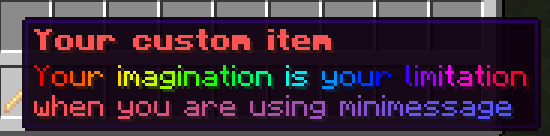
Configuration of the item
MC: 1.20.1
```yaml items: loreitem0: item: material: BLAZE_ROD name: <red><bold>Your custom item lore: - <rainbow>Your imagination is your limitation</rainbow> - '<gradient:red:blue>when you are using minimessage' ```
PlaceholderAPI auto-update
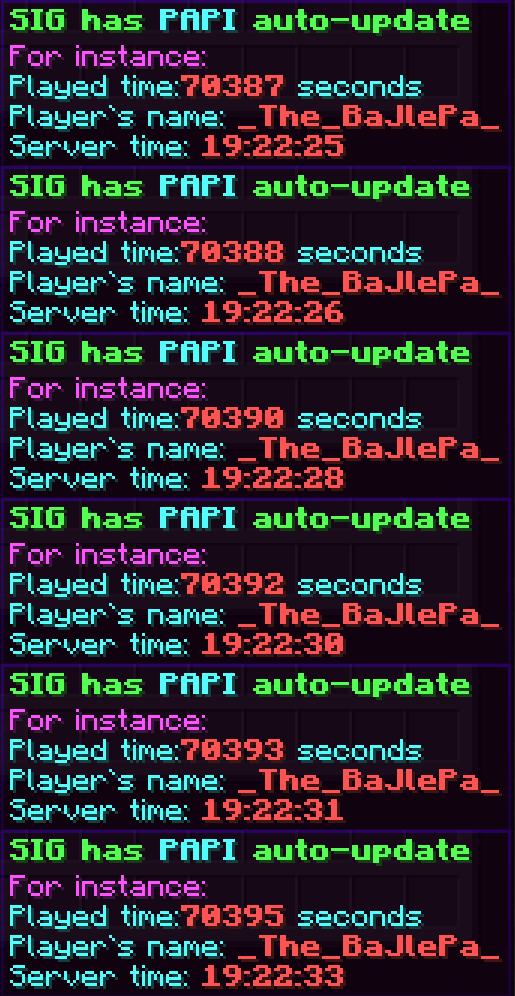
Configuration of the item
MC: 1.20.1
```yaml items: loreitem2: item: material: BLAZE_ROD name: '<green><bold>SIG has <aqua>PAPI</aqua> auto-update' lore: - '<light_purple>For instance:' - "<aqua>Played time:<red><bold>%player_seconds_lived%</red> seconds" - "<aqua>Player`s name: <red><bold>%player_name%</red>" - "<aqua>Server time: <red><bold>%server_time_HH:mm:ss%</red>" ```
Many interaction options and placeholders
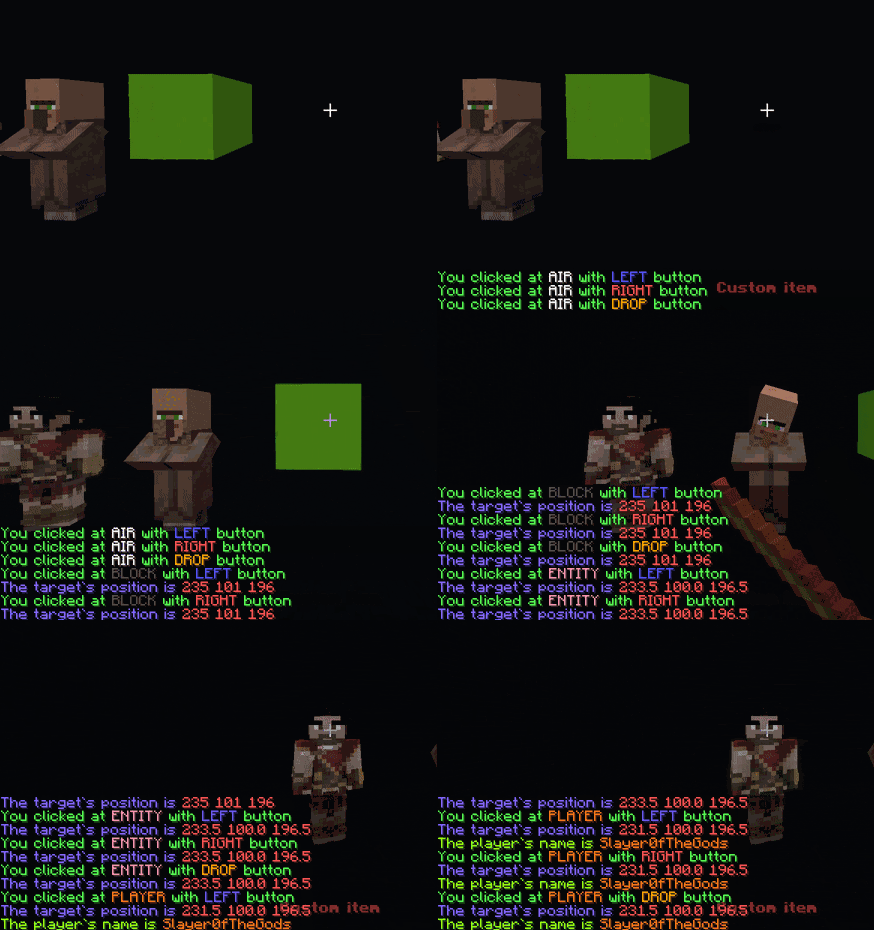
Configuration of the item
MC: 1.20.1
```yaml items: interactable-item: item: material: BLAZE_ROD name: <red><bold>Custom item usage: - predicate: at: air button: left commands: '[console] tellraw %player% %minimessage_<green>You clicked at <white>AIR</white> with <blue>LEFT</blue> button%' - predicate: at: air button: right commands: '[console] tellraw %player% %minimessage_<green>You clicked at <white>AIR</white> with <red>RIGHT</red> button%' - predicate: at: air button: drop commands: '[console] tellraw %player% %minimessage_<green>You clicked at <white>AIR</white> with <gold>DROP</gold> button%' - predicate: at: block button: left commands: - '[console] tellraw %player% %minimessage_<green>You clicked at <dark_gray>BLOCK</dark_gray> with <blue>LEFT</blue> button%' - '[console] tellraw %player% %minimessage_<color:#8769ff>The target`s position is <red>%target_x% %target_y% %target_z%</red>%' - predicate: at: block button: right commands: - '[console] tellraw %player% %minimessage_<green>You clicked at <dark_gray>BLOCK</dark_gray> with <red>RIGHT</red> button%' - '[console] tellraw %player% %minimessage_<color:#8769ff>The target`s position is <red>%target_x% %target_y% %target_z%</red>%' - predicate: at: block button: drop commands: - '[console] tellraw %player% %minimessage_<green>You clicked at <dark_gray>BLOCK</dark_gray> with <gold>DROP</gold> button%' - '[console] tellraw %player% %minimessage_<color:#8769ff>The target`s position is <red>%target_x% %target_y% %target_z%</red>%' - predicate: at: entity button: left commands: - '[console] tellraw %player% %minimessage_<green>You clicked at <color:#ff96b4>ENTITY</color> with <blue>LEFT</blue> button%' - '[console] tellraw %player% %minimessage_<color:#8769ff>The target`s position is <red>%target_x% %target_y% %target_z%</red>%' - predicate: at: entity button: right commands: - '[console] tellraw %player% %minimessage_<green>You clicked at <color:#ff96b4>ENTITY</color> with <red>RIGHT</red> button%' - '[console] tellraw %player% %minimessage_<color:#8769ff>The target`s position is <red>%target_x% %target_y% %target_z%</red>%' - predicate: at: entity button: drop commands: - '[console] tellraw %player% %minimessage_<green>You clicked at <color:#ff96b4>ENTITY</color> with <gold>DROP</gold> button%' - '[console] tellraw %player% %minimessage_<color:#8769ff>The target`s position is <red>%target_x% %target_y% %target_z%</red>%' - predicate: at: player button: left commands: - '[console] tellraw %player% %minimessage_<green>You clicked at <color:#ff7b1c>PLAYER</color> with <blue>LEFT</blue> button%' - '[console] tellraw %player% %minimessage_<color:#8769ff>The target`s position is <red>%target_x% %target_y% %target_z%</red>%' - predicate: at: player button: right commands: - '[console] tellraw %player% %minimessage_<green>You clicked at <color:#ff7b1c>PLAYER</color> with <red>RIGHT</red> button%' - '[console] tellraw %player% %minimessage_<color:#8769ff>The target`s position is <red>%target_x% %target_y% %target_z%</red>%' - predicate: at: player button: drop commands: - '[console] tellraw %player% %minimessage_<green>You clicked at <color:#ff7b1c>PLAYER</color> with <gold>DROP</gold> button%' - '[console] tellraw %player% %minimessage_<color:#8769ff>The target`s position is <red>%target_x% %target_y% %target_z%</red>%' - predicate: at: player commands: - '[console] tellraw %player% %minimessage_<color:#9eff0d>The player`s name is <color:#ff7b1c>%player_target%</color>%' ```
Can be used anywhere
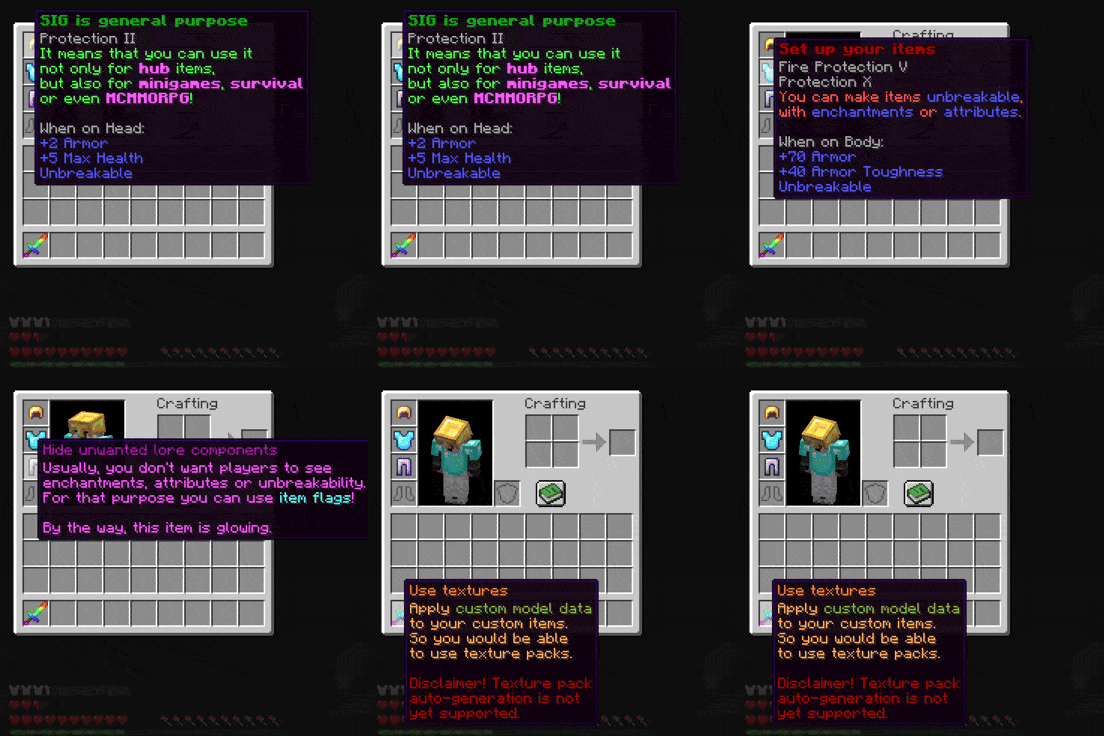
Configuration of the items
MC: 1.20.1
```yaml items: helmet: item: material: GOLDEN_HELMET name: '<dark_green><bold>SIG is general purpose' lore: - '<green>It means that you can use it' - '<green>not only for <light_purple><bold>hub</light_purple> items,' - '<green>but also for <light_purple><bold>minigames</light_purple>, <light_purple><bold>survival</light_purple>' - '<green>or even <light_purple><bold>MCMMORPG</light_purple>!' enchantments: minecraft:protection: 2 unbreakable: true attributes: - operation: ADD_VALUE name: health attribute: MAX_HEALTH amount: 5 slot: HEAD - operation: ADD_VALUE name: armor attribute: ARMOR amount: 2 slot: HEAD usage: cancel: false chestplate: item: material: DIAMOND_CHESTPLATE name: '<dark_red><bold>Set up your items' lore: - '<red>You can make items <blue>unbreakable</blue>,' - '<red>with <blue>enchantments</blue> or <blue>attributes</blue>.' enchantments: minecraft:protection: 10 minecraft:fire_protection: 5 unbreakable: true attributes: - operation: ADD_VALUE name: toughness attribute: ARMOR_TOUGHNESS amount: 40 slot: CHEST - operation: ADD_VALUE name: armor attribute: ARMOR amount: 70 slot: CHEST usage: cancel: false leggings: item: material: IRON_LEGGINGS name: '<dark_purple>Hide unwanted lore components' lore: - "<light_purple>Usually, you don't want players to see" - "<light_purple>enchantments, attributes or unbreakability." - "<light_purple>For that purpose you can use <aqua>item flags</aqua>!" - "" - "<light_purple>By the way, this item is glowing." unbreakable: true enchantments: minecraft:fortune: 1 item-flags: - HIDE_UNBREAKABLE - HIDE_ENCHANTS - HIDE_ATTRIBUTES usage: cancel: false sword: item: material: NETHERITE_SWORD cmd: 1 name: '<color:#ff7c17>Use textures</color>' lore: - '<color:#ffa861>Apply <color:#88aa3a>custom model data</color></color>' - '<color:#ffa861>to your custom items.</color>' - '<color:#ffa861>So you would be able</color>' - '<color:#ffa861>to use texture packs.</color>' - '' - '<dark_red>Disclaimer! Texture pack</dark_red>' - '<dark_red>auto-generation is not</dark_red>' - '<dark_red>yet supported.</dark_red>' unbreakable: true item-flags: - HIDE_UNBREAKABLE - HIDE_ENCHANTS - HIDE_ATTRIBUTES usage: cancel: false ``` Textures can be found here
Supports
- WorldGuard(7.x.x) - Nexo - Oraxen - ItemsAdder - HeadDatabase - PlaceholderAPI - Custom potions - Leathers colors - Custom NBT - And more!
Feedback
If you have any issues with the plugin, feel free to open an issue on the plugin`s github. Also you can reach me out through other ways listed in github's readme.
