
SimpleCometElevator
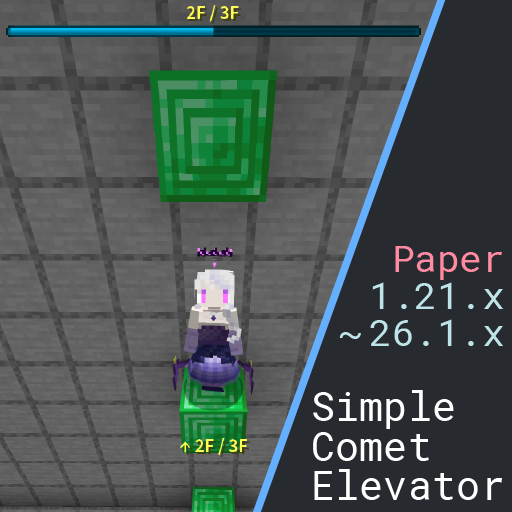
Just place 2 blocks. A simple elevator plugin for Minecraft(Paper)
 14
14
Quick challenge
How far can you run before the mobs catch you?
Minecraft check
Confirm your run
Complete the quick check to get your code.
SimpleCometElevator
SimpleCometElevator
A simple elevator plugin for Minecraft Paper.
シンプルなMinecraft Paper用エレベータープラグイン。
---
⭐ Features / 特徴
- Highly configurable — Installation only requires placing two blocks. - Highly configurable — BossBar display, movement sounds, and cooldown out of the box. - Highly configurable — Customize block types, display format, sounds, and more.
---
⏳ Quick Start / クイックスタート
How to Build an Elevator / エレベーターのつくりかた


1. 2 empty/passable blocks above each one with at least 2 empty/passable blocks above each one — that's one floor. - Each elevator shaft should use the same block type. - Default floor blocks: most metal blocks (except copper), and wool blocks.
2. up on a floor block → move up ⬆
3. down on a floor block → move down ⬇
4. You can also use a command to move to a specific floor
`/sce move <number>`
Minimum Requirements / 最低限の構成
- The floor block must be listed in `base-blocks`. - Each floor must have at least `required-air` empty blocks above it (default: `2`). - Those empty blocks must be listed in `passable-blocks`.
> You can view and edit all settings in `config.yml` inside the plugin folder.
---
⚡ Built-in Features / 機能
BossBar Floor Display / ボスバーによるフロア表示
- Shows current floor and total floors on screen. - Customize color, style, and format. 

Title and ActionBar option / タイトル、アクションバー表示オプション
- You can also set up UP and DOWN messages for the title and action bar. - This feature is disabled by default.
Sound Effects / 効果音
- Different sounds for going up and going down. - Adjust volume and pitch individually, or disable entirely. - You can also play back multiple sounds with different delay settings.
Cooldown / クールダウン
- Optional cooldown to prevent spam teleporting. - Configurable duration and message format.
---
⚙️ Configuration / 設定
All settings are in `plugins/SimpleCometElevator/user-settings/config.yml`.
Massages Language / 言語
```yaml messages: language: ja ``` > choose between en and ja
日本語と英語が選べるよ
Floor Blocks / 床ブロック
```yaml elevator: floor: base-blocks: - IRON_BLOCK - GOLD_BLOCK - DIAMOND_BLOCK - EMERALD_BLOCK - NETHERITE_BLOCK - REDSTONE_BLOCK - LAPIS_BLOCK - $WOOLS # Tag-based bulk selection is supported passable-blocks: - $AIR - $CARPETS
Blocks treated as empty space above floors
required-air: 2 # Minimum empty blocks above each floor tolerance-height: 0.3 # How far off a floor block a player can be (in blocks) allow-mixed-blocks: false # Allow different block types in one shaft ```
Command / コマンド
```yaml elevator: command: move: enabled: true # Can also disable the move command ```
Cooldown / クールダウン
```yaml elevator: cooldown: enabled: false seconds: 1.0 format: "§cCooldown: {time}s" ```
Sounds / 効果音
```yaml elevator: sound: up: enabled: true broadcast: false # Determines whether the sound can be heard by others entries: - type: minecraft:entity.experience_orb.pickup volume: 1.0 pitch: 0.69 delay: 0 # Delay after movement (ms)
down: enabled: true broadcast: false entries: - type: minecraft:entity.experience_orb.pickup volume: 1.0 pitch: 0.56 delay: 0
command: # You can also customize the sound effects for moving between floors using commands. up: enabled: true broadcast: false entries: # Can play the sound multiple times - type: minecraft:entity.experience_orb.pickup volume: 1.0 pitch: 0.56 delay: 0 - type: minecraft:entity.experience_orb.pickup volume: 1.0 pitch: 0.69 delay: 350
down: enabled: true broadcast: false entries: - type: minecraft:entity.experience_orb.pickup volume: 1.0 pitch: 0.69 delay: 0 - type: minecraft:entity.experience_orb.pickup volume: 1.0 pitch: 0.56 delay: 350
```
BossBar / ボスバー
```yaml elevator: floorbar: enabled: true color: BLUE # BLUE, GREEN, PINK, PURPLE, RED, WHITE, YELLOW style: SOLID # SOLID, SEGMENTED_6, SEGMENTED_10, SEGMENTED_12, SEGMENTED_20 format: "§e{current}F / {total}F" use-y-progress: false # Use Y-coordinate range for progress bar instead of floor count ```
Title / タイトル
```yaml elevator: title: up: enabled: false title: "§e↑UP↑" subtitle: "§7{current}F / {total}F" fade-in: 10 stay: 40 fade-out: 10 down: enabled: false title: "§e↓DOWN↓" subtitle: "§7{current}F / {total}F" fade-in: 10 stay: 40 fade-out: 10 command: up: enabled: false title: "§b↑{current}F↑" subtitle: "§7/ {total}F" fade-in: 10 stay: 40 fade-out: 10 down: enabled: false title: "§b↓{current}F↓" subtitle: "§7/ {total}F" fade-in: 10 stay: 40 fade-out: 10 ```
ActionBar / アクションバー
```yaml elevator: actionbar: up: enabled: false format: "§e↑ {current}F / {total}F" down: enabled: false format: "§e↓ {current}F / {total}F" command: up: enabled: false format: "§b↑ {current}F / {total}F" down: enabled: false format: "§b↓ {current}F / {total}F" ``` ---
📋 Commands / コマンド
For Player / プレイヤー向け
Permission: `simplecometelevator.move`
| Command | Description | |---------|-------------| | `/sce move <floor>` | Move to the specified floor |
For Admin / 管理者向け
Permission: `simplecometelevator.admin`
| Command | Description | |---------|-------------| | `/sce help` | Show command help | | `/sce info` | Show plugin info | | `/sce check` | Check update | | `/sce reload` | Reload `config.yml` | | `/sce get <path>` | Display a config value | | `/sce set <path> <value>` | Update and apply a config value | | `/sce reset <path> [confirm]` | Delete value and restore default config value |
Examples: ``` /sce set elevator.cooldown.enabled true /sce set elevator.cooldown.seconds 1.5 /sce reload ```
---
🎯 Compatibility / 対応バージョン
- Server software: 1.21.x ~ 26.1.x - Server software: Paper
---
🛠️ Advanced Settings / 高度な設定
Tag Notation (`$`) / タグの利用
Use Minecraft block tags for bulk selection: ```yaml base-blocks: - $WOOLS # All wool blocks - $BUTTONS # All button types - IRON_BLOCK # Individual block still works ``` Available tags: Spigot Javadocs
Exclusion Notation (`!`) / 除外設定
Exclude specific blocks or tags: ```yaml passable-blocks: - $TRAPDOORS - !IRON_TRAPDOOR # Exclude iron trapdoors specifically ```
---
💡 Tips
- Some configurations cannot be reloaded using the reload command. After editing `config.yml`, we recommend reloading the plugin itself. - Keep `tolerance-height` below `0.5` to avoid false detections. - Use different sounds for up and down for better feedback.
---
🐛 Troubleshooting / トラブルシューティング
Elevator not working? Check the following:
1. Is the floor block listed in `base-blocks`? 2. Are there at least `required-air` empty blocks above the floor? (default: `2`) 3. Are the blocks in that space listed in `passable-blocks`? 4. Did you run reloading the plugin after changing `config.yml`?
---
📖 Full Documentation / 詳細ドキュメント
- 日本語ガイドもあるわよ!: 日本語ガイドもあるわよ! - 日本語ガイドもあるわよ!: %%MD1%%
---
Source: Source Source: https://github.com/stabery/SimpleCometElevator
Bug reports and feature requests → GitHub Issues Pull requests are welcome!
