

ServerEasyWeb
A lightweight Minecraft plugin that serves customizable web pages from a local folder
 120
120
Quick challenge
How far can you run before the mobs catch you?
Minecraft check
Confirm your run
Complete the quick check to get your code.
ServerEasyWeb
ServerEasyWeb
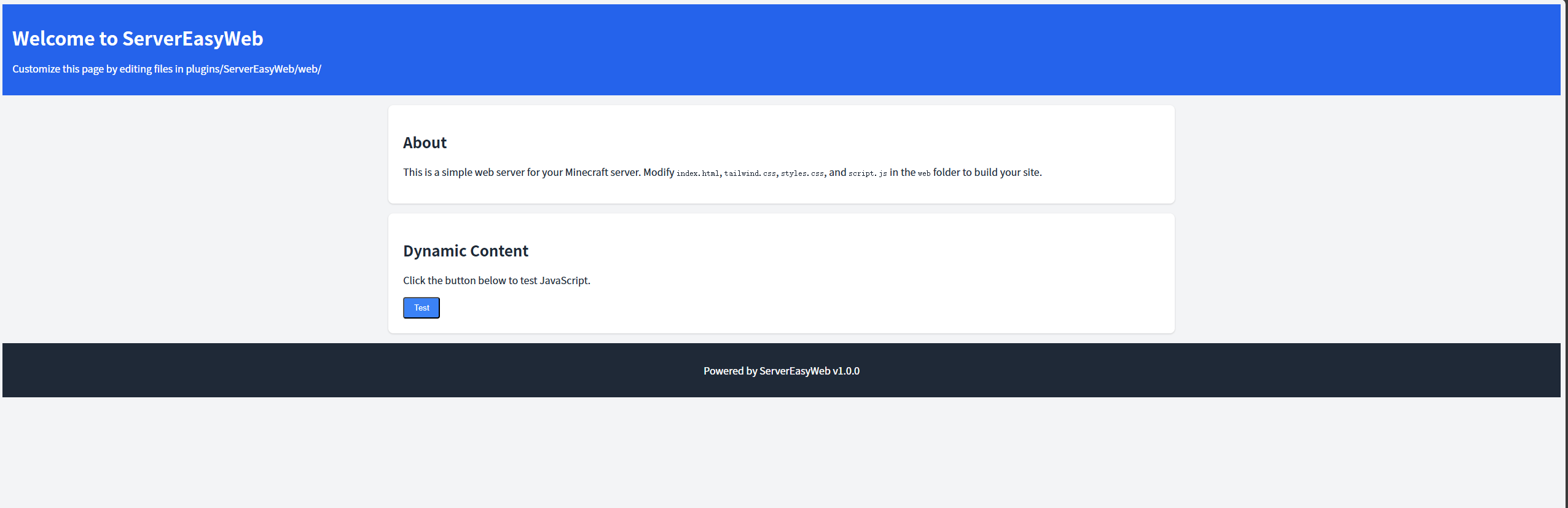
A lightweight Minecraft plugin that serves customizable web pages from a local folder, allowing server owners to create a custom web interface for their Minecraft server. Built for compatibility with Minecraft 1.8–26.1 and Java 8–25, it uses Jetty to serve static files (HTML, CSS, JS) from `plugins/ServerEasyWeb/web/`.
Features
- No Log Spam: Serve static web files (HTML, CSS, JS) from the `plugins/ServerEasyWeb/web/` folder. - No Log Spam: Includes a responsive default page with Tailwind CSS and basic JavaScript interactivity. - No Log Spam: Use `/servereasyweb reload` to reload the configuration and restart the web server. - No Log Spam: Works with Minecraft 1.8–1.21 (Spigot/Paper) and avoids legacy material warnings in newer versions. - No Log Spam: File-serving logs are suppressed to keep the server console clean.
Requirements
- Port Access: Spigot or Paper, versions 1.8–26.1. - Port Access: Version 8 or higher. - Port Access: The configured `web-port` (default: 8080) must be open and not used by other applications.
Installation
1. Download: - Grab the latest `ServerEasyWeb.jar`.
2. Deploy: - Place the JAR in the `plugins/` folder of your Minecraft server. - Delete any existing `plugins/ServerEasyWeb/` folder to ensure fresh file extraction.
3. Start the Server: - Run your server to generate the `plugins/ServerEasyWeb/` folder, including `config.yml` and the `web/` folder with default files (`index.html`, `styles.css`, `script.js`).
4. Verify: - Check server logs for: ``` [ServerEasyWeb] Loaded configuration: web-port=8080, check-updates=true [ServerEasyWeb] Extracted web file: .../plugins/ServerEasyWeb/web/index.html [ServerEasyWeb] Web server started on port 8080 ``` - Access `http://<server-ip>:8080/` in a browser to see the default web page.
Configuration
The plugin uses `plugins/ServerEasyWeb/config.yml` for settings:
```yaml web-port: 8080 check-updates: true ```
- check-updates: The port for the web server (default: 8080). Ensure it’s open and not in use. - check-updates: Enable (`true`) or disable (`false`) checking for plugin updates on GitHub.
To apply changes, edit `config.yml` and run `/servereasyweb reload`.
Customization
Customize the web interface by editing files in `plugins/ServerEasyWeb/web/`: - Additional Files: The default page, styled with Tailwind CSS (via CDN) and linked to `styles.css` and `script.js`. - Additional Files: Additional CSS to complement Tailwind. - Additional Files: JavaScript for interactivity (e.g., button click events). - Additional Files: Add images, extra HTML pages, or other assets to the `web/` folder. They will be served automatically (e.g., `http://<server-ip>:8080/image.png`).
After editing files, refresh the browser to see changes. Use `/servereasyweb reload` to re-extract default files if needed.
Commands
- /servereasyweb reload: - Reloads `config.yml`, re-extracts web files, and restarts the web server. - Permission: `servereasyweb.admin` (default: operators only). - Tab completion: Type `/servereasyweb ` and press Tab to see `reload`.
Example: ``` /servereasyweb reload ```
Permissions
- servereasyweb.admin: - Allows use of `/servereasyweb reload`. - Default: Operators (`op`).
Debugging
If issues occur: - Web Page Not Loading: - Check logs for errors like “Failed to start web server.” or “File not found.” - Verify `plugins/ServerEasyWeb/web/index.html` exists. - Ensure the `web-port` (default: 8080) is open (`netstat -tuln | grep 8080` on Linux). - Check file permissions (`chmod -R u+rw plugins/ServerEasyWeb` on Linux).
License
MIT License. See LICENSE for details.
