

ResourceWorldResetter
ResourceWorldResetter is a Minecraft plugin designed to automate the resetting of a resource world at scheduled intervals.
 406
406
Quick challenge
How far can you run before the mobs catch you?
Minecraft check
Confirm your run
Complete the quick check to get your code.
ResourceWorldResetter
ResourceWorldResetter v4.0.0

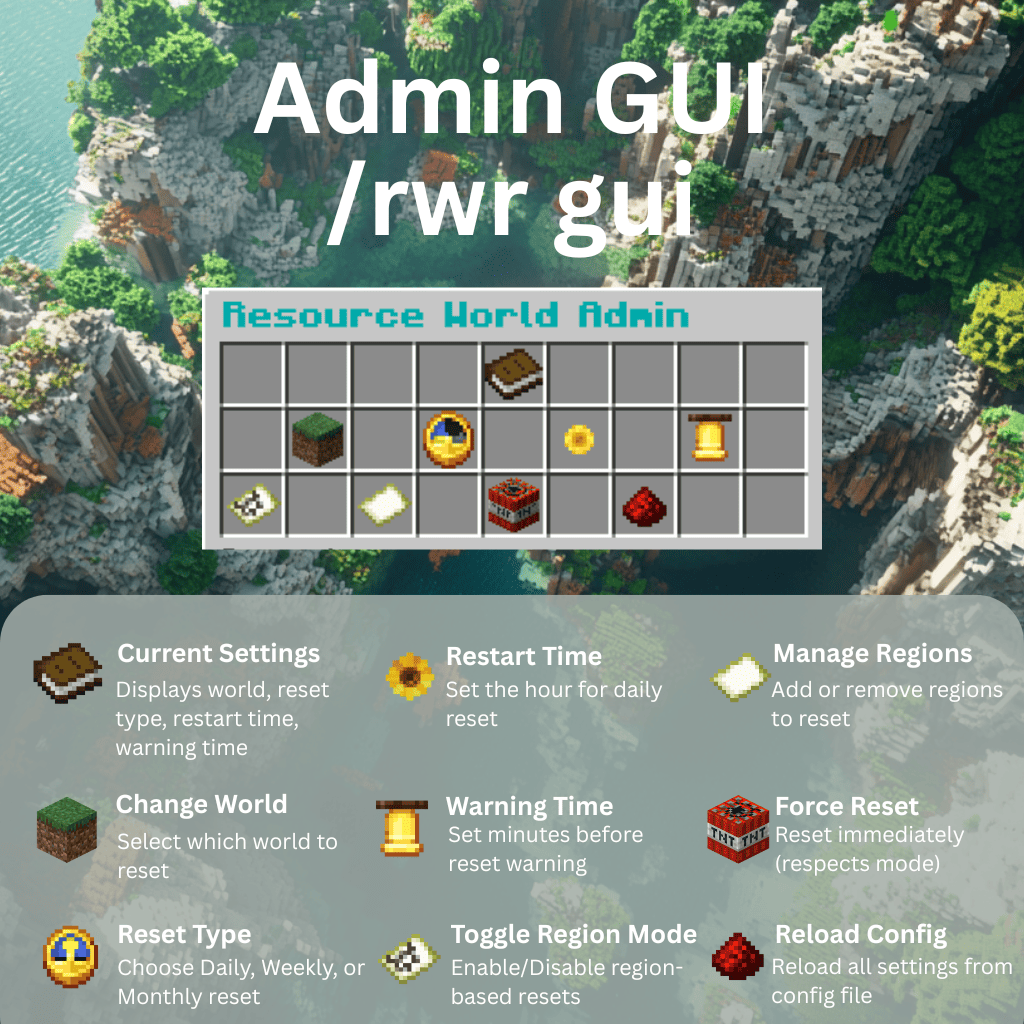
Admin GUI — `/rwr gui`
Click the icons in-game to change world, schedule, warnings, region settings, force resets, or reload config.
Automated Resource World Resets with Phase-Aware Status and Unified /rwr Commands
ResourceWorldResetter v4 is the next generation of automatic resource world resets. It introduces an explicit phase-based reset model, a unified /rwr command tree, and improved operator visibility into reset progress and failures.
⚠️ BREAKING CHANGE: v4 introduces a new unified `/rwr` command structure. Old commands (`/rwrgui`, `/resetworld`, `/rwrregion`, `/rwrresume`, etc.) no longer exist. Server owners must update scripts and permissions. Auto-migration is provided for configs.
What's New in v4
✓ Explicit Reset Phases - Reset progress is tracked using phases: IDLE → PRECHECK → TELEPORT → UNLOAD → DELETE → RECREATE → VERIFY → COMPLETE (or FAILED on error) - `/rwr status` reports the exact phase for in-progress or failed resets - Reset state metadata is persisted for better operational visibility
✓ Unified Command Structure - All functionality is grouped under `/rwr` subcommands - Built-in help: `/rwr` or `/rwr help` - Legacy command aliases are intentionally removed in v4
Built-in help: `/rwr help` now shows a complete, command-by-command help page with usage examples and permission notes for every subcommand.
✓ Full Operator Visibility - `/rwr status` — shows exact phase, next reset time, resume phase, and last failure reason - `/rwr next` — displays next reset timestamp, warning timestamp, and countdown in server timezone - No more guessing whether a reset is stuck, blocked, or progressing
Key Features
Core Features: - Automatic Resource World Resets — daily, weekly, monthly schedules - Selective Region Resets — reset specific areas without deleting the entire world - GUI-Based Configuration — no manual YAML editing needed - Multiverse-Core Integration — handles world deletion and recreation
Safety & Reliability: - State Machine Foundation — explicit phases and persisted state tracking - Failure Recovery Controls — resume and cancel controls for incomplete reset handling - Failure Visibility — phase and failure details exposed in status output - Safe Player Teleportation — guarantees solid ground; automatic fallback if no safe spot exists - Graceful Shutdown Handling — incomplete reset state is detected and can be managed with `/rwr resume`
Operator Experience: - Phase-Level Status Reporting — `/rwr status` shows exact phase, not just "IN_PROGRESS" - Reset Scheduling Transparency — `/rwr next` shows countdown to next reset - Recovery Options — `/rwr resume` and `/rwr resume cancel` for interrupted resets
Player Experience: - World Teleport GUI — `/rwr tp` for easy world navigation; `/rwr back` to return - Configurable Warnings — countdown broadcasts before scheduled resets - Region Throttling — batch chunk unloading prevents lag spikes - Custom Events — plugin integration via PreResetEvent, PostResetEvent, RegionPreResetEvent, RegionPostResetEvent
v4.0.0 Breaking Changes
Old commands no longer exist: - `/rwrgui` → use `/rwr gui` - `/reloadrwr` → use `/rwr reload` - `/resetworld` → use `/rwr reset now` - `/rwrregion` → use `/rwr region <enable|disable|list|add|remove|addhere>` - `/rwrresume` → use `/rwr resume [cancel]`
What is automatic: - Config is auto-migrated from v3 schema to v4 on first startup - A backup is created as `config.v3.backup.yml` - Old reset-state format is archived
What admins must do: 1. Update all scripts and automation to `/rwr` subcommands 2. Update permission nodes in your permission plugin 3. Run `/rwr status` to verify setup 4. Test with `/rwr reset now` during low activity
See MIGRATION.md for the full upgrade guide.
Commands & Permissions
| Command | Description | Permission | |---|---|---| | /rwr help | Show all supported `/rwr` subcommands | resourceworldresetter.admin | | /rwr gui | Open the admin configuration GUI | resourceworldresetter.admin | | /rwr reload | Reload config from file | resourceworldresetter.admin | | /rwr status | Show current phase, next reset, and failure/resume details | resourceworldresetter.admin | | /rwr next | Show next reset timestamp, warning timestamp, and countdown | resourceworldresetter.admin | | /rwr reset now | Force an immediate reset | resourceworldresetter.admin | | /rwr resume [cancel] | Resume or cancel incomplete reset recovery | resourceworldresetter.admin | | /rwr region <enable|disable|list|add|remove|addhere> | Manage region-based resets | resourceworldresetter.admin | | /rwr tp | Open world teleport menu | resourceworldresetter.admin | | /rwr back | Teleport back to previous location | resourceworldresetter.admin |
Permissions
The plugin exposes granular permission nodes for player-facing teleport commands so servers can allow them to non-admin players while keeping admin operations restricted.
Player-Facing Commands (available to all by default): - `resourceworldresetter.tp` — Allows `/rwr tp` to open the world selection GUI. Default: `true` (all players). - `resourceworldresetter.back` — Allows `/rwr back` to teleport back to your last recorded location. Default: `true` (all players).
Admin-Only Commands: - All other subcommands (`gui`, `reload`, `reset`, `resume`, `region`, `status`, `next`) are protected by `resourceworldresetter.admin` (default: `op` only).
The root `/rwr` command has no permission gate; Spigot allows all users to execute it, and permission checks happen per subcommand. This enables non-admins to use player-facing commands while keeping administration features restricted.
Supported Versions - Minecraft: 1.20.5+ (Spigot API 26.1+) - Java: 25 or newer - Multiverse-Core: 4.3.1+ (fully compatible with v5) - Tested on: Spigot 26.1, 26.1.1, 26.1.2
Installation 1. Download the latest v4 release from GitHub Releases 2. Back up your plugin folder and worlds 3. Place ResourceWorldResetter.jar into `plugins/` 4. Ensure Multiverse-Core 4.3.1+ is installed 5. Restart your server (auto-migration will run if upgrading from v3) 6. Create your resource world (e.g., `/mv create Resources normal`) 7. Run `/rwr gui` and click Change World to select it 8. Configure schedule and preflight gates via GUI or `config.yml`
How It Works 1. Admin configures target world and reset schedule via `/rwr gui` 2. On scheduled reset, plugin enters phase-based flow: PRECHECK → TELEPORT → UNLOAD → DELETE → RECREATE → VERIFY → COMPLETE 4. Players are safely teleported to a fallback world with visual warnings 5. World is deleted and regenerated by Multiverse-Core 6. Status is visible at any time via `/rwr status` (exact phase reported) 7. If reset fails, admins can inspect failure reason and control recovery with `/rwr resume`
Important Information
Time Zone Awareness: The plugin schedules resets based on the server's local system time.
Data Loss Warning: Once a world is reset, all data within it is permanently deleted, including player structures and inventories. Back up your world files before configuring and using this plugin.
Preflight Gates: v4.0.0 includes preflight configuration keys (TPS, players, disk) in the schema for forward compatibility. Full gate enforcement and policy controls are targeted for v4.1+.
Reset Phases: Monitor `/rwr status` to see which phase the current or last reset reached. Phase information is essential for troubleshooting reset failures.
Issues & Support: - Report bugs: Issues - Contributions welcome: Pull requests accepted
Author & License Author: TamaWish License: MIT License
Download v4.0.0 Now — Breaking Change Release with Better Commands and Phase Visibility
