

PostSpawner
A lightweight Minecraft plugin for managing Monster Spawner
 62
62
Quick challenge
How far can you run before the mobs catch you?
Minecraft check
Confirm your run
Complete the quick check to get your code.
PostSpawner
简体中文 | English
PostSpawner



PostSpawner is a lightweight Minecraft plugin for managing monster spawners, providing control over spawner mining and placement.
📚 Features
- ✅ Update Check: Supports silk touch and normal tool mining of spawners - ✅ Update Check: Built-in Chinese and English language files, easily extendable - ✅ Update Check: Supports various actions like command execution, item drops, sound effects, etc. - ✅ Update Check: Compatible with PlaceholderAPI, ItemsAdder, MythicMobs, NeigeItems, Oraxen and more - ✅ Update Check: Fully customizable config and message system - ✅ Update Check: Optional update checking feature
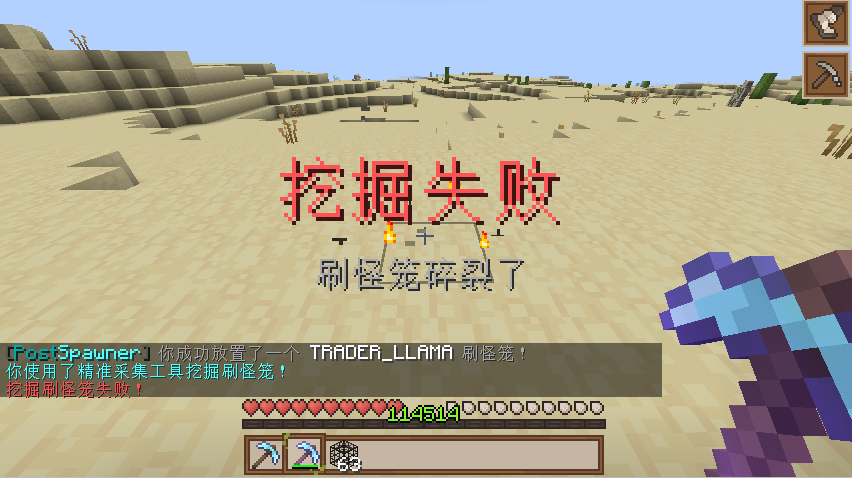
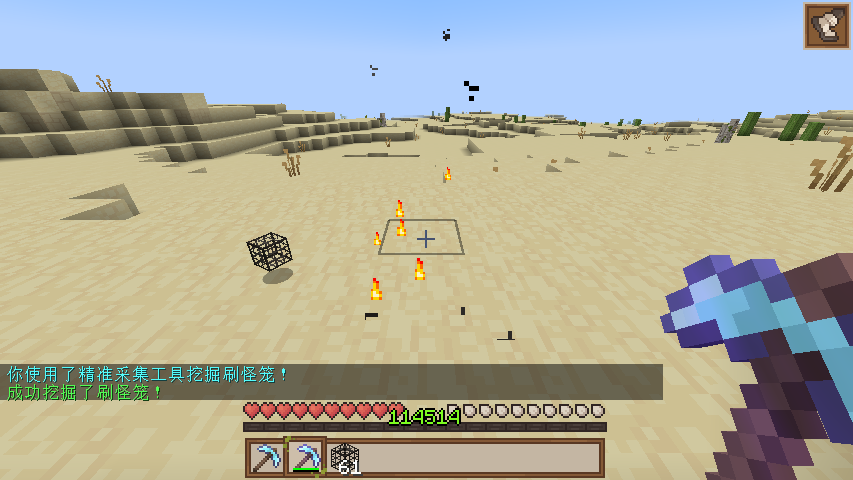
💻 Installation
1. Download the latest PostSpawner.jar 2. Place the plugin in your server's plugins folder 3. Start/Restart the server 4. Edit plugins/PostSpawner/config.yml for customization 5. Use `/ps reload` to reload plugin configuration
🔧 Commands
| Command | Description | Permission | |---------|-------------|------------| | `/ps reload` | Reload plugin config and language files | `postspawner.command.reload` | | `/ps version` | Show version information | `postspawner.command.version` | | `/ps help` | Show help information | `postspawner.command.help` | | `/ps update` | Check for updates | `postspawner.command.update` |
🔒 Permissions
| Permission | Description | Default | |------------|-------------|---------| | `postspawner.use.place` | Place spawners | All players | | `postspawner.use.break` | Break spawners | All players | | `postspawner.command.reload` | Reload command | OP | | `postspawner.command.version` | Version command | All players | | `postspawner.command.help` | Help command | All players | | `postspawner.command.update` | Update command | OP | | `postspawner.admin` | Includes all permissions | OP |
🛠️ Actions
PostSpawner provides a rich action system. Use the following action formats in config:
Format: `[]` for required parameters, `()` for optional parameters
| Action Syntax | Description | Example | |---------------|-------------|---------| | `[command] [command]` | Make player execute command | `[command] spawn` | | `[op] [command]` | Temporarily give player OP to execute command | `[op] gamemode creative` | | `[console] [command]` | Execute command from console | `[console] broadcast Someone mined a spawner!` | | `[sound] [sound] (volume) (pitch)` | Play sound for player | `[sound] BLOCK_ANVIL_LAND 1.0 1.5` | | `[message] [text]` | Send message to player | `[message] &aYou successfully mined a spawner!` | | `[title] [title] (subtitle)` | Show title to player | `[title] &aMining Success &7Got a spawner` | | `[drop_monster_spawner]` | Drop the broken spawner | `[drop_monster_spawner]` | | `[drop] [itemID] (amount)` | Drop item at location | `[drop] DIAMOND 5` | | `[give] [itemID] (amount)` | Give item to player | `[give] DIAMOND_SWORD 1` | | `[buff] [potion] (duration) (level)` | Give player potion effect | `[buff] SPEED 30 2` | | `[money] [action] [amount]` | Control player economy | `[money] give 100`, `[money] take 200`, `[money] set 50` | | `[points] [action] [amount]` | Control player points | `[points] give 100`, `[points] take 200`, `[points] set 50` |
Note: Breaking spawners in creative mode won't trigger any actions.
📦 Item Library Support
When using `[drop]` and `[give]` actions, the following item libraries are supported:
| Library | Format | Example | |---------|--------|---------| | Minecraft | `minecraft:itemID [amount]` | `minecraft:diamond_sword`, `diamond:5` | | ItemsAdder | `itemsadder:itemID [amount]` | `itemsadder:ruby_sword` | | MMOItems | `mmoitems:type:ID [amount]` | `mmoitems:SWORD:EXCALIBUR` | | NeigeItems | `neigeitems:itemID [amount]` | `neigeitems:test_item` | | Oraxen | `oraxen:itemID [amount]` | `oraxen:amethyst_helmet` | | MythicMobs | `mythicmobs:itemID [amount]` | `mythicmobs:special_bow` | | SX-Item | `sxitem:itemID [arg1:arg2...] [amount]` | `sxitem:magic_wand:arg1:arg2` | | Zaphkiel | `zaphkiel:itemID [amount]` | `zaphkiel:legendary_axe` | | CraftEngine | `craftengine:itemID [amount]` | `craftengine:magic_staff` | | AzureFlow | `azureflow:itemID [amount]` | `azureflow:wizard_robe` |
Simplified formats: - Default source is minecraft (can be omitted), e.g. `diamond:5` equals `minecraft:diamond:5` - If amount is 1, can be omitted, e.g. `itemsadder:ruby_sword` equals `itemsadder:ruby_sword 1`
📊 Variables
You can use these built-in variables in actions:
- `%player%` - Player name - `%block_x%` - Block X coordinate - `%block_y%` - Block Y coordinate - `%block_z%` - Block Z coordinate - `%block_world%` - Block world - `%entity_type%` - Entity type
Additionally, if PlaceholderAPI is installed, you can use PlaceholderAPI variables.
📫 Contact
- 
-  <-Click to join
- 
📜 License
This plugin is licensed under GNU General Public License v2.0.
