

PlayerGrave
Creating death chests
 1,26k
1,26k
Quick challenge
How far can you run before the mobs catch you?
Minecraft check
Confirm your run
Complete the quick check to get your code.
PlayerGrave
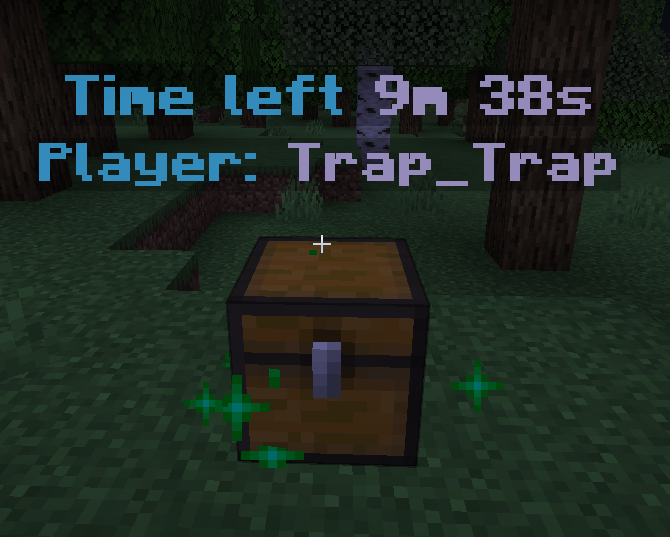
Main Purpose:
The PlayerGrave plugin adds the functionality of creating death chests in Minecraft, which store players' inventory upon death. This helps players recover their items easily without losing them.
Key Features:
Death Chest Creation:
When a player with the appropriate permission (`playergrave.use`) dies, a chest is created at the death location containing their inventory. If the location is occupied, the chest spawns above the block.
Interactive Chest Menu:
Players can interact with the death chest through a custom menu (`DeathMenu`) that allows them to retrieve their items.
Automatic Chest Removal:
Death chests have a limited lifespan (default: 600 seconds). If not emptied in time, they are automatically removed, and any remaining items drop on the ground.
Explosion Protection:
Death chests are protected from explosions (e.g., creeper blasts).
Chest Breaking:
If a player breaks the chest, all remaining items are dropped naturally.
Visual Indicators:
Two invisible armor stands are created above the chest: - One displays the name of the player who owns the chest. - The other shows the remaining lifespan of the chest.
Compass Guidance:
Upon respawn, players receive a compass pointing to their death location (the chest).
Benefits:
- Protects player items after death. - Convenient chest interaction menu. - Explosion protection. - Compass for quick navigation to the death chest.
Usage:
- Players must have the permission `playergrave.use` to use the plugin. - Upon death, a chest is automatically created, and a compass helps locate its position. - Players can retrieve their items or leave them until the chest is automatically removed.
