PingNameTags
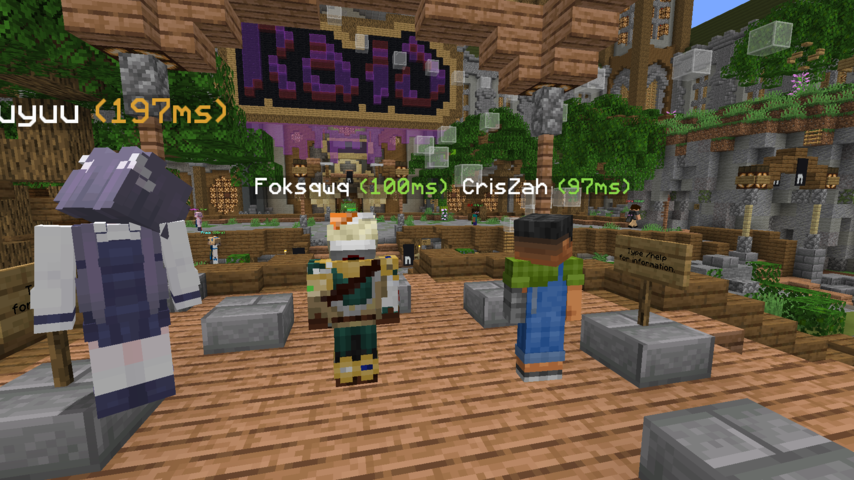
Adds colored ping inside player's nametag
 60,73k
Quick challenge
How far can you run before the mobs catch you?
Minecraft check
Confirm your run
Complete the quick check to get your code.
PingNameTags
PingNameTags
Displays the ping next to player name tags ingame.
Numbers change colour based on ping
Configurable through Mod Menu
Requirements/Installation
1. Install the Fabric Loader: - Download the Fabric Loader from the Install the Fabric Loader. - Run the Fabric Loader installer and follow the on-screen instructions to install it for your Minecraft version.
2. Install the Fabric API and Cloth Config API: - Download the Install the Fabric API and Cloth Config API and %%MD1%% - Place the downloaded JAR file into your Minecraft `mods` folder (located in the `.minecraft` directory).
Configuration
The configuration can be edited in-game if Mod Menu is installed.
| Option | Type | Default Value | Description | |----------------------- |-----------------|---------------|--------------------------------------------------------------------------------------------------------------------| | `enabled` | `boolean` | `true` | Whether ping nametags are enabled or not. | | `togglepingnametags` | `Key` | `G` | The key that toggles ping nametags on and off. | | `pingTextPosition` | `Left | Right` | `Right` | The position of the ping text placed next to the name. | | `pingTextFormatString` | `String` | `"(%dms)"` | The format string for ping text. Must include a `%d`, which will be replaced dynamically by the actual ping value. |
Demo