
pinger
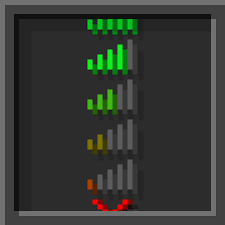
Real-time ping indicator in the tab list.
 15
15
Quick challenge
How far can you run before the mobs catch you?
Minecraft check
Confirm your run
Complete the quick check to get your code.
pinger
Pinger
Displays each player's real-time ping in the tab list, color-coded by latency threshold. Includes a private `/ping` command and full runtime control via admin commands.
---
Features
- Live ping indicator in the tab list, refreshed on a configurable interval - Color-coded thresholds — configurable colors, values, and bracket style - Private `/ping` command — response is only visible to the sender - Runtime toggle for tab display and `/ping` command without a server restart - Full internationalization — drop any `.yml` into `lang/` and point config to it - Bundled languages: Custom (`en_US`) and Custom
---
Ping Thresholds
| Range | Color | Default | |---|---|---| | Excellent | Green | ≤ 35 ms | | Good | Gold | 36 – 99 ms | | Warning | Red | 100 – 999 ms | | Critical | Dark Red, bold | ≥ 1000 ms |
All values and colors are editable in `config.yml`.
---
Commands
| Command | Description | Permission | |---|---|---| | `/ping` | Show your current ping | `pinger.ping` | | `/pinger help` | List all commands | — | | `/pinger reload` | Reload config and language | `pinger.admin` | | `/pinger on tab` | Enable tab ping display | `pinger.admin` | | `/pinger off tab` | Disable tab ping display | `pinger.admin` | | `/pinger on ping` | Enable `/ping` command | `pinger.admin` | | `/pinger off ping` | Disable `/ping` command | `pinger.admin` | | `/pinger status` | Show current plugin state | `pinger.admin` |
`/pinger on` and `/pinger off` without an argument toggle both at once. Runtime changes reset to `config.yml` values on `/pinger reload`.
---
Permissions
| Node | Default | Description | |---|---|---| | `pinger.admin` | OP | All `/pinger` admin subcommands | | `pinger.ping` | true | Use `/ping` | | `pinger.see` | true | See ping in tab list |
---
Configuration
Generated automatically on first launch with full inline documentation.
```yaml general: enabled: true update-interval: 20 # 20 ticks = 1 second language: en_US
display: show-in-tab: true ping-command-enabled: true show-ms-suffix: true brackets: open: "[" close: "]" color: GRAY bold: true
thresholds: excellent: { max: 35, color: GREEN } good: { max: 99, color: GOLD } warning: { max: 999, color: RED } critical: { min: 1000, color: DARK_RED, bold: true, text: "CRITICAL" } ```
---
Custom Language
1. Create `plugins/pinger/lang/your_lang.yml` — use `en_US.yml` as a template 2. Set `language: your_lang` in `config.yml` 3. Run `/pinger reload`
`&` color codes and placeholders (`{ping}`, `{player}`, etc.) are fully supported.
---
Requirements
- Paper 1.21+ (or any Paper fork) - Java 21+
---
*by pozii*
