

PerfectMessages
Perfect! Unimprovable! Ideal! Messages for minecraft.
 721
721
Quick challenge
How far can you run before the mobs catch you?
Minecraft check
Confirm your run
Complete the quick check to get your code.
PerfectMessages
---
Perfect Messages (PM) — Convenient Message Management in Minecraft
Are you tired of `/title`? Want to make colorful notifications that stay in a message log, send cinematic dialogues, or create immersive NPC conversations? With Perfect Messages (PM), you can do it all — easily and beautifully. Perfect Messages (PM) visit the mod’s project page.
---
Features
* 🚀 Pop-Up Messages Display smooth, fading notifications with customizable text, colors, and duration. Supports all Minecraft color codes and HEX formatting.
* 🎨 HEX Color Support Use any custom color via:
```bash &#RRGGBB ```
Example: `&#FF5733Hello!`
* 🔢 Dynamic Placeholders
* `%player_name%` — Player’s name * `%player_health%` — Current health * `%player_xp%` — XP level * `%item_in_hand%` — Item in main hand
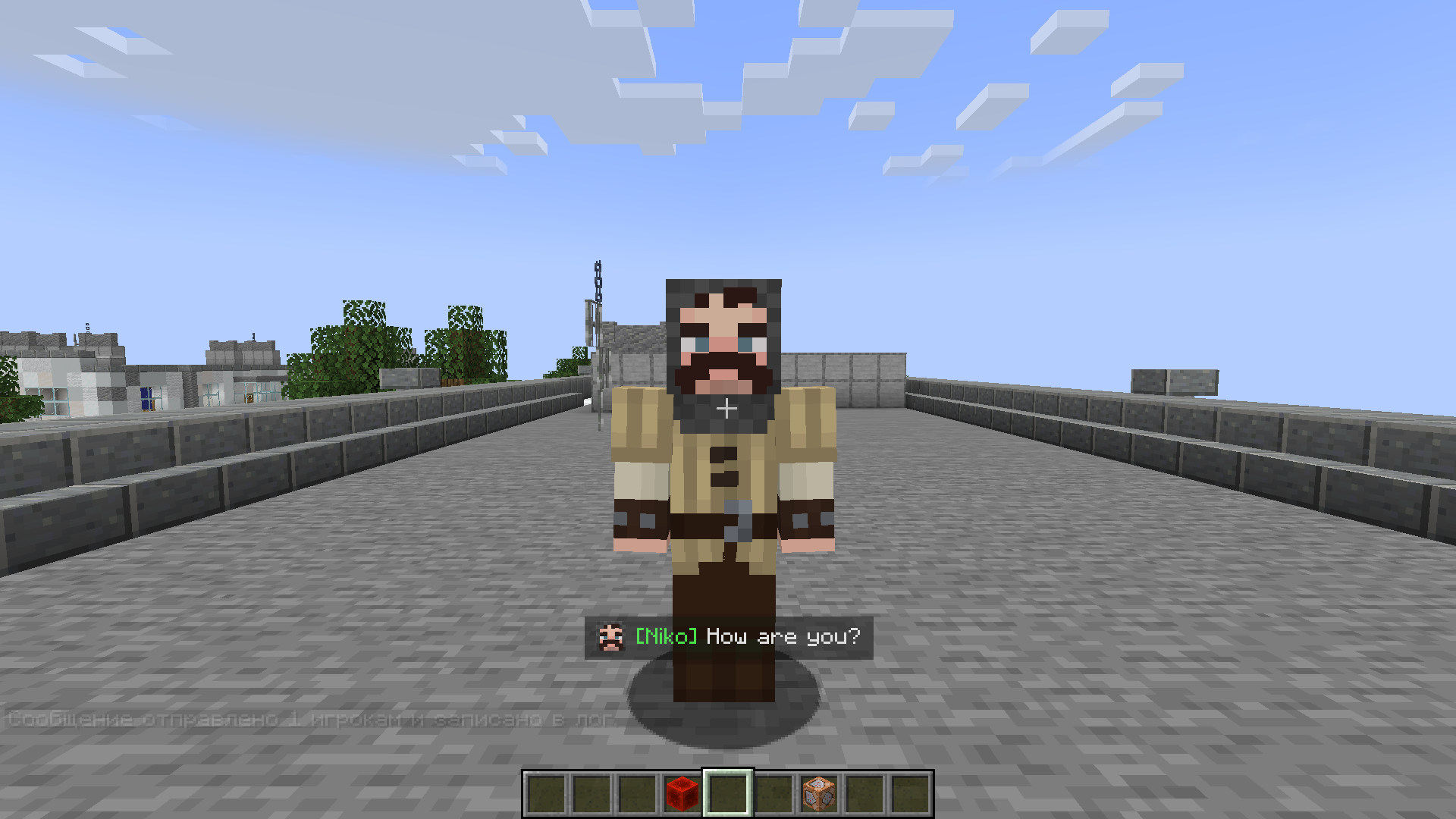
* 🖼️ Image Support Add icons or portraits to messages:
```bash /perfectmessage @a "pic.png Hello, %player_name%!" 5 true ```
All images are stored in `mods/pm/images/` (created automatically). Images appear at the start of messages and align properly with multiline text.
* 📝 Message Log View all previous messages in a smooth, scrollable message window. Perfect for quests, story mods, or chat-style dialogues.
* 🔍 Commands
* `/perfectmessage` — Send a custom message with adjustable duration and optional logging * `/clearmessages` — Clear all messages from the log
Example:
```bash /perfectmessage @a "b50d4Welcome, %player_name%!" 10 true ```
* ⌨️ Options → Controls → PM: Toggle Message Log Open or close the message log directly from in-game (default key: `N`). The key can be changed in Options → Controls → PM: Toggle Message Log.
* 🪄 Text Effects
* `&k` — Obfuscated (glitched) text * `&r` — Reset formatting * `text` — Shaking text effect
---
How to Use
1. Send a Message
```bash /perfectmessage @a "&#FF5733Hello, %player_name%!" ``` 2. Add an Image
```bash /perfectmessage @a "pic.png &aYou found a treasure!" 5 true ``` 3. Clear the Log Press Clear the Log (or your chosen key) to view past messages. 4. Clear the Log
```bash /clearmessages ```
---
Configuration
You can adjust:
* Whether logging is enabled * Fade duration and transparency * Maximum stored messages * Visual effects like shaking or gradients
The config file is automatically created in your Forge config directory.
---
Installation
1. Install Forge (Minecraft 1.19.2 or 1.20.1). 2. Place the mod file into the `mods` folder. 3. Launch Minecraft — the folder `mods/pm/images/` will be created automatically. 4. Configure your controls and enjoy stylish messages!
---
Compatibility
* Languages: 1.19.2, 1.20.1 * Languages: Forge * Languages: English, Russian
---
For Modpack Creators
Perfect Messages is ideal for interactive cutscenes, interactive cutscenes, or interactive cutscenes. You can easily script dialogue sequences using command blocks, scripts, or datapacks.
💬 Example: NPC Dialogue Chain
```bash /perfectmessage @a "npc.png &#ffc107Villager: &rHello, traveler!" 5 true /perfectmessage @a "npc.png &#ffffffVillager: &rThe forest ahead is dangerous..." 5 true /perfectmessage @a "npc.png &#ff0000Villager: &rBeware of the shadows!" 5 true ```
🪄 Example: Quest Reward Message
```bash /perfectmessage @a "chest.png �ff00You received 50 gold and a new sword!" 5 true ```
🧙 Tip
Combine it with mods like Quest Frameworks, Quest Frameworks, or Quest Frameworks to create immersive stories with timed, animated dialogue.
---
Support & Feedback
If you encounter any issues or want to share ideas, join our Discord Channel or visit the mod’s project page.
---
Perfect Messages — Your Messages, Your Story.
Create cinematic notifications, immersive storytelling, and expressive communication in Minecraft with ease.
---
