Zs Sky+
The Sky Pack replaces Minecraft’s default sky with a clean and visually appealing custom sky. Designed to reduce visual noise and improve focus, this pack provides a smooth and aesthetic sky that looks great in PvP, BedWars, SkyWars, and general gameplay.
The sky textures are optimized to be bright, clear, and distraction-free, helping players concentrate on combat and building. It blends well with vanilla visuals and works perfectly alongside PvP and BedWars texture packs.
Features
Custom clean sky textures
Reduced visual clutter for better focus
Smooth gradients and aesthetic colors
Improves visibility in PvP gameplay
Vanilla-friendly and lightweight
Compatible with most PvP & BedWars packs
Zs Red Wings

The Red Wings Elytra texture pack redesigns the Elytra with bold red wings, giving flight a powerful and striking visual style. The wings feature clean detailing and smooth shading, making them stand out while remaining clear and balanced during gameplay.
Designed to fit seamlessly with Minecraft’s vanilla aesthetic, this Elytra texture enhances exploration, PvP movement, and creative builds without affecting performance. Perfect for players who want a stylish, eye-catching look while flying.
Features
Custom red-wing Elytra design
Clean textures with smooth shading
Highly visible and stylish during flight
Vanilla-friendly and immersive look
Performance-friendly and lightweight
Suitable for survival, PvP, and multiplayer servers
Z’s PVP PACK
# **_ZEUZ’S PVP PACK_**
**! THIS PACK IS STILL GETTING CHANGED. IT ISNT DONE AND IT ISNT PERFECT !**

## **_PVP FOCUSED_**
No distractions, no fluff, just the essentials to help you sharpen your skills and have fun while doing it. Install it, queue up, and let your enemies wonder how you just pulled off that insane win.

## **_PERFORMANCE_**
Who needs lag when you’re trying to land a perfect combo? Not you. That’s why this pack is designed to run smooth as butter even on low-end machines. With performance-focused tweaks and optimizations baked right in, you’ll enjoy higher FPS, reduced stuttering, and faster load times.

**_Have Fun While Using The Pack!_**
Zs 3D Spears

The 3D Spears texture pack replaces standard weapon visuals with fully modeled 3D spear designs, adding depth and realism to combat. Each spear features clean modeling and sharp details, creating a more immersive and powerful look while staying clear and readable during gameplay.
Designed to blend smoothly with Minecraft’s vanilla style, these 3D spears enhance both PvP and survival experiences without affecting performance. The pack is ideal for players who want unique, high-quality weapon visuals while keeping gameplay balanced and recognizable.
Features
Fully modeled 3D spear designs
Enhanced depth and realistic detailing
Clear and recognizable in PvP combat
Vanilla-friendly visual style
Performance-optimized models
Suitable for survival, PvP, and multiplayer servers
zQuests
[](https://minestrator.com/a/GROUPEZ)
**Attention, this is a free version of zQuests, you can use it but you must buy the paid version to get help!**
—
# **Features**
## ✅ 30 quest types
* **[BLOCK_BREAK](https://zquests.groupez.dev/configurations/quests#block_break)**
* **[BLOCK_PLACE](https://zquests.groupez.dev/configurations/quests#block_place)**
* **[ENTITY_KILL](https://zquests.groupez.dev/configurations/quests#entity_kill)**
* **[FARMING](https://zquests.groupez.dev/configurations/quests#farming)**
* **[FISHING](https://zquests.groupez.dev/configurations/quests#fishing)**
* **[TAME](https://zquests.groupez.dev/configurations/quests#tame)**
* **[ENCHANT](https://zquests.groupez.dev/configurations/quests#enchant)**
* **[BREW](https://zquests.groupez.dev/configurations/quests#brew)**
* **[SMELT](https://zquests.groupez.dev/configurations/quests#smelt)**
* **[CRAFT](https://zquests.groupez.dev/configurations/quests#craft)**
* **[VOTE](https://zquests.groupez.dev/configurations/quests#vote)**
* **[SELL](https://zquests.groupez.dev/configurations/quests#sell)** *(requires [zShop](https://www.spigotmc.org/resources/zshop-advanced-shop-plugin.74073/))*
* **[PURCHASE](https://zquests.groupez.dev/configurations/quests#purchase)** *(requires [zShop](https://www.spigotmc.org/resources/zshop-advanced-shop-plugin.74073/))*
* **[ENTITY_DAMAGE](https://zquests.groupez.dev/configurations/quests#entity_damage)**
* **[EXPERIENCE_GAIN](https://zquests.groupez.dev/configurations/quests#experience_gain)**
* **[HATCHING](https://zquests.groupez.dev/configurations/quests#hatching)**
* **[ITEM_CONSUME](https://zquests.groupez.dev/configurations/quests#item_consume)**
* **[ITEM_BREAK](https://zquests.groupez.dev/configurations/quests#item_break)**
* **[ITEM_MENDING](https://zquests.groupez.dev/configurations/quests#item_mending)**
* **[RESURRECT](https://zquests.groupez.dev/configurations/quests#resurrect)**
* **[JOB_LEVEL](https://zquests.groupez.dev/configurations/quests#job_level)** *(requires [zJobs](https://zjobs.groupez.dev/))*
* **[JOB_PRESTIGE](https://zquests.groupez.dev/configurations/quests#job_prestige)** *(requires [zJobs](https://zjobs.groupez.dev/))*
* **[SMITHING](https://zquests.groupez.dev/configurations/quests#smithing)**
* **[ISLAND](https://zquests.groupez.dev/configurations/quests#island)** *(requires [SuperiorSkyBlock](https://www.spigotmc.org/resources/87411/))*
* **[COMMAND](https://zquests.groupez.dev/configurations/quests#command)**
* **[CUBOID](https://zquests.groupez.dev/configurations/quests#cuboid)**
* **[CUSTOM](https://zquests.groupez.dev/configurations/quests#custom)**
* **[INVENTORY_OPEN](https://zquests.groupez.dev/configurations/quests#inventory_open)**
* **[INVENTORY_CONTENT](https://zquests.groupez.dev/configurations/quests#inventory_content)**
* **[SHEAR](https://zquests.groupez.dev/configurations/quests#shear)**
* **[LOOK_AT_BLOCK](https://zquests.groupez.dev/configurations/quests#look_at_block)**
* **[LOOK_AT_ENTITY](https://zquests.groupez.dev/configurations/quests#look_at_entity)**
—
## ✅ Integrations & extras
* **Holograms support** *(via [zEssentials](https://www.spigotmc.org/resources/zessentials-best-essentials-cmi-sunlight-alternative.118014/))*
* **Scoreboard support** *(via zEssentials)*
* **WayPoints support (1.21.8+)** *(via zEssentials)*
* **Toast messages**
* **Endless customization** – every detail is configurable
* **Optimized inventories** powered by [zMenu](https://www.spigotmc.org/resources/zmenu-ultra-complete-menu-plugin.110402/)
* **Texture-pack–friendly inventories**
* **16+ powerful [placeholders](https://zquests.groupez.dev/configurations/placeholders)**
* **Favorites & display options for players**
* **Fully configurable rewards**
* **100% open source**
* **Try before you buy** via our [Discord](http://discord.groupez.dev/)
* **Complete [documentation](https://zquests.groupez.dev/)**
* **Powerful API** to create custom quests
* **Dozens of admin & player [commands](https://zquests.groupez.dev/configurations/commands-and-permissions)**
—
# **How to install zQuests**
## Requirements
* **Java**: 21+
* **Minecraft**: 1.20.4 → 1.21.8+
* **Server software**: Spigot, Paper, Folia (and Paper forks)
* **Required plugin**: [zMenu](https://www.spigotmc.org/resources/zmenu-ultra-complete-menu-plugin.110402/)
* **Optional**: [PlaceholderAPI](https://www.spigotmc.org/resources/placeholderapi.6245/) (Folia-compatible version available)
> ⚠️ Modded server software is **not supported**.
## Installation steps
1. Download **zQuests** and required plugins
2. Place the `.jar` files in the `plugins/` folder
3. Start or restart the server
4. Configure the plugin
5. Restart again – **zQuests is ready!**
—
# **Example**
This showcase demonstrates a full **zQuests** configuration with a custom texture pack.
* First video: the beginning of the **[FairySky](https://www.fairysky.fr/)** tutorial
* Second video: custom inventories powered by **zQuests + zMenu**
FairySky is a **Skyblock 1.21.8** server, fully developed and configured by myself, featuring most of my plugins.
ZPython
# 🐍 ZPython
**ZPython** is a combination of a **Minecraft plugin** (Paper/Spigot 1.20.1) and a **web panel** for managing Python projects on your Minecraft server.
🧩 The plugin handles **starting and stopping scripts**.
🌐 The panel provides **easy management of projects, files, logs, and access controls**.
—
[](https://zpython.zdev.website/)
[](https://discord.gg/53HpgxpzrX)
—
## ✨ Key Features of the Plugin
– 🚀 **Start and stop projects**
Launch Python scripts from the web panel with unified logic.
– ⌨️ **Management commands:**
/zpython projects — list projects
/zpython create — create a project
/zpython run — start a project
/zpython stop — stop the current project
/zpython status [] — get project status
– 🌍 **Localization:** RU/EN (set in `config.yml`)
– ⚡ **Server optimization:** the `optimizeMode` disables unnecessary game features and can restrict player access.
– 🤫 **Silent synchronization:** update files and projects without cluttering the console.
– 🛠 **Compatibility:** Paper 1.20.1
—
## 🖥 Web Panel Features
– 📦 **Project management**
Create/delete, upload files, configure dependencies, start/stop projects.
– 📊 **Real-time status**
– 🔑 **Discord authorization**
– 🌐 **Bilingual panel:** RU/EN + translated tooltips.
—
## 💡 Why use ZPython?
– ⚙ **Fast deployment of Python projects**.
– 💤 **Minimal load** and “silent” mode.
– 🌏 **Multilingual support**.
ZPvPToggle
# ZPvPToggle
A lightweight Minecraft plugin that allows players to toggle their PvP status on and off. Players can only engage in PvP when both parties have PvP enabled.



## Features
– **Toggle PvP**: Players can enable or disable their PvP status
– **Visual Indicators**: Customizable particle rings show which players have PvP enabled
– **Cooldowns:** Configurable cooldown for toggling PvP after a player enters PvP combat.
– **Custom Indicators:** Players can choose their own indicators. Access to indicators is permission-based.
– **Admin Controls**: Staff can toggle PvP for other players
– **Fully Customizable**: All messages and particle effects can be configured
– **Folia Support**: Works with Folia server software
– **Permissions-Based**: Granular permission system for different commands
## Commands
| Command | Description | Permission |
|———|————-|————|
| `/pvp` | Toggle your PvP status | zpvptoggle.user |
| `/pvp toggle` | Toggle your PvP status | zpvptoggle.user |
| `/pvp on` | Enable your PvP status | zpvptoggle.user |
| `/pvp off` | Disable your PvP status | zpvptoggle.user |
| `/pvp hide` | Hide PvP particle indicators | zpvptoggle.user |
| `/pvp show` | Show PvP particle indicators | zpvptoggle.user |
| `/pvp indicator ` | Change your PvP indicator | zpvptoggle.indicator. |
| `/pvp help` | Display the help message | zpvptoggle.user |
| `/pvp reload` | Reload plugin configuration | zpvptoggle.admin |
| `/pvp ` | Toggle PvP for another player | zpvptoggle.admin |
| `/pvp bypass ` | Toggle PvP Bypass status for you or another player | zpvptoggle.admin |
## Permissions
| Permission | Description | Default |
|————|————-|———|
| `zpvptoggle.user` | Allows players to toggle their own PvP status | true |
| `zpvptoggle.indicator.` | Give access to specific indicators. | multiple |
| `zpvptoggle.admin` | Allows staff to toggle PvP status for other players | op |
## Configuration
### config.yml
“`yaml
# Whether to disable PvP when a player dies
disable-pvp-on-death: true
# Whether to show a warning message when a player first toggles PvP
warning-message-enabled: true
# Whether to apply pvp-toggle protections to pets of players too
protect-pets: true
# Duration of the cooldown for players toggling pvp or since their last pvp interaction
pvp-cooldown: 10.0
particle-indicator:
# Interval in ticks to show the ring of particles. 20 ticks = 1 second.
interval-ticks: 60
# Maximum distance (in blocks) at which players can see PvP indicators.
max-view-distance: 32
# The default indicator to use (must match one of the keys in the indicators section)
default-indicator: default
# Define multiple particle ring indicators
indicators:
# Default ring – red circle around feet
default:
type: REDSTONE
points: 32
random-particle-positions: false
radius: 0.8
y-offset: 0.1
interval: 5
random-offset-vertical: 0.0
random-offset-horizontal: 0.0
speed: 0.01
color: RED
dust-size: 1.0
“`
## Compatibility
– Paper 1.21+
– Folia-compatible
– Java 21+
## Dependencies
– [MCKotlin](https://modrinth.com/plugin/mckotlin)
## Installation
1. Download the latest version of ZPvPToggle from [Modrinth](https://modrinth.com/plugin/zpvptoggle/versions).
2. Download MCKotlin from [Modrinth](https://modrinth.com/plugin/mckotlin)
3. Place the downloaded `.jar` files into your server’s `plugins/` folder.
4. Restart your server.
5. Configure the plugin to your liking by editing the `.yml` files in the `plugins/ZPvPtoggle/` folder.
Zero Point Systems

Zero Point Systems is a mod that adds many unique logistical blocks and items that can be used for creating redstone contraptions, controlling Valkyrien Skies ships, transmitting data, and more!
The primary feature is a unique cable system that allows for four independent signals to be sent through a single block: the Dense Cable. These signals can be either redstone signals or Forge Energy signals, and you can combine them within a single dense cable. Just make sure they’re all on separate channels, or there might be explosive consequences! You can combine single cables into dense cables and vice versa with the use of the Dense Cable Separator block, which transfers the signals between the dense cables and 4 individual ones which are distinguished by colored faces.
To go along with these dense cables, there are several blocks which connect directly to them without the use of the usual separator block:
– The Octo and Dodeca Controllers. These controllers map keys on your keyboard directly to the colored channels of a dense cable when you sit at them. Their primary intended use case is as a control interface for VS ships, but you can also use them to control anything you like.
– The Switch Panel. This panel connects a tiny lever directly to each channel of a dense cable.
– The Graduated Lever. This lever connects to a single cable and allows precise control of the redstone signal strength passing through it.
The Octo and Dodeca Controllers. These controllers map keys on your keyboard directly to the colored channels of a dense cable when you sit at them. Their primary intended use case is as a control interface for VS ships, but you can also use them to control anything you like.
The Switch Panel. This panel connects a tiny lever directly to each channel of a dense cable.
The Graduated Lever. This lever connects to a single cable and allows precise control of the redstone signal strength passing through it.
There is also a Data Cable system that can send strings of letters over long distances. This can be used to send and receive radio signals, display text on panels, compare text, and automatically record incoming messages into books! You can even play the messages out loud using the text-to-speech Loudspeaker block!
Credits:
– French + German translations courtessy of ruralpainter857
ZPlus+ Optimize
A simple Minecraft modpack focusing on performance and graphics enhancements.
**ZPlus+ Optimize** is the best optimization modpack to optimize and boost your Minecraft experience with better performance and amazing visuals. Improve FPS, reduce lag, enjoy smooth gameplay with this lightweight and powerful modpack. Perfect for all Minecraft players.
# ⚠️ Attention Content Creators⚠️
If you’re a content creator making a video about the More Optimized, please make sure to:
1. Provide the Official Link: Share the official Modrinth link in your video description.
2. Give Proper Credits: Mention the modpack name and give credits in your video to support its creators. Your support helps the community grow and keeps modders motivated to create amazing content!
## Key Features:
– Performance Boost: Powered by Sodium, Lithium, and ImmediatelyFast, this modpack drastically improves frame rates, reduces lag, and optimizes chunk loading for a buttery-smooth experience.
– Visual Enhancements: With Iris Shaders, enjoy breathtaking lighting effects, realistic shadows, and enhanced textures for a visually captivating world.
– Improved Efficiency: Mods like More Culling, Dynamic FPS, and Entity Culling ensure your system runs efficiently by minimizing unnecessary rendering and resource usage.
– Stability & Fixes: Say goodbye to memory leaks and lag spikes with Memory Leak Fix and ModernFix, ensuring a stable and crash-free gameplay experience.
– User-Friendly Configuration: Easily tweak your settings with the intuitive YetAnotherConfigLib (YACL) and Cloth Config API.
– Additional Enhancements: Enjoy faster chunk management with Concurrent Chunk Management Engine, better mob rendering with Enhanced Block Entities, and smoother animations with 3D Skin Layers.
– Included Dependencies: The modpack comes preloaded with carefully selected mods to deliver peak performance and visual excellence
## Included Dependencies:
**The modpack comes preloaded with carefully selected mods to deliver peak performance and visual excellence:**
1. Krypton to optimize server and client networking.
2. Sodium Extra and Reese’s Sodium Options for advanced performance settings.
3. FerriteCore and LazyDFU for reduced memory usage.
4. Model Gap Fix for enhanced block model rendering.
5. Clumps for simplified experience orb collection.
##
zozinian’s FPS performance pack remastered
my minecraft performance pack is configured to draw out your computers maximum fps potential thanks to a wide variety of optimization mods hand picked by me ;]
i will try to keep updating this pack with the newest optimization mods to the latest versions of minecraft
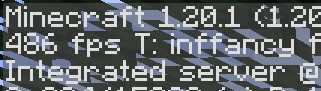
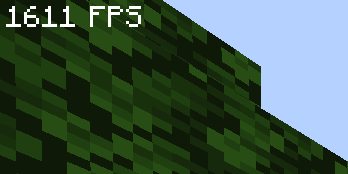
“this modpack gave me 300% more fps ~~and my wife came back~~” – _you, after downloading my pack_
**vanilla minecraft, no mods**
**my pack, optimized**
Mods
– [Yet Another Config Lib](https://modrinth.com/mod/yacl)
– [BactroMod](https://modrinth.com/mod/bactromod)
– [Ksyxis](https://modrinth.com/mod/ksyxis)
– [ServerCore](https://modrinth.com/mod/servercore)
– [VanillaIcecreamFix](https://modrinth.com/mod/vanillaicecreamfix)
– [ImmediatelyFast](https://modrinth.com/mod/immediatelyfast)
– [Clean F3](https://modrinth.com/mod/clean-f3)
– [Logical Zoom](https://modrinth.com/mod/logical-zoom)
– [I see you over there!](https://modrinth.com/mod/i-see-you-over-there)
– [fast-ip-ping](https://modrinth.com/mod/fast-ip-ping)
– [Blocky Bubbles](https://modrinth.com/mod/blocky-bubbles)
– [Sodium](https://modrinth.com/mod/sodium)
– [PurpurClient](https://modrinth.com/mod/purpurclient)
– [Reese’s Sodium Options](https://modrinth.com/mod/reeses-sodium-options)
– [Collision Fix](https://modrinth.com/mod/collision-fix)
– [Disable Accessibility Screen](https://modrinth.com/mod/disable-accessibility-screen)
– [StutterFix](https://modrinth.com/mod/stutterfix)
– [Async Pack Scan](https://modrinth.com/mod/async-pack-scan)
– [Cull Leaves](https://modrinth.com/mod/cull-leaves)
– [Fast Items](https://modrinth.com/mod/fast-items)
– [Fabric Language Kotlin](https://modrinth.com/mod/fabric-language-kotlin)
– [Yeetus Experimentus](https://modrinth.com/mod/yeetus-experimentus)
– [Dynamic FPS](https://modrinth.com/mod/dynamic-fps)
– [Video Tape](https://modrinth.com/mod/videotape)
– [Bobby](https://modrinth.com/mod/bobby)
– [ServerAddressSpaceFix](https://modrinth.com/mod/serveraddressspacefix)
– [Entity Culling](https://modrinth.com/mod/entityculling)
– [Xaero’s World Map](https://modrinth.com/mod/xaeros-world-map)
– [lazy-language-loader](https://modrinth.com/mod/lazy-language-loader)
– [Enhanced Block Entities](https://modrinth.com/mod/ebe)
– [Indium](https://modrinth.com/mod/indium)
– [Fabric API](https://modrinth.com/mod/fabric-api)
– [Sodium Extra](https://modrinth.com/mod/sodium-extra)
– [RailOptimization](https://modrinth.com/mod/railoptimization)
– [No Fog](https://modrinth.com/mod/no_fog)
– [Model Gap Fix](https://modrinth.com/mod/modelfix)
– [Debugify](https://modrinth.com/mod/debugify)
– [Particle Core](https://modrinth.com/mod/particle-core)
– [Faster Random](https://modrinth.com/mod/faster-random)
– [FixMCStats](https://modrinth.com/mod/fixmcstats)
– [Nvidium](https://modrinth.com/mod/nvidium)
– [Concurrent Chunk Management Engine (Fabric)](https://modrinth.com/mod/c2me-fabric)
– [LibJF](https://modrinth.com/mod/libjf)
– [FastChest](https://modrinth.com/mod/fastchest)
– [FeyTweaks](https://modrinth.com/mod/feytweaks)
– [NarrusYeetus](https://modrinth.com/mod/narrus-yeetus)
– [Iris Shaders](https://modrinth.com/mod/iris)
– [I Know What I’m Doing!](https://modrinth.com/mod/i-know-what-im-doing)
– [Remove Reloading Screen](https://modrinth.com/mod/rrls)
– [kennytvs-epic-force-close-loading-screen-mod-for-fabric](https://modrinth.com/mod/forcecloseworldloadingscreen)
– [Chunky](https://modrinth.com/mod/chunky)
– [Server Resourcepack Checker](https://modrinth.com/mod/server-resource-pack-checker)
– [Krypton](https://modrinth.com/mod/krypton)
– [Client Side Noteblocks](https://modrinth.com/mod/clientsidenoteblocks)
– [bad packets](https://modrinth.com/mod/badpackets)
– [BadOptimizations](https://modrinth.com/mod/badoptimizations)
– [Lithium](https://modrinth.com/mod/lithium)
– [Fzzy Config](https://modrinth.com/mod/fzzy-config)
– [No Telemetry](https://modrinth.com/mod/no-telemetry)
– [FPS Reducer](https://modrinth.com/mod/fps-reducer)
– [Entity View Distance](https://modrinth.com/mod/entity-view-distance)
– [Server Pinger Fixer](https://modrinth.com/mod/serverpingerfixer)
– [Better Beds](https://modrinth.com/mod/better-beds)
– [spark](https://modrinth.com/mod/spark)
– [FabricBetterGrass](https://modrinth.com/mod/fabricbettergrass)
– [Mod Menu](https://modrinth.com/mod/modmenu)
– [ModernFix](https://modrinth.com/mod/modernfix)
– [Language Reload](https://modrinth.com/mod/language-reload)
– [FerriteCore](https://modrinth.com/mod/ferrite-core)
– [IJM’s Tweaks](https://modrinth.com/mod/ijm-tweaks)
– [Very Many Players (Fabric)](https://modrinth.com/mod/vmp-fabric)
– [Fishing Rod Fix](https://modrinth.com/mod/fishing-rod-fix)
– [Centered Crosshair](https://modrinth.com/mod/centered-crosshair)
– [Auth Me](https://modrinth.com/mod/auth-me)