[MTR4] Zhongtong EuroZT18 – Metro Mondego


## Zhongtong N18/EuroZT18 – Metro Mondego
The Zhongtong N18 (also known as EuroZT18) is a 18m articulated electric bus. It features 3 doors and a reduced mobility area.
This pack in particular adds the EuroZT18 used in Portugal’s latest sensation – Metro Mondego (also known as SMM), a Bus Rapid System (BRT/MetroBus) that was built to replace a line that was closed over a decade ago between Coimbra and Lousã.
> This pack also features **a new feature**! The EuroZT18 has working indicators: the right indicator will **blink when the bus is at a stop** and, **prior to departure, the left indicator will blink**!
> The front door is animated and opens just like a normal bus door in order to give it some realism. The middle/rear doors aren’t animated like the front door because, in real life, these doors open outwards
> This vehicle also has an **experimental feature** – fleet numbers. Each vehicle has its own unique 3-digit number (shown on the rear and on the front) based on when they’ve departed from the depot.

## Retexturing this bus
Would you like to retexture this bus for your own operator?
Feel free to contact me (by joining my [Discord Server](https://discord.gg/astMcchNdP) or sending me a DM from the MTR server) to be able to assist you or, if needed, to do the retexture for you!
## Recommended consist
In order to enjoy this pack to its fullest, I recommend using the consist below when setting up this bus
Click to expand
– Zhongtong N18 Metro Mondego (Front)
– Zhongtong N18 Metro Mondego (Back)
## Support, Issues and Suggestions
If you find any issues in this pack, have any suggestions for improvement or need help setting this up, feel free to join my [Discord Server](https://discord.gg/astMcchNdP)! I also post sneak peeks of my upcoming packs there 🙂
> **Note:** This project is NOT affiliated with, and is not an official product of Metro Mondego
## KNOWN ISSUES
The bus’s doors will bug out if you attempt to open them WITHOUT any platform block. As such, **make sure** that you only open this bus’s doors **when standing at a stop with a platform**.
## Terms of Use
Click to expand
## Terms
“I”, “My”, “Creator”, “Modeler” or “Contributor” refer to Movies22
“ResourcePacks” refers to any resourcepack that I’ve created and distributed, whether it was on Modrinth or anywhere else
“MTR” or “Minecraft Transit Railway” refers to the minecraft mod required by all of My ResourcePacks in order to ensure their functionality of working trains
“Model” refers to any models, done in Blender or BlockBench that I distribute through my resourcepacks
“The User” or “You” refers to the user downloading the resourcepacks/reading these terms. These terms apply to The User.
“The Content”, “Resourcepack” or “the Pack” refers to any resourcepacks that the Creator has created/co-created and published on Modrinth or other platforms.
“Discord Server” refers to Movies22’s Dev Hub, a Discord Server owned by the Creator which is used to publish and share all of the Creator’s active works.
## Article 1 (Scope of these Terms)
These terms of use apply to **all resource packs** and **models** created by the Creator.
## Article 2 (Distribution)
1. You may include this resourcepack into a **modpack**.
2. You may **modify any of the packs for personal use**.
3. You **may not** distribute any modifications to any of my packs through Modrinth or any other platform without my express permission.
3.a) You may distribute modified versions of the pack if it’s intended to be used within a specific server only without requiring my permission. I’d appreciate it if you informed me of such uses, in order to give you any assistance required!
3.b) When redistributing, you must credit the creator and link the original resourcepack on Modrinth
3.c) When redistributing you must specify a license that does not conflict with these terms and conditions. If unsure, you may link this license to inherit its terms.
4. You **may not** integrate **any resourcepack OR any models within said resourcepacks** into another resourcepack/addon **without my express permission**.
## Article 3 (Prohibited Acts)
The user must **not** do any of the following when using any of my content:
1. Using the content for religious, political or cult purposes
2. Redistributing this content without any modifications (except for redistribution for the purpose of incorporating it into a multiplayer server or distributed world)
3. Acts that violate local/European laws, regulations, public order, morals or any other applicable regulations within the EU
4. Acts related to criminal acts
5. Acts that may cause disadvantages, damage or discomfort to other users and/or third parties
6. Using this content to represent and/or recreate an accident, disaster, or any other insensitive situation
7. Using this resourcepack for AI training/machine learning
8. Acts that violate the terms of use of the MTR discord server
9. Acts that violate minecraft’s EULA/Community Guidelines
10. Porting the content to any form of media other than MTR, whether inside or outside Minecraft (for example forge mod, RTM or BVE)
11. Other acts that are deemed inappropriate/inadequate
## Article 4 (Suspension of Distribution)
All active resourcepacks will be listed on my Discord Server.
Any inactive projects will be archived on Modrinth, **only receiving the necessary updates to ensure that they still work with newer versions of MTR unless stated otherwise in the resourcepack’s description/Discord Server.**
If a project is archived, you should **not** redistribute it, or breach any of the terms in this document. (specially the ones about redistribution)
**The Creator is not to be held liable for any disadvantage or damage caused to third parties due to the suspension of distribution of this resource pack.**
## Article 5 (Restrictions)
If found in breach of these terms, the Creator **may restrict or prohibit** the user from using all or part of this or all resourcepacks without prior notice.
Additionally, if the user utilises the resource pack in a manner that the Creator deems inappropriate, the Creator **may restrict** the user from utilising said pack and/or any other packs **after informing the user**.
## Article 6 (Disclaimers)
1. The Creator is not to be held responsible for any damage or other incidents caused by the usage of the creator’s models and resource packs
2. By downloading this resourcepack you agree to these terms of use.
3. The contents of any resourcepack may be changed at any time. You should keep your packs updated in order to enjoy the latest features/upgrades
4. These terms may be revised at any time at the discretion of the Creator. If any changes are made, the Creator will notify the public via the Discord Server.
## Disclaimer
This pack is not associated with **Metro Mondego**, **Sistema de Mobilidade do Mondego** or **Zhongtong**/**Energia Fundamental**.
zSupportExtender
## 🚀 zSupportExtender
**zSupportExtender** is a lightweight compatibility layer designed for Paper servers, enabling plugins to run smoothly across multiple Minecraft versions without requiring updates or modifications.
—
### 🛒 Buy Here
**zSupportExtender+++** https://discord.gg/4xZB53Bwd4
—
### ✨ What it does
zSupportExtender helps bridge differences between Minecraft versions by providing a stable runtime environment for plugins. It reduces version-related issues and improves compatibility from **Paper 1.19 up to 26.1.2**.
—
### ⚙️ Features
* Cross-version compatibility support (1.19 → 1.21.1)
* No external dependencies required
* Lightweight and optimized for performance
* Safe fallback handling for API differences
* Clean startup with no warnings or unnecessary logs
—
### 📦 Supported Platforms
* ✔ Paper 1.19
* ✔ Paper 1.20 / 1.20.x
* ✔ Paper 1.21 / 1.21.1
* ✔ Paper 26.1.2
—
### 🛠 Use Case
This plugin is ideal for server owners who want to:
* Run older plugins on newer versions
* Maintain compatibility without constant updates
* Reduce breakage caused by API changes
—
### ⚠️ Important Notes
* This plugin does not modify other plugins directly
* Compatibility depends on how plugins are built ( some may still break (well it?) )
* Designed to improve compatibility, not guarantee it in all cases
—
### 📄 Installation
1. Download the latest version
2. Place the `.jar` file into your `/plugins` folder
3. Restart your server
—
### 👨💻 Developer Info
* Built using stable Paper APIs
* Designed with forward compatibility in mind
* No configuration required (plug & play)
—
**zSupportExtender** focuses on simplicity, performance, and practical compatibility for modern Paper servers.
Zorua Spiral Universe Season 3
The Zorua Spiral Universe Modpack provides multiple mods that enhance the worldbuilding through structures, adds plenty of ores to give the players tons of customization through Tinker’s Construct, and plenty of Create addons to help you automate whatever items you want. This project will get updated as time goes on to add more content to keep players on their toes and continually give them more customization options.
Current Version: ZSU v3.0.1
ZStaffChatPro Bridge (Addon)
# ZStaffChatPro Bridge
Server-side addon for [ZStaffChatPro](https://modrinth.com/plugin/zstaffchatpro) that connects your Spigot/Paper/Folia backends to the proxy.
## What it does
– **Vanish Sync** — Syncs PremiumVanish/SuperVanish status to BungeeCord/Velocity so vanished players are hidden from /stafflist across the network
– **AFK Detection** — Sends player movement data (throttled to 30s per player) to the proxy for accurate AFK tracking
– **Activity Bridging** — Enables proxy-side features like in-game activity log and /staffafk to work with real player data
## Setup
1. Install ZStaffChatPro on your BungeeCord/Velocity proxy
2. Install this Bridge addon on each Spigot/Paper/Folia backend
3. No configuration needed — it connects automatically via plugin messaging
## Requirements
– ZStaffChatPro on the proxy (BungeeCord or Velocity)
– Spigot, Paper, or Folia 1.16+
– Optional: PremiumVanish or SuperVanish for vanish sync
ZStaffChatPro

—
*The most advanced staff communication plugin for Minecraft networks.*
**[Wiki & Documentation](https://docs.zenyxdev.org)** | **[Bridge Addon](https://modrinth.com/plugin/zstaffchatpro-bridge-(addon))** | **[Discord](https://discord.com/invite/ZGd6Mvacuf)**
—
## What is ZStaffChatPro?
ZStaffChatPro is a powerful and lightweight staff chat plugin designed for Minecraft server networks. It allows your staff team to communicate privately across multiple servers using fully customizable chat channels.
Whether you run a small survival server or a large network with dozens of backends, ZStaffChatPro provides everything your staff needs — private channels, playtime tracking, AFK detection, Discord integration, and much more.
The plugin works on **Spigot**, **Paper**, **Folia**, **BungeeCord**, and **Velocity**, supporting Minecraft **1.8.x — 1.21.x** and **26.1.1**.
—
## Features
### Unlimited Custom Channels
Create as many staff chat channels as you need — Staff, Admin, Builder, Helper, or anything you can think of. Each channel is fully independent with its own:
– Display name and color prefix
– Permission node
– Command and aliases (e.g. `/sc`, `/ac`, `/bchat`)
– Chat prefix shortcut (e.g. type `!hello` in chat to send “hello” to the Staff channel)
– Message format with full placeholder support
– Priority system for staff list ordering
Want just one channel? Keep only “staff” in the config and you’re done.
### Cross-Network Support
Full BungeeCord and Velocity proxy support. Staff can chat across all backend servers seamlessly.
– See which server each staff member is on
– Track server switches in the activity log
– Disable staff chat on specific servers (e.g. lobby, minigames)
– Custom server display names via aliases (e.g. `hub-01` shows as `Hub`)
– Bridge addon for accurate AFK detection and signed chat support on backends
### Discord Integration
Connect your staff chat to Discord with two available modes:
**Webhook Mode** — Simple one-way setup (Minecraft -> Discord). Just paste a webhook URL and you’re done. Each channel can have its own Discord channel. Supports rich embeds with customizable colors, authors, and footers.
**Bot Mode** — Full two-way integration (Minecraft <-> Discord). Staff can send messages from Discord directly into the in-game staff chat. Supports role-based permissions, custom bot status, and rich embeds.
Both modes include an **Activity Log** that sends staff joins, leaves, server switches, vanish, and AFK events to Discord — with per-event embed colors.
### Staff List
View all online staff members with `/stafflist`. Three display modes available:
**Default** — Compact, one line per channel:
“`
Staff (2): player1, player2
“`
**Grouped** — One player per line:
“`
Staff (2)
player1
player2
“`
**Server** — Grouped by backend server (proxy only):
“`
Staff (3)
Hub (1)
player1
Survival (2)
player2
player3
“`
Player format is fully customizable — show LuckPerms prefix, server name, or any combination.
### Staff Management
**Playtime Tracking** — Track how long each staff member spends online. View daily, weekly, and total playtime with AFK breakdown using `/stafftime`.
**AFK Detection** — Automatically marks inactive staff as AFK after a configurable timeout. AFK status is shown in the staff list and reported in the activity log. Staff can also manually toggle AFK with `/staffafk`.
**Spy Mode** — Allows authorized staff to see messages from all channels, even ones they don’t have permission for. Toggle with `/staffspy`.
**Toggle Mode** — Use `/sc` without a message to toggle auto-redirect. When enabled, all your regular chat messages are automatically sent to that staff channel.
**Activity Log** — Track staff activity directly in the staff chat channel:
– Player joins and leaves
– Server switches (with previous and current server)
– Vanish on/off
– AFK on/off
No extra permission needed — works for any player with access to a channel.
### Integrations
**LuckPerms** — Automatic support for prefix, suffix, group, and rank placeholders. Use `{luckperms_prefix}`, `{luckperms_rank}`, etc. in any message format. Full hex color support including `&#RRGGBB` format.
**PremiumVanish / SuperVanish** — Vanished players are shown with a [Vanished] tag in the staff list and vanish events are tracked in the activity log. Cross-server sync via Bridge addon.
**Chat Filter** — Built-in word filter with two modes: censor (replace with obfuscated text or custom string) or block (prevent the message entirely). Supports word lists and regex patterns.
### Customization
Everything is configurable. Clean config files with detailed comments for every option.
– Full hex color support (`{#FF5555}text`)
– Gradient support (`{#FF0000>>#0000FF}text{/}`)
– 20+ placeholders across all formats
– Multi-line message support
– Customizable help, about, and staff list output
– Auto-backup and regeneration when config version changes
—
## Quick Start
1. Drop the plugin JAR into your server’s `plugins/` folder
2. For proxy setups: install on the proxy + [Bridge addon](https://modrinth.com/plugin/zstaffchatpro-bridge-(addon)) on each backend server
3. Start the server — default channels work out of the box
4. Customize channels, formats, and features in `config.yml`
For detailed setup guides, all configuration options, and troubleshooting visit the **[Wiki](https://docs.zenyxdev.org)**.
—
## Commands
| Command | Description |
|———|————-|
| `/sc ` | Send a message to the Staff channel |
| `/ac ` | Send a message to the Admin channel |
| `/stafflist` | View all online staff members |
| `/staffspy` | Toggle spy mode (see all channels) |
| `/stafftime [player]` | View playtime statistics |
| `/staffafk` | Toggle AFK status |
| `/zscp reload` | Reload all configuration files |
| `/zscp about` | Show plugin info and status |
Full command list, permissions, and placeholders available on the [Wiki](https://docs.zenyxdev.org).
—
## Supported Platforms
| Platform | Versions |
|———-|———-|
| Spigot / Paper | 1.8.x — 1.21.x and 26.1.1 |
| Folia | 1.19.4+ |
| BungeeCord / Waterfall | All versions |
| Velocity | 3.0+ |
—
Need help? Visit the **[Wiki](https://docs.zenyxdev.org)** or join our **[Discord](https://discord.com/invite/ZGd6Mvacuf)**.
ZSpeed
What you need to know!
YOU NEED THESE MODS:
tickrate api
player animator
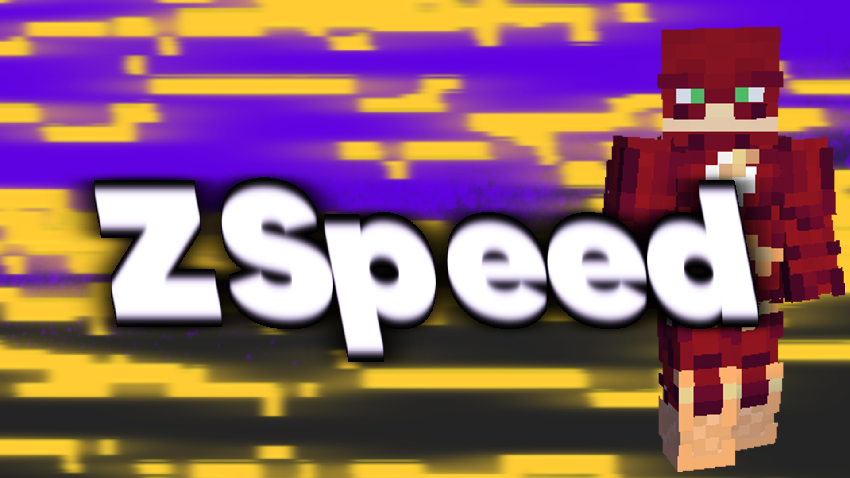
There are currently 3 suits:
^ Flash
^ Reverse Flash
^ Zoom
Key Bindings:
Y = Increase Speed
H = Decrease Speed
R = Enable/Disable Speed
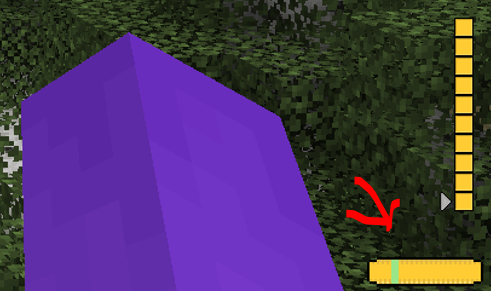
There Is a small meter at the bottom of your screen.
Use Jei or go to [https://legacy.curseforge.com/minecraft/mc-mods/zspeed](https://legacy.curseforge.com/minecraft/mc-mods/zspeed) to see the recipies!
Suit Textures:
I had some preset suits I didn’t make, I took them out but now only the flash suit has a texture, they still work. They just don’t have textures. I will work on them!
Bugs:
There are a few Bugs that I am aware of and trying to fix!
^ Crash – Index (number prob 20-30) Invalid in length 0, This is a bug with the trail, its not you, and its rare. But It can happen, I will try to eliminate it in future versions.
^ Trail is off!!! – At a 45 degree and -135 degree angle the trail is not directly behind the player. I’m not entirely sure why this is. But I will continue to crack at it in the future.
^ Other Players can’t see my trail! – This is because of how I render the trail. I render it directly to the client and not the game itself. I will work on multiplayer compatibility, But Its not here yet!
MULTIPLAYER IS RESTRICTED:
The way I coded some of the features makes it single player only. This mod WILL work in multiplayer, It just wont look as cool 🙁 , I am working on making it compatible, but for now, Only you can see your trail.
I will update this mod over time (especially if yall like it)
ZSpawn
**Command Description Permission**
**/spawn**
**/setspawn**
**/zsetspawn**
**/zshelp**
**ZSpawn** is a Minecraft plugin designed to manage player spawn locations. It provides commands to teleport to spawn, set or update the spawn point, and view a help menu. Features include **countdown teleportation with movement cancellation**, ActionBar messages, sound effects, and automatic teleport on first join or respawn
Zslow







# ZSlow
ZSlow is a versatile plugin designed to manage chat activity on your Minecraft server. With ZSlow, server administrators can easily control chat by enabling features such as chat pausing, slow mode, and chat logging. Whether you’re looking to maintain a more organized chat environment or implement stricter chat regulations, ZSlow provides the tools you need to manage chat activity effectively.

– **Chat Pausing:** Temporarily pause chat activity to prevent messages from being sent.
– **Slow Mode:** Limit the frequency of messages in the chat to reduce spam and maintain order.
– **Chat Logging:** Log chat messages to keep track of conversations and monitor player activity.
– **Whitelist and Blacklist:** Control who can send messages by adding players to either the whitelist or blacklist.
– **Customizable Settings:** Adjust plugin settings to suit your server’s needs and preferences.

– **/zslow enable**: Activate the chat management system.
– **/zslow disable**: Deactivate the chat management system.
– **/zslow settings**: Configure plugin settings, including chat cooldown.
– **/zslow info**: Obtain information about the plugin.
– **/zslow whitelist**:
– `/zslow whitelist add `: Add a player to the whitelist.
– `/zslow whitelist remove `: Remove a player from the whitelist.
– `/zslow whitelist list`: Display all whitelisted players.
– **/zslow blacklist**:
– `/zslow blacklist add `: Add a player to the blacklist.
– `/zslow blacklist remove `: Remove a player from the blacklist.
– `/zslow blacklist list`: Display all blacklisted players.
– **/zslow pausechat**:
– `/zslow pausechat on`: Pause the chat.
– `/zslow pausechat off`: Unpause the chat.
– **/zslow help**: Access plugin help information.
– **/zslow status**: Check the status of the chat management system.
– **/zslow reload**: Reload plugin configurations.
– **/zslow chatlogs**:
– `/zslow chatlogs on`: Enable chat logging.
– `/zslow chatlogs off`: Disable chat logging.

– `zslow.admin`: Allows access to all ZSlow commands and features.
– `zslow.whitelist`: Allows access to manage players on the whitelist.
– `zslow.blacklist`: Allows access to manage players on the blacklist.
– `zslow.info`: Allows access to view plugin information.
– `zslow.pausechat`: Allows access to pause or resume chat activity.
– `zslow.help`: Allows access to view plugin help information.
– `zslow.status`: Allows access to view the current status of chat management features.
– `zslow.reload`: Allows access to reload plugin configurations.
– `zslow.chatlogs`: Allows access to enable or disable chat logging.
– `zslow.bypass.slowmode`: Allows bypassing the slowmode restrictions in ZSlow.
– `zslow.bypass.pausechat`: Allows bypassing the pausechat restrictions in ZSlow.
– `zslow.chatlogs.exempt`: Allows bypassing the pausechat restrictions in ZSlow.
## Support
For support or assistance with the ZSlow plugin, please visit our [GitHub repository](https://github.com/zuhaz/zslow) or contact us through the SpigotMC forums or join our [Discord Server](https://discord.gg/7mhdvfgybX).
## Installation
1. Download the latest version of ZSlow from the [releases page](https://github.com/zuhaz/zslow/releases) or [SpigotMC](https://www.spigotmc.org/resources/zslow.115755/) or [Modrinth](https://modrinth.com/plugin/zslow/).
2. Place the downloaded `.jar` file in your server’s `plugins` folder.
3. Restart or reload your server.
## License
ZSlow is licensed under the MIT License. See the [LICENSE](LICENSE) file for details.
Zshoopy Mod
**IF YOU ARE USING THE LASTEST BETA YOU WILL NEED THIS**
[Curios API](https://www.curseforge.com/minecraft/mc-mods/curios)
What You can Expected from the Zshoopy Mod
In this mod you will be able to explore, the great world of Zshoopy, and Zshoopy Biome, with great and new powerful weapons, such as, XFirecookins AXE, NonLethals Sword, Zshoopys Wand, The Atrocity, and Parples Ax, To Craft these weapons you will need new ores such as, Parpleit, Zshoopy Ore, Silver, NonLethal Ore, and Blood Stone, Will all these weapons your unstoppable!
New Entity’s will roam around your world such as, Zshoopy DAGOAT, Xfirecookin, and Enthozic, if you can defeat them they will drop their weapon BESIDES Zshoopy DAGOAT, he will drop the most POWERFUL CHESTPLATE EVER.
ZSEiT
### ENG:
Introducing the “ZSEiT Modpack” for Minecraft Fabric 1.20.1The “ZSEiT Modpack” is a specialized collection of mods for Minecraft, meticulously designed to cater to the unique needs of a school server environment. Compatible with the Fabric 1.20.1 mod loader, this modpack is tailored to enhance the Minecraft experience by introducing innovative mechanics, expanding upon existing features, adding new structures, and enriching the game’s terrain. Aimed exclusively at enhancing gameplay on the designated school server, the “ZSEiT Modpack” promises a unique, immersive experience that goes beyond the conventional Minecraft adventure.
### Exclusive School Server Compatibility:
Tailored Experience: The modpack is developed with the school server in mind, ensuring compatibility and a seamless gaming experience exclusive to its community.
Educational and Fun: By integrating educational elements with fun gameplay, the modpack offers a unique blend that enriches the learning experience through gaming.
Key Features:
– Innovative Mechanics: Engage with new and expanded game mechanics that add depth and complexity to your Minecraft adventures.
– Unique Structures and Terrains: Explore new structures and traverse diverse terrains, each meticulously designed to enhance the exploration aspect of the game.
– AutoModpack Integration: The AutoModpack mod simplifies the mod installation process, automatically setting up all necessary mods and configurations upon your first server entry. It also ensures that your game remains up-to-date by automatically applying updates as they become available.
– BETA Version with Continuous Updates: The modpack is currently in its BETA phase, which means it will receive ongoing updates and improvements. Players have the opportunity to influence the development process and contribute to the modpack’s evolution.
### Community Involvement:
Players are encouraged to join the mod’s Discord server (https://bit.ly/zseit-mc) to participate in the development process, provide feedback, and engage with a community of fellow Minecraft enthusiasts. This collaborative approach allows players to have a direct impact on the modpack’s future updates and features.
### Getting Started:
To dive into this unique Minecraft experience with the “ZSEiT Modpack,” visit CurseForge or Modrinth to download the modpack. Make sure you’re running Minecraft with the Fabric 1.20.1 mod loader. The AutoModpack feature will handle the rest, ensuring a smooth and hassle-free start on the school server.The “ZSEiT Modpack” is more than just a mod collection; it’s a gateway to a customized Minecraft experience that blends education with entertainment. Designed exclusively for a school server, it offers a unique opportunity to explore, learn, and grow within the Minecraft universe. Join us on this exciting journey and help shape the future of educational gaming.
### POL:
Przedstawiamy “ZSEiT Modpack” dla Minecraft Fabric 1.20.1. “ZSEiT Modpack” to specjalistyczny zbiór modów do Minecrafta, starannie zaprojektowany, aby sprostać unikalnym potrzebom środowiska serwera szkolnego. Kompatybilny z mod loaderem Fabric 1.20.1, ten modpack jest dostosowany do wzbogacenia doświadczenia w grze Minecraft poprzez wprowadzenie innowacyjnych mechanik, rozbudowę istniejących funkcji, dodanie nowych struktur oraz wzbogacenie terenu gry. Mając na celu wzbogacenie rozgrywki na wyznaczonym serwerze szkolnym, “ZSEiT Modpack” obiecuje unikalne, wciągające doświadczenie, które wykracza poza konwencjonalną przygodę w Minecraft.
### Wyłączna Kompatybilność z Serwerem Szkolnym:
Dostosowane Doświadczenie: Modpack został opracowany z myślą o serwerze szkolnym, zapewniając kompatybilność i płynne doświadczenie w grze wyłącznie dla jego społeczności.
Edukacyjna i Zabawna: Poprzez integrację elementów edukacyjnych z zabawną rozgrywką, modpack oferuje unikalną mieszankę, która wzbogaca doświadczenie uczenia się poprzez gry.
Kluczowe Funkcje:
– Innowacyjne Mechaniki: Angażuj się w nowe i rozbudowane mechaniki gry, które dodają głębi i złożoności do twoich przygód w Minecraft.
– Unikalne Struktury i Tereny: Odkrywaj nowe struktury i przemierzaj różnorodne tereny, każdy starannie zaprojektowany, aby wzbogacić aspekt eksploracji gry.
– Integracja AutoModpack: Mod AutoModpack upraszcza proces instalacji modów, automatycznie konfigurując wszystkie niezbędne mody i konfiguracje przy pierwszym wejściu na serwer. Zapewnia również, że twoja gra pozostaje aktualna, automatycznie stosując aktualizacje, gdy stają się dostępne.
– Wersja BETA z Ciągłymi Aktualizacjami: Modpack jest obecnie w fazie BETA, co oznacza, że będzie otrzymywał bieżące aktualizacje i ulepszenia. Gracze mają możliwość wpływania na proces rozwoju i przyczyniania się do ewolucji modpacka.
### Zaangażowanie Społeczności:
Gracze są zachęcani do dołączenia do serwera Discord (https://bit.ly/zseit-mc), aby uczestniczyć w procesie rozwoju, dostarczać opinie i angażować się w społeczność innych entuzjastów Minecraft. To współpracujące podejście pozwala graczom mieć bezpośredni wpływ na przyszłe aktualizacje i funkcje modpacka.
### Jak Zacząć:
Aby zanurzyć się w tej unikalnej przygodzie Minecraft z “ZSEiT Modpack”, odwiedź CurseForge lub Modrinth, aby pobrać modpack. Upewnij się, że uruchamiasz Minecraft z mod loaderem Fabric 1.20.1. Funkcja AutoModpack zajmie się resztą, zapewniając płynny i bezproblemowy start na serwerze szkolnym.”ZSEiT Modpack” to coś więcej niż tylko zbiór modów; to brama do dostosowanego doświadczenia w Minecraft, które łączy edukację z rozrywką. Zaprojektowany wyłącznie dla serwera szkolnego, oferuje unikalną możliwość eksploracji, nauki i rozwoju w uniwersum Minecraft. Dołącz do nas w tej ekscytującej podróży i pomóż kształtować przyszłość edukacyjnych gier.