Zxygo’s Crystal Util
**Business email: [email protected]** |
**Business discord: zxygomc.mod**
### Open to partnerships/sponsors ^
———————————————————————————————-
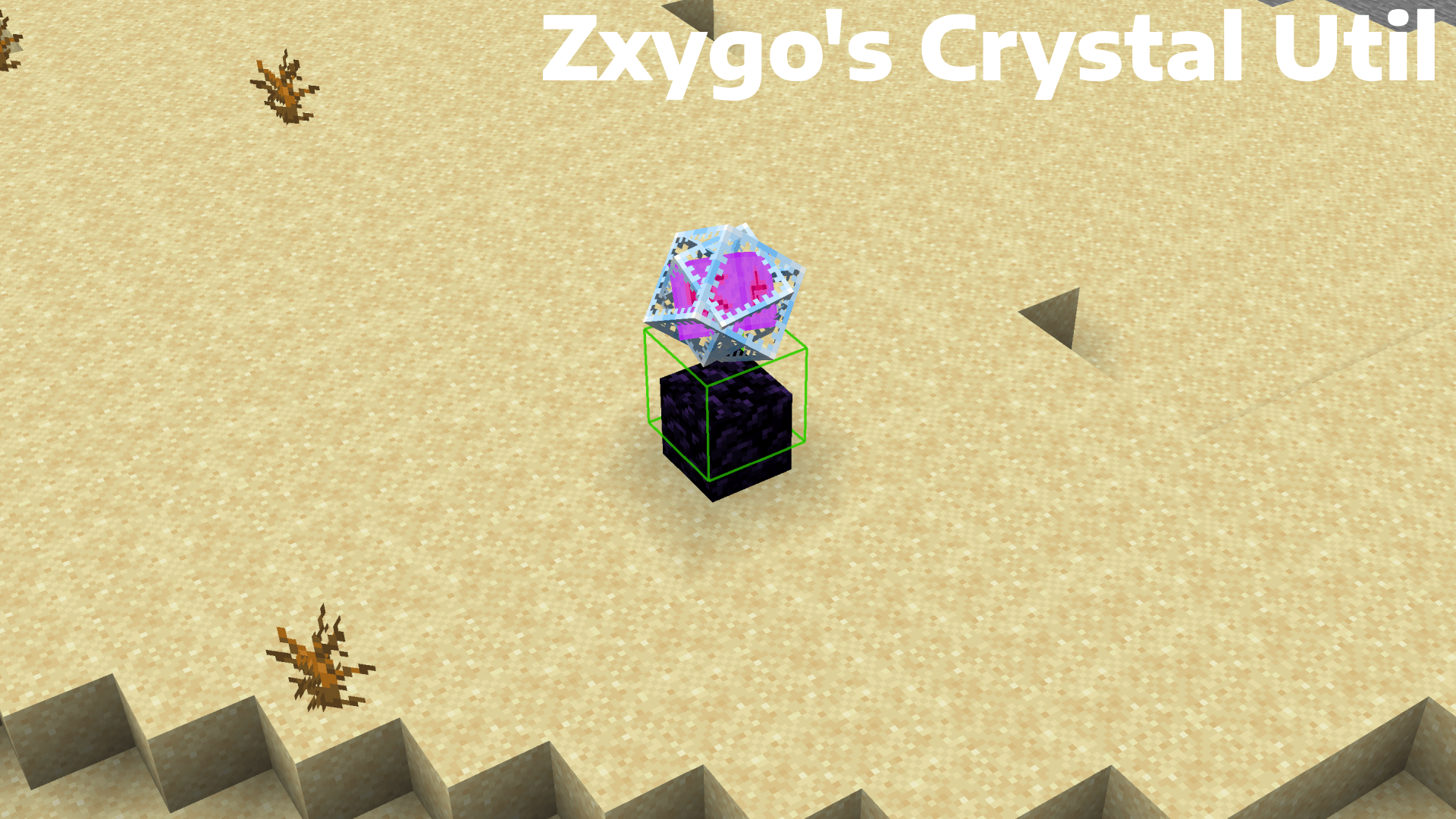
**Zxygo’s Crystal Util is a utility mod that shows people a relative damage indicator of a crystal comapred to the position and distance of a player compared to a crystal. It shows a simple box outline that changes color depending on your relative position and distance, and it allows for many uses.**
———————————————————————————————-
**NOTE: This mod may be seen as cheating on some servers and provides a unfair advantage. This mod is simply to be used as a learning tool for people getting into Crystal PVP. It exists as a tool that players can use, not a cheat. I don’t support hacking or cheating of any kind**
———————————————————————————————-
———————————————————————————————-
### Features
**Color-Coded Danger Levels**
– Red: can be dealt heavy damage and can be popped / killed
– Yellow: will deal some damage, a bit dangerous, take caution
– Green: safe
**Fully Customizable**
– Toggle the indicator on/off anytime
**Clean & Optimized**
– Minimal performance impact
– Works in multiplayer smoothly
**Mod Menu Integration**
– Simple Mod Menu Integration
———————————————————————————————-
### How It Works
Zxygo’s Crystal Util analyzes the vertical position of end crystals relative to your player, along with the distance from the player to the crystal. This allows for a calculation for the indicator and then a color depending on the calculation.
For example, if the crystal is above your head or you are far away from it, it renders green (least damage).
Intermediate positions blend between colors.
———————————————————————————————-
**This is my first ever mod, so apologies if there are some bugs. I hope this helps in someone’s journey in Crystal PVP, as at the very start of your journey, this mod can help you learn the mechanics and how you take damage from a crystal.**
Zxygo’s Anchor Util
**Business email: [email protected]** |
**Business discord: zxygomc.mod**
### Open to partnerships/sponsors ^
———————————————————————————————-
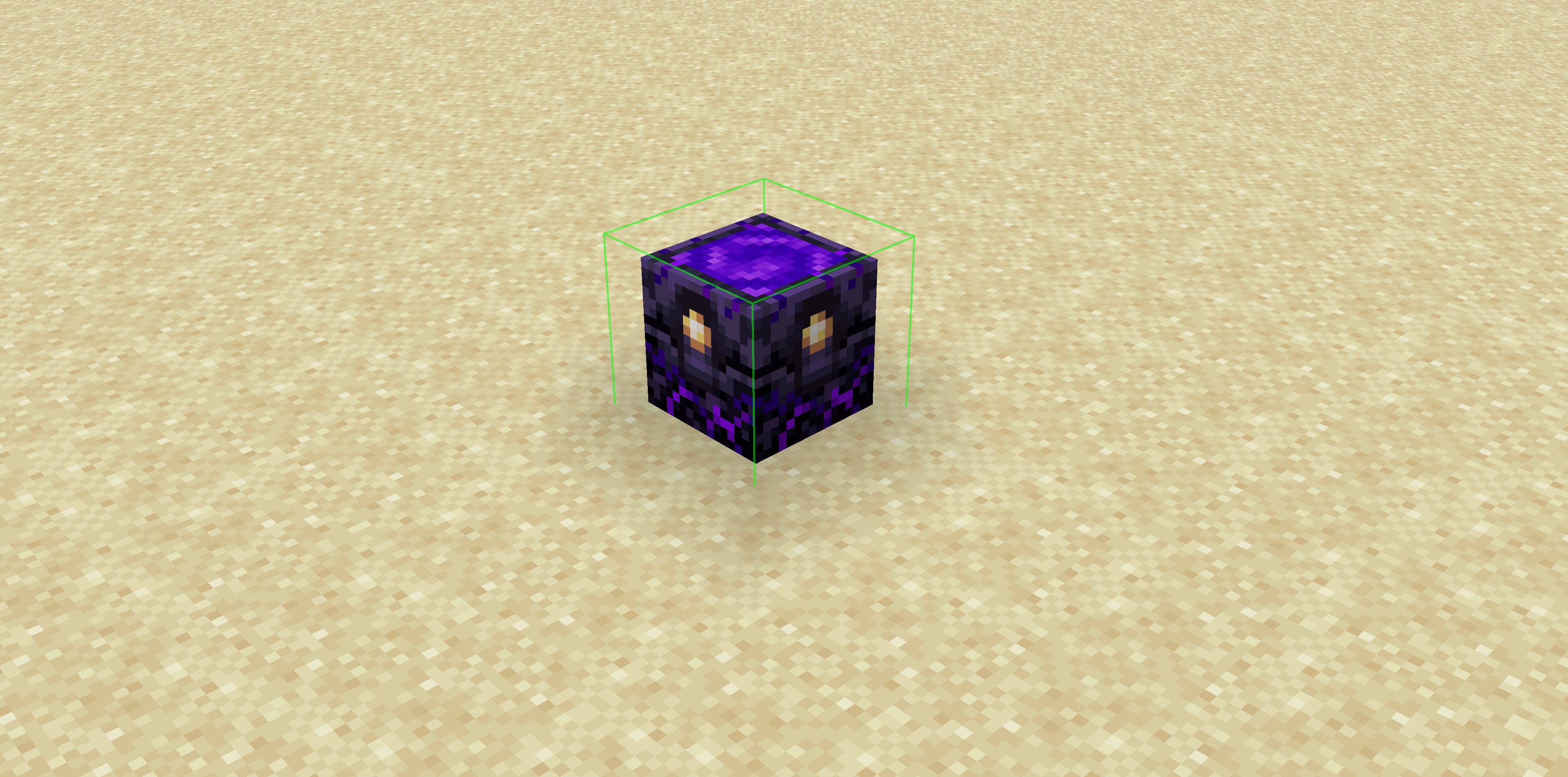
**Zxygo’s Anchor Util is a utility mod that shows people a relative damage indicator of a anchor comapred to the position and distance of a player compared to a anchor, along with taking in factors like the armor and enchantments a player is using. It shows a simple box outline that changes color depending on your relative position and distance, along with armor and enchantments, and it allows for many uses.**
**Check out my other mod: Zxygo’s Crystal Util**
————————————————————————————————
**NOTE: This mod may be seen as cheating on some servers and provides a unfair advantage. This mod is simply to be used as a learning tool for people getting into Crystal PVP. It exists as a tool that players can use, not a cheat. I don’t support hacking or cheating of any kind**
————————————————————————————————
————————————————————————————————
### Features
**Color-Coded Danger Levels**
– Red: (deadly)
– Yellow: (dangerous)
– Green: (safe)
**Fully Customizable**
– Toggle the indicator on/off anytime
**Clean & Optimized**
– Minimal performance impact
– Works seamlessly in multiplayer
**Mod Menu Integration**
– Simple Mod Menu Integration
————————————————————————————————
### How It Works
Zxygo’s Anchor Util analyzes the position and distance of anchors relative to your player, along with the other factors like blocks placed between you and the anchor, armor, and enchantments like protection on the armor. This allows for a calculation for the indicator and then a color depending on the calculation.
For example, if you have a obsidian block in front of the anchor between you, then it will be a green (least damage).
ZXRP
[](https://discord.gg/VQP9zM7EwU) [](https://t.me/trzteam) [](https://www.donationalerts.com/r/zcript_)
# 💬 Description
A resource pack that adds a lot of RP items to the game. Created specifically for the RP servers.
There is currently no English localization
# 📄 Other
List of items: https://3sqd.ru
Thanks to TweaksWr, dscss2 and Krisytov for their help!
Zxro’s Vanilla+
# Zxro’s Vanilla Plus
A Simple Minecraft Modpack Focussing on Performance, Graphic enhancements and some Quality of life Changes while Keeping to the Vanilla Minecraft we all know.
## Performance
Zxro’s Vanilla+ is faster than most competing game clients, thanks to our modern performance mods. The bundled mods have been carefully selected to be safe and provide speed and performance unlike most others.
## Vanilla but better
although Zxro’s Vanilla+ has some changes to the classic Vanilla experience like adding the [Dungeons and Taverns Datapack](https://modrinth.com/datapack/dungeons-and-taverns) to spice up exploration and really emerse into a new minecraft vanilla experience, it still allows you to play Minecraft as you remembered it, no matter what version you played before.
## Up to date
Zxro’s Vanilla+ recieves fast updates and will update to new versions as soon as possible. updating the modpack is easy and will preserve mod settings where possible.
## Vanilla Tweaks
Massive Thanks to [Vanilla Tweaks](https://vanillatweaks.net/) for letting me use their service for this pack, check them out!
ZxMenus
🧩 ZxMenus – Simple & Powerful GUI Menu Plugin
ZxMenus is a lightweight, all-in-one inventory GUI menu plugin inspired by DeluxeMenus, built to be powerful, fast, and easy to configure.
Create fully customizable GUI menus that open with commands and perform player-specific actions such as running commands, opening other menus, or executing console commands. ZxMenus focuses on simplicity without sacrificing flexibility.
—
✨ Features
Create unlimited GUI menus using simple YAML configuration
Open menus using custom commands
Execute player or console commands from menu items
Open menus for other players
Permission-based access for menus and items
Full PlaceholderAPI support
Lightweight and optimized for performance
Compatible with modern Spigot / Paper servers
Designed as an easier alternative to DeluxeMenus
—
📌 Commands
/zxmenu open
ZxArena
# ZXArena
**ZXArena** is a powerful and flexible **Spigot arena management plugin** that enables server owners to create, store, and instantly reset arenas across multiple Minecraft versions.
Perfect for **PvP**, **minigames**, and **event-based servers**.
—
## Key Highlights
### Arena Creation & Restoration
* Select any region and save it as a reusable arena
* Reset arenas back to their original state at any time
### Reset Performance Modes
* **Normal Mode** – Balanced reset speed (~3–5 seconds)
* **Extreme Mode** – High-speed reset in about 1 second
### Selection Tool
* Use a **golden axe** to define arena boundaries
* Left-click and right-click to set region corners
### Arena Statistics
* Track last reset time
* View how long each reset took
### Version Compatibility
* Works seamlessly on **Minecraft 1.20.1 – 1.21.4**
### Advanced Formatting
* Supports standard Minecraft colors and **hex color codes**
### Smart Command Completion
* Full tab-completion for all commands and arguments
### PlaceholderAPI Integration
* Access arena data anywhere using placeholders
—
## Commands & Permissions
| Command | Purpose | Permission |
| —————————— | ——————————– | —————— |
| `/zxarena pos1` | Set first selection point | `zxarenaset.admin` |
| `/zxarena pos2` | Set second selection point | `zxarenaset.admin` |
| `/zxarena save ` | Save selected region as an arena | `zxarenaset.admin` |
| `/zxarena reset [mode]` | Reset arena (normal / extreme) | `zxarenaset.use` |
| `/zxarena delete ` | Remove an arena | `zxarenaset.admin` |
| `/zxarena list` | Show all arenas and stats | `zxarenaset.use` |
| `/zxarena setspawn ` | Set arena spawn point | `zxarenaset.admin` |
| `/zxarena givewand` | Receive the selection wand | `zxarenaset.admin` |
| `/zxarena reload` | Reload configuration files | `zxarenaset.admin` |
| `/zxarena help` | View command help | All players |
| `/zxarena version` | Show plugin version | All players |
—
## Permission Nodes
* **`zxarenaset.admin`** – Complete administrative access
* **`zxarenaset.use`** – Basic usage (reset, list, view info)
—
## Installation Guide
1. Download **`xArenaReset.jar`**
2. Move the file to your server’s `/plugins` directory
3. Restart or reload the server
4. Configuration files will generate automatically
—
## Configuration Settings
All options can be customized via the configuration file, including:
* Reset delays
* Custom messages & color formats
* Automatic reset intervals
* Global broadcast messages
—
## PlaceholderAPI Placeholders
### General
| Placeholder | Output |
| —————– | ———————– |
| `%zxarena_count%` | Total number of arenas |
| `%zxarena_list%` | List of all arena names |
### Arena-Specific
| Placeholder | Description |
| ——————————————- | ——————— |
| `%zxarena_info__name%` | Arena name |
| `%zxarena_info__world%` | World name |
| `%zxarena_info__blocks%` | Block count |
| `%zxarena_info__mode%` | Last reset mode |
| `%zxarena_info__last_reset%` | Time since last reset |
| `%zxarena_info__reset_duration%` | Reset duration |
| `%zxarena_info__spawn%` | Spawn coordinates |
| `%zxarena_info__region%` | Region boundaries |
| `%zxarena_info__autoreset%` | Auto-reset status |
| `%zxarena_info__autoreset_interval%` | Interval (seconds) |
### Raw Data
| Placeholder | Description |
| ——————————————- | ——————– |
| `%zxarena_info__raw_reset_duration%` | Reset time (ms) |
| `%zxarena_info__raw_last_reset%` | Last reset timestamp |
—
## Color Formatting
* Supports standard Minecraft color codes (`&a`, `&c`, etc.)
* Full **HEX color** support for modern servers
—
ZX HomeSystem
ZX HomeSystem – Advanced Minecraft Home Management Plugin
Transform your Minecraft server with the most feature-rich home system available!
ZX HomeSystem is a premium home management plugin developed by ZX Studio that provides players with an exceptional teleportation and home management experience. With its intuitive command system and stunning visual interface, players can easily set, manage, and teleport to multiple homes across your server.
Key Features:
🏠 Advanced Home Management
Set multiple named homes with /zxhome set
Delete, rename, and list your homes effortlessly
Public/private home sharing system for player interaction
Permission-based home limits for different rank tiers
⚡ Premium Teleportation System
Configurable teleport delays with movement cancellation
Customizable cooldowns to prevent abuse
Safe teleport location checking for player security
Cross-world teleportation support with sound effects
Particle effects for immersive teleport experience
🎮 Stunning User Interface
Beautiful GUI interface for home management
Full tab completion for all commands
Colorful, formatted chat messages with custom prefixes
Action bar notifications during teleport countdown
Professional ASCII art branding
🛡️ Server Administration Tools
Flexible configuration system with rank-based limits
Economy integration for teleport and home setting costs
World restrictions for home placement control
Automatic data saving with configurable intervals
Detailed logging for server monitoring
Admin reload command for configuration changes
Commands:
/zxhome help – Comprehensive help menu
/zxhome set – Set a new home location
/zxhome go – Teleport to your home
/zxhome del – Remove a home
/zxhome list – View all your homes
/zxhome gui – Open the home management GUI
/zxhome rename – Rename existing homes
/zxhome share – Share homes with friends
/zxhome public – Make homes publicly accessible
/zxhome near – Find your nearest home
/zxhome reload – Reload configuration (Admin only)
Perfect For:
Survival servers wanting enhanced player convenience
Creative servers with multiple world setups
Minigame servers needing quick teleport solutions
Any Minecraft server looking to improve player retention
Built with performance and scalability in mind, ZX HomeSystem seamlessly integrates with your existing server setup while providing the premium features your players demand.
Developed with ❤️ by ZX Studio – Creating exceptional Minecraft experiences
Zwaluw’s Projectiles
## Welcome!
I’ve always liked texture packs which just are add-ons for default, this way you could technically make your own texture pack! This pack is no exception!
## What is it?
Zwaluws Better Projectiles changes the textures of:
The arrows,
The bow,
The crossbow,
The fishing rods.
The snowballs and
The eggs!

Zwad’s Simple Bingo
The pack includes several essential optimization mods, along with [Chunky](https://modrinth.com/plugin/chunky) for chunk pregeneration.
My primary use case for this modpack is when setting up a server for LAN events. [Chunky](https://modrinth.com/plugin/chunky) is particularly crucial; without pregenerating chunks, allowing all players to join at once could lead to server crashes due to Minecraft’s highly resource-intensive chunk generation process.
I host the modpack using the [itzg docker image](https://docker-minecraft-server.readthedocs.io/en/latest/) on a local server, but feel free to host it however suits you best.
Here’s an example using Docker Compose:
“`yaml
version: “3.8”
services:
mc:
image: itzg/minecraft-server
tty: true
stdin_open: true
ports:
– “25565:25565”
environment:
EULA: “TRUE”
MOD_PLATFORM: MODRINTH
MODRINTH_MODPACK: LINK_TO_YOUR_MODPACK
volumes:
# attach the relative directory ‘data’ to the container’s /data path
– ./data:/data
“`
Please feel free to use this pack, but note that I cannot guarantee any continued support beyond any updates I make in preparation for upcoming LAN events.
Zwad’s Create/Vanilla+
## Overview ##
This modpack was designed to seamlessly integrate the Create mod into the vanilla gameplay of Minecraft, providing an enhanced yet familiar experience. Whether you’re a fan of technical builds or just enjoy adventuring, this modpack has something for you.
While the modpack is mostly focused on the Create mod it also includes some progression mods. This is mainly so that my non-technically inclined friends would stop leaving every server after one week, having completed all the goals they wanted to achieve.
## Main Mods ##
[**Create**](https://modrinth.com/mod/create-fabric): brings innovative automation and engineering to Minecraft. With gears, belts, pulleys, and cogs, you can build complex machinery and contraptions to automate tasks and enhance your world.
[**End Remastered**](https://modrinth.com/mod/endrem): Forces players to embark on a thorough exploration of the world before accessing the End. It adds depth and progression to the game, encouraging players to enjoy the journey as much as the destination. Make sure to check out the End Remastered mod page for detailed information.
[**Better End**](https://modrinth.com/mod/betterend): Adds more content to the End dimension. This mod provides new biomes, mobs, and items, giving players plenty to explore and conquer after defeating the Ender Dragon. Be sure to read the Better End mod page to fully understand its offerings.
The addition of Better End is the largest step away from vanilla Minecraft outside of the Create mod. However, I hope it won’t be too controversial, as the End has always been severely lacking in content and reasons to visit outside of finding an Elytra or building an Enderman farm.
[**YUNG’s Mods**](https://modrinth.com/user/YUNGNICKYOUNG): Make existing structures more interesting and challenging without feeling the need to add loads of new structures that clutter the landscape.
[**Terralith**](https://modrinth.com/mod/terralith): Adds new biomes and world generation without introducing any new blocks to the game. It also adds new village buildings. There are a few rare new structures, but they shouldn’t feel out of place.
[**Farmer’s Delight**](https://modrinth.com/mod/farmers-delight): Expands the food and farming options in the game. In combination with the Create mod, you can now build the Jaffa factory of your dreams.
## General ##
The modpack includes all the expected performance mods and comes with Complementary Shaders out of the box. The Supplementaries mod is included but configured to disable some features that felt out of place. To compensate for the extra blocks added mostly by the Create mod, Backpacks and Storage Drawers are included in the modpack.
A world map and minimap are also included, as well as a claims system, all integrated to make playing, especially on servers, easier. Chunky is included for world pregeneration, which is strongly encouraged for those running the pack on servers, as it would solve all chunk generation-related lag issues.
Many other smaller, less impactful mods are also included, but writing a description for each would be impractical. If you’re interested in seeing a full list of mods, you can simply inspect the version dependencies.
_This modpack was created for personal use. Any future updates are completely dependent on my interest in playing the game at that moment in time._