Zyxify PVP 16x
PVP pack by Zyxify made for 1.8 Hypixel games like: bedwars,skywars and other gamemodes.
Its got high quality textures made for pvp such as: small swords,improved wool, and new textures for other bloxs and items used in pvp.
PVP pack by Zyxify made for 1.8 Hypixel games like: bedwars,skywars and other gamemodes.
Its got high quality textures made for pvp such as: small swords,improved wool, and new textures for other bloxs and items used in pvp.
A lightweight, no-fuss web server plugin for Paper Minecraft servers — host static websites directly from your server with zero external setup.
## What is this?
ZyveraWeb Lite lets you serve static web content (HTML, CSS, JavaScript, images, and more) straight from your Minecraft server. No need for Apache, Nginx, or other external web servers — just install the plugin and go.
## Features
– 🌐 Serve static files via HTTP or HTTPS
– 🔒 Optional HTTPS support with custom SSL certificates
– 📂 Automatic default web file generation on first launch
– 🛡️ Built-in path traversal protection to keep your server safe
– 📄 Automatically serves `index.html` when accessing directories
– 🏷️ Branded footer automatically added to HTML pages
## Getting Started
1. Drop the plugin jar into your server’s `plugins/` folder and restart.
2. Default web files are created automatically in `plugins/ZyveraWeb-lite/www/`.
3. Tweak settings in `plugins/ZyveraWeb-lite/config.yml` (see below).
4. Access your site at `http://your-server-ip:8080` (default) or the HTTPS port if enabled.
## Configuration
Edit `plugins/ZyveraWeb-lite/config.yml` to adjust settings:
^^^yaml
server:
host: “0.0.0.0”
domain: “” # Just to display. Leave empty for loopback (localhost)
http:
enabled: true
port: 8080
https:
enabled: false
port: 8443
SSLPubl: fullchain.pem
SSLPriv: privkey.pem
^^^
### HTTPS Setup
Enable HTTPS by setting `https.enabled` to `true`, then place your SSL certificate (`fullchain.pem`) and private key (`privkey.pem`) in `plugins/ZyveraWeb-lite/ssl/`.
# ZyveraWelcomeMessage
**Greet your players with stunning gradient messages, fireworks, and sounds—all fully controllable via a single config.**

*↑ Gradient welcome message in chat*
—
## ✨ Features
– 🎨 **Color gradients** — Supports all MiniMessage gradients (`
– 🌍 **Global message** for all players upon joining
– 👤 **Individual messages** per player (name or UUID)
– 🥇 **First-Join Message** — automatically detects new players
– 🎆 **Fireworks Effects** — type, colors, number, and delay configurable
– 🔊 **Sound Effects** — for the player themselves or everyone online
– ⚡ **Folia-compatible**
– 🔄 `/zwm reload` — no server restart required
—
## 🚀 Installation
1. Copy the JAR file to the `/plugins/` folder
2. Start the server
3. Customize `plugins/ZyveraWelcomeMessage/config.yml`
4. Run `/zwm reload` in-game
—
## ⚙️ Configuration (Example)
“`yaml
global:
join-message:
text: “
fireworks:
enabled: true
type: BALL_LARGE
colors: [“#a855f7”, “#6366f1”]
sound:
enabled: true
sound: “ENTITY_PLAYER_LEVELUP”
“`
Placeholders: `{player}` · `{displayname}` · `{world}` · `{uuid}`
All colors in hex format (`#rrggbb`). MiniMessage reference: [docs.advntr.dev](https://docs.advntr.dev/minimessage/format.html)
—
## 🔧 Commands & Permissions
| Command | Description |
|——–|————-|
| `/zwm reload` | Reload config |
| `/zwm preview [global|first-join|playername]` | Preview message |
| `/zwm version` | Plugin info |
| Permission | Default |
|———- -|———|
| `zyvera.welcomemessage.admin` | OP |
| `zyvera.welcomemessage.bypass` | false |
—
## 🖥️ Compatibility
| Platform | Status |
|———|——–|
| Paper 1.16+ | ✅ |
| Folia | ✅ |
| Purpur | ✅ |
| Spigot 1.16+ | ⚠️ Limited |
—
*Made by Thomas & Zyvera-Systems · [zyvera-systems.dev](https://zyvera-systems.dev)*
Translated with DeepL.com (free version)
# ⚔ Zyvera-TicTacToe
### Classic TicTacToe as a fully GUI-based Lobby Minigame.





**by Thomas U. & Zyvera-Systems**
—
## Overview
Zyvera-TicTacToe adds a complete TicTacToe minigame to your Minecraft server — fully inventory-based, with automatic matchmaking, direct challenges, persistent ranked stats, and crafting table binding. No dependencies, no setup hassle. Just drop and play.
—
## Features
### 🎮 Game Modes
– **Queue (Ranked)** — Join the matchmaking queue and get paired automatically. Wins, losses, draws, streaks — everything is tracked.
– **Challenge (Unranked)** — Challenge any online player directly. No stats, just fun.
– **Workbench Binding** — Bind TicTacToe to crafting tables in your world. Right-click toggles the queue (1s cooldown).
### 🖥️ GUI System
– **Compact 3×3 Board** — Clean layout in a 36-slot inventory
– **Real Player Heads** — Actual Minecraft skins displayed via SkullMeta
– **Win Highlight** — Winning line turns green at the end
– **Main Menu** — Queue, stats, and leaderboard in one place
– **Stats GUI** — Wins, losses, draws, winrate, total moves, streaks
– **Top 10 Leaderboard** — Gold, silver, bronze for the best players
### ⏱️ Timeout System
– **No moves placed + 120s idle** → Game gets cancelled (no stats affected)
– **Ranked + moves placed + 120s idle** → Inactive player loses automatically
– **Challenge (Unranked)** → Timeout has no effect
### 🔮 Holograms
Bound crafting tables display a floating hologram above them:
> **TicTacToe**
> [Click Me]
—
## Commands
| Command | Description | Permission |
|———|————-|————|
| `/ttt` | Open main menu | `zyvera.ttt.use` |
| `/ttt play` | Join the queue | `zyvera.ttt.use` |
| `/ttt leave` | Leave the queue | `zyvera.ttt.use` |
| `/ttt challenge
| `/ttt accept` | Accept a challenge | `zyvera.ttt.use` |
| `/ttt deny` | Deny a challenge | `zyvera.ttt.use` |
| `/ttt stats [name]` | View stats (GUI) | `zyvera.ttt.use` |
| `/ttt top` | Top players (GUI) | `zyvera.ttt.use` |
| `/ttt quit` | Leave active game | `zyvera.ttt.use` |
| `/ttt bind` | Bind a crafting table | `zyvera.ttt.bind` |
| `/ttt unbind` | Unbind a crafting table | `zyvera.ttt.bind` |
| `/ttt reload` | Reload config | `zyvera.ttt.admin` |
**Alias:** `/tictactoe`
—
## Permissions
| Permission | Description | Default |
|———–|————-|———|
| `zyvera.ttt.use` | Basic TicTacToe access | everyone |
| `zyvera.ttt.bind` | Bind/unbind workbenches | OP |
| `zyvera.ttt.stats.others` | View other players’ stats | everyone |
| `zyvera.ttt.admin` | Admin commands (reload) | OP |
—
## Compatibility
| Platform | Supported |
|———-|———–|
| Bukkit | ✅ 1.13+ |
| Spigot | ✅ 1.13+ |
| Paper | ✅ 1.13+ |
| Purpur | ✅ 1.13+ |
| Folia | ✅ Regionized Scheduler |
– **Java:** 8+
– **Dependencies:** None
– Material fallbacks ensure compatibility across all versions (e.g. `RED_CONCRETE` → `STAINED_CLAY` on legacy)
– Folia support is fully reflection-based — no compile-time dependency
—
## Configuration
Everything is customizable — messages, colors, materials, timeouts, and hologram text.
“`yaml
prefix: “&8[&6&lTTT&8] ”
game:
turn-timeout: 120
challenge-timeout: 60
workbench-cooldown: 1000
gui:
symbol-x-material: RED_CONCRETE
symbol-o-material: BLUE_CONCRETE
hologram:
line1: “&6&lTicTacToe”
line2: “&8[&aKlick Mich&8]”
offset-y: 1.5
“`
—
## Installation
1. Drop the JAR into your `plugins/` folder
2. Start or restart the server
3. Config generates automatically
4. Done — `/ttt` and play!
—
**Made with ❤️ by Thomas U. & Zyvera-Systems**
⭐ *Enjoying TicTacToe? Leave a review!*
包含一些小型的模组翻译,主要来源于AI,包含部分人工修改,目前只有简体中文的qwq
目前包含的模组ID:
“`
accessible-step
cameraoverhaul
chatplus
chunksfadein
clean_tooltips
crumbling_hearts
distanthorizons
distraction_free_recipes
do_a_barrel_roll
durability_visibility_options
dynmus
elytratime
explosiveenhancement
genshinthirdperson
ias
icantdomath
immersive-hotbar
make_bubbles_pop
moderate-loading-screen
now_playing
quickmenu
reactivemusic
scoreboard-overhaul
scribble
segmented
slimefun_essentials
totem-party
wakes
whatisit
wildfire_gender
worldplaytime
“`
# ZyrenAuth – Secure Minecraft Authentication Plugin
**ZyrenAuth** is a modern, robust, and privacy-focused authentication plugin for Minecraft 1.21.1+ servers, developed by [_Pheonix](https://pheonix.is-a.dev). It delivers strong account protection and a seamless, intuitive login experience for Paper (Spigot-compatible) environments.
🔗 **[Official Modrinth Page (updates & downloads)](https://modrinth.com/plugin/zyrenauth/versions)**
🔗 **[Official Website & Online Config Generator](https://zyrenauth.wuaze.com/)**
—
## ✨ Key Features
– **Mandatory Reverse Word Captcha on Join**
Every player must solve a reverse word captcha before login/registration. Fully configurable expiry/attempts and safe void teleport during the challenge.
– **Dedicated 2FA Setup GUI**
`/za 2fa setup` opens an in-game GUI to display your 2FA secret key and QR code URI, making authenticator setup seamless.
– **Focused Authentication Teleportation**
After solving captcha, players are teleported to a safe void (`0.5, 0.0, 0.5`) for `/login` or `/register`—no world interaction until auth is done.
– **Comprehensive Player State Management**
Original location, inventory, gamemode, health, food, experience, and potion effects are saved at auth start and reliably restored after success.
– **Asynchronous Modrinth Update Checker**
Plugin checks for the latest release version on startup and notifies server owners in the console if an update is available.
– **Dynamic On-Screen Prompts**
Clear, persistent titles and subtitles for `/register` and `/login` guide users through the process.
– **Optional 2FA (Google Authenticator)**
Players can enable/disable 2FA; required for their own logins once enabled.
– **Smart Player Authentication**
– **Online-Mode Servers:** Automatically registers/logs in legitimate Minecraft accounts, with auto-username update.
– **Offline-Mode/Alternative Auth:** Registered players are auto-logged in; new players must register for account protection.
– **Secure Logins**
BCrypt password hashing and robust username validation.
– **Flexible Storage**
MySQL/MariaDB for scalable persistence. Robust encrypted file-based fallback.
– **Optional Email Features**
Supports email confirmation and password reset (requires MySQL+SMTP).
– **Improved Command Interface**
`/za` (alias: `/zyrenauthadmin`) for all admin, status, reload, migrate, delete, and 2FA subcommands.
– **Streamlined File Management**
All plugin files are organized under `plugins/config/zyrenauth/` for a clean server directory.
—
## 🚀 Supported Platforms
– **Paper** (and all compatible forks) 1.21.1+
_Place ZyrenAuth `.jar` in your `plugins/` folder._
—
## ⚡ Quick Start
1. **Download** the latest version from [Modrinth](https://modrinth.com/plugin/zyrenauth/versions).
2. Put the `.jar` in your server’s `plugins/` folder.
3. Start and stop the server to generate `config.json`.
4. **Easily configure** `config.json` using our [Online Config Generator](https://zyrenauth.wuaze.com/).
5. Restart the server and you’re done!
—
## ⚙️ Key Configuration Options
– Captcha: `captchaEnabled`, `captchaExpiryMinutes`, `maxCaptchaAttempts`
– Password: `minPasswordLength`, `requireDigit`, `requireLowercase`, `requireUppercase`, `requireSpecialChar`
– MySQL: `mysqlEnabled`, `mysqlHost`, `mysqlDatabase`, etc.
– Email/SMTP: `emailFeaturesEnabled`, `smtpHost`, etc.
– See all options at [zyrenauth.wuaze.com](https://zyrenauth.wuaze.com/).
—
## 📜 Commands
– `/register
– `/login
– `/captcha
– `/addemail
– `/emailconfirm
– `/resetpassword` – Request a password reset.
– `/resetconfirm
– `/za help` – Plugin help.
– `/za status` – Plugin status (OP only).
– `/za reload` – Reload config (OP only).
– `/za migrate
– `/za delete
– `/za 2fa setup|confirm |disable |status` – Manage 2FA.
---
## 🤝 Support & License
- **Issues/Source:** [https://github.com/Hardik-Verma/ZyrenAuth](https://github.com/Hardik-Verma/ZyrenAuth)
- **License:** MIT
- **By [_Pheonix](https://pheonix.is-a.dev) – Website & app developer**
---
Thank you for choosing ZyrenAuth!
# 📜 ZyraQuests
> **A fully custom quest plugin with beautiful GUI menus, 6 objective types, flexible rewards, and native ZyraJobs integration — built for Spigot 1.21.**
—
## ✨ Overview
**ZyraQuests** lets you create any quest you can imagine directly from a single YAML file — no commands, no in-game editor required. Players browse quests through polished inventory menus, track their progress in real time via action bar indicators, and earn XP, items, or custom commands as rewards.
Works perfectly standalone, and unlocks extra features when paired with **ZyraJobs**.
—
## 🖥️ GUI Menus
ZyraQuests is built around three fully interactive inventory menus:
**📋 Quest Browser** — Browse all quests sorted by category (Mining, Farming, Hunting, Brewing, General). Each quest shows its difficulty color, objectives count, your current status (not started / in progress / completed), and a live XP progress bar if active. Paginated for large quest collections.
**🔍 Quest Detail** — Opens on click. Shows the full quest description, each objective with its own progress bar, all rewards previewed as items, and the Accept / Abandon button. Border color changes based on difficulty (green = Easy, yellow = Medium, red = Hard, orange = Legendary).
**⚡ Active Quests** — See all your quests in progress at a glance, with per-objective progress bars. Quick-navigate back to any quest’s detail view.
—
## 📋 Creating Quests
Everything lives in `quests.yml`. One quest looks like this:
“`yaml
quests:
diamond_hunter:
display-name: “Diamond Hunter”
description:
– “The real treasure lies deep below.”
– “Find and mine diamonds.”
icon: DIAMOND
category: MINING
difficulty: HARD
repeatable: false
objectives:
– type: MINE_BLOCK
block: DIAMOND_ORE
amount: 10
display: “Mine Diamond Ore”
– type: REACH_JOB_LEVEL
job: miner
level: 20
display: “Be Miner Level 20”
rewards:
– type: XP
amount: 20
– type: JOB_XP
job: miner
amount: 1000
– type: ITEM
material: DIAMOND_PICKAXE
amount: 1
name: “&b&lDeep Earth Pickaxe”
lore:
– “&7Forged from the deepest veins.”
“`
That’s it — reload with `/qadmin reload` and the quest is live.
—
## 🎯 Objective Types
| Type | What it tracks |
|——|—————|
| `MINE_BLOCK` | Breaking specific blocks underground |
| `HARVEST_CROP` | Harvesting fully grown crops |
| `KILL_MOB` | Killing any entity by type |
| `BREW_POTION` | Brewing potions at a brewing stand |
| `COLLECT_ITEM` | Picking up or crafting specific items |
| `REACH_JOB_LEVEL` | Reaching a level in ZyraJobs *(ZyraJobs required)* |
—
## 🎁 Reward Types
| Type | Effect |
|——|——–|
| `XP` | Give vanilla experience levels |
| `JOB_XP` | Add ZyraJobs XP to a specific job *(ZyraJobs required)* |
| `ITEM` | Give an ItemStack with optional custom name & lore |
| `COMMAND` | Run any console command with `%player%` placeholder |
—
## 🔗 ZyraJobs Integration
ZyraQuests integrates with **ZyraJobs** as a soft-dependency — install both plugins and the integration activates automatically. No configuration needed.
When ZyraJobs is present:
– `JOB_XP` rewards give XP directly into the player’s job level
– `REACH_JOB_LEVEL` objectives track job progression in real time
– If ZyraJobs is absent, `JOB_XP` rewards fall back to vanilla XP automatically
—
## 📈 Player Experience
– 🔔 **Level-up style chat message** when a quest is completed, listing all rewards
– 📺 **Screen title** on completion
– 📊 **Action bar progress** updates every time an objective advances
– 🔊 **Sounds** on quest accept and completion
– 🔁 **Repeatable quests** — configure any quest to be completable multiple times
– 🌐 **Server broadcast** on completion (optional, disabled by default)
– 💬 **Join message** reminding players of their active quests
—
## 🏷️ Quest Difficulties
| Difficulty | Color | Border |
|———–|——-|——–|
| Easy | 🟢 Green | Lime glass |
| Medium | 🟡 Yellow | Yellow glass |
| Hard | 🔴 Red | Red glass |
| Legendary | 🟠 Orange | Orange glass |
—
## ⚙️ Configuration
**`config.yml`** — Global settings:
– `max-active-quests` — how many quests a player can track at once (default: 3)
– `actionbar-progress` — show action bar updates on objective progress
– `sounds` — toggle all sounds
– `broadcast-completion` — announce completions server-wide
– All chat messages fully customizable with color codes
**`quests.yml`** — All quests. Add, remove, or edit quests freely. No restart needed — just `/qadmin reload`.
—
## 🛠️ Commands
| Command | Description |
|———|————-|
| `/quests [category]` | Open the quest browser |
| `/qadmin reload` | Reload config and all quests |
| `/qadmin list` | List all quest IDs |
| `/qadmin give
| `/qadmin complete
| `/qadmin reset
| `/qadmin info
Tab-completion is supported on all commands.
—
## 🔑 Permissions
| Permission | Default | Description |
|———–|———|————-|
| `zyraquests.use` | Everyone | Access to `/quests` |
| `zyraquests.admin` | OP | Access to `/qadmin` |
—
## 📦 Requirements
– **Minecraft**: 1.21.x
– **Server software**: Spigot or Paper 1.21+
– **Java**: 21+
– **No required dependencies**
– **Optional**: ZyraJobs (for `JOB_XP` rewards and `REACH_JOB_LEVEL` objectives)
—
## 🤝 Part of the Zyra Suite
ZyraQuests is designed to work alongside **ZyraJobs** as a unified gameplay ecosystem. Install both for the full experience — quests that reward job XP, objectives that track job levels, and a consistent GUI style across both plugins.
—
## 👤 Credits
Made with by **sti_moi** — *zyrajobs’s group*
—
## 🗂️ ZyraMenu — Custom GUI Menus for 1.8 → 1.21
**ZyraMenu** is a lightweight, fully YAML-driven GUI menu plugin with **native multi-version support** from Minecraft 1.8.8 all the way to 1.21.x — no NMS, no reflection hacks, just clean compatibility layers.
—
### ✨ Features
– **YAML-based menus** — each menu is its own `.yml` file in `plugins/ZyraMenu/menus/`, easy to edit and reload without restarting the server
– **In-game menu creator** — open a chest, place your items, close it: the menu is saved automatically (`/zm create
– **Image backgrounds** — drop a `.png` named after your menu into `IMAGES-MENU/`, and ZyraMenu will slice it into a 9-slot grid and apply it as the inventory background
– **Rich slot actions** — assign one action per slot:
– `CLOSE` — close the inventory
– `COMMAND:
– `CONSOLE:
– `MESSAGE:
– `OPENMENU:
– `SERVER:
– **Item utilities** — rename any held item or set individual lore lines directly in-game
– **Player head support** — set a skull owner per slot for custom player heads
– **Hot reload** — `/zm reload` picks up all config and menu changes instantly
– **Tab completion** — full tab-complete support on all subcommands
—
### 🔧 Commands
| Command | Description |
|—|—|
| `/zm view
# ⚒ ZyraJobs
> **A fully custom Jobs plugin with beautiful GUI menus, progressive unlocks, and a deep leveling system — built for Spigot 1.21.**
—
## ✨ Overview
**ZyraJobs** lets your players choose a profession and level it up by doing what they love — mining, farming, hunting, or brewing. Every action earns XP, every level unlocks something new, and every milestone rewards the grind.
No bloat. No dependencies. Just a clean, immersive jobs experience with handcrafted GUI menus that look great out of the box.
—
## 🧭 The 4 Jobs
| Job | How to level up | Unlocks |
|—–|—————-|———|
| ⛏ **Miner** | Break ores underground | Coal → Iron → Gold → Diamond → Ancient Debris |
| 🌾 **Farmer** | Harvest fully grown crops | Wheat (Lv.1) → Carrots (Lv.5) → Chorus Plant (Lv.30) |
| 🏹 **Hunter** | Kill mobs & animals | Chickens → Creepers → Endermen → Warden (Lv.40) |
| ⚗ **Alchemist** | Brew potions at a stand | Basic potions (Lv.1) → Strength (Lv.8) → Turtle Master (Lv.25) |
Each job goes from **level 1 to 50**, with an XP formula that scales naturally: `100 × level^1.5`.
—
## 🖥️ Custom GUI Menus
ZyraJobs is built around **beautiful, interactive inventory menus**:
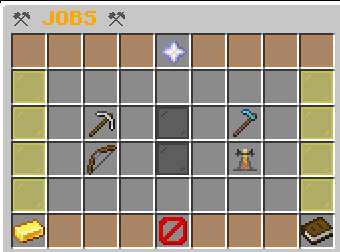
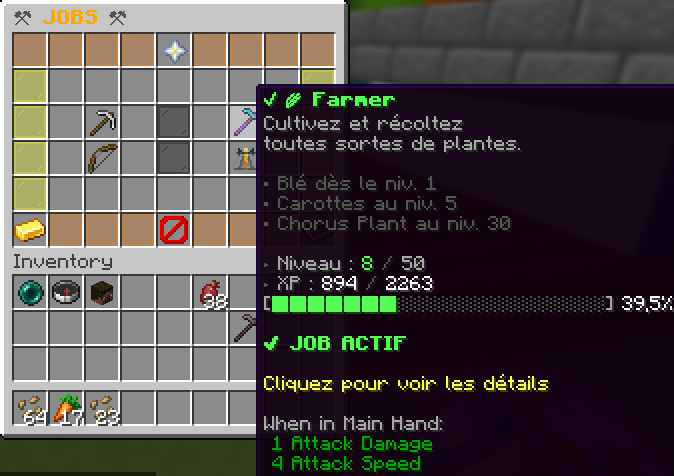
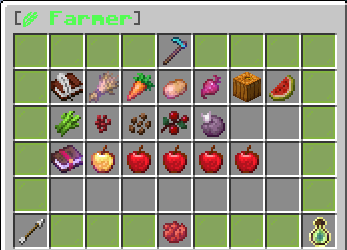
– **Main Menu** — displays all 4 jobs with your current level, XP bar, and active job highlighted with an enchantment glow
– **Job Detail Menu** — color-coded per job (gray / green / red / purple), shows every unlockable action, required level, XP reward, and all level bonuses
– Everything is **click-to-navigate**: open job details, join, leave, all without typing a command
—
## 📈 Progressive Unlocks
Crops, ores, mobs and potions are **gated by level** — you earn the right to work with better materials as you progress.

**Example for Farmer:**
– Lv. 1 → Wheat `+8 XP`
– Lv. 5 → Carrots & Potatoes `+15 XP` *(unlocked!)*
– Lv. 8 → Beetroots `+12 XP`
– Lv. 10 → Pumpkins & Melons `+20 XP`
– Lv. 30 → Chorus Plant `+45 XP`
Every unlock sends the player a chat notification the moment they reach the required level.
—
## 🎖️ Level-Up System
When a player levels up, they get:
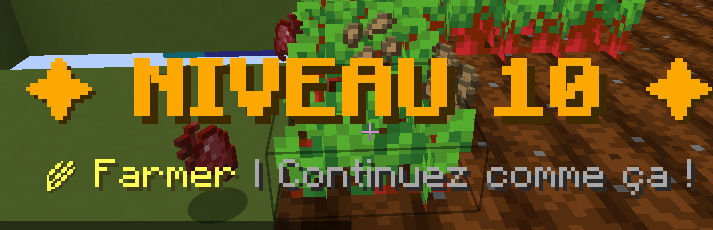

– 🔔 A **rich chat message** with a formatted XP progress bar
– 📺 A full **screen title** announcing the new level
– 🔊 A **level-up sound** effect
– 📣 A notification if a **new action is unlocked** at that level
—
## ⚡ Job Bonuses (every 10 levels)
Each job grants passive bonuses at milestone levels:
**⛏ Miner**
– Lv. 10 — 15% chance to double coal drops
– Lv. 20 — 10% chance to double iron/gold drops
– Lv. 40 — 2% chance to find a diamond while mining deepslate
– Lv. 50 — **PRESTIGE**: Triple XP on all ores
**🌾 Farmer**
– Lv. 5 — 50% chance to auto-replant harvested crops
– Lv. 15 — 10% chance to double wheat/carrot yield
– Lv. 25 — Auto-replant guaranteed at 100%
– Lv. 50 — **PRESTIGE**: Instant harvest without breaking
**🏹 Hunter**
– Lv. 15 — 2% chance to drop monster heads on kill
– Lv. 25 — Double XP against bosses (Ravager, Elder Guardian, Evoker…)
– Lv. 35 — Regeneration effect after each kill
– Lv. 50 — **PRESTIGE**: Random potion drop on every kill
**⚗ Alchemist**
– Lv. 15 — 8% chance to brew a duplicate potion
– Lv. 25 — Brewed potions last 25% longer
– Lv. 35 — 5% chance to auto-upgrade potion to level II
– Lv. 50 — **PRESTIGE**: All your potions are automatically level II
—
## 🛠️ Commands
| Command | Description |
|———|————-|
| `/jobs` | Open the Jobs GUI |
| `/jadmin reload` | Reload the config |
| `/jadmin setlevel
| `/jadmin addxp
| `/jadmin reset
| `/jadmin info
—
## 🔑 Permissions
| Permission | Default | Description |
|———–|———|————-|
| `zyrajobs.use` | Everyone | Access to `/jobs` |
| `zyrajobs.admin` | OP | Access to `/jadmin` |
—
## ⚙️ Configuration
Everything is configurable in `config.yml`:
– Max level (default: 50)
– XP formula base and exponent
– Multi-job mode (allow multiple jobs at once)
– Per-action XP rewards and minimum level requirements
– Level-up titles & sounds on/off
– All chat messages with color code support
—
## 📦 Requirements
– **Minecraft**: 1.21.x
– **Server software**: Spigot or Paper 1.21+
– **Java**: 21+
– **No dependencies** required
—
## 👤 Credits
Made by **sti_moi** — *zyraplug’s group*
# 🏠 ZyraHome
**GUI-based home management with teams & VIP support — by sti_moi**



—
## ◈ Overview
ZyraHome is a lightweight yet feature-rich home plugin for Paper 1.21.x servers. Unlike traditional command-based home plugins, everything is handled through a clean 27-slot GUI — no memorizing commands, no typing coordinates. Just open the menu, click, and teleport.
The plugin supports personal homes, VIP premium homes with instant teleportation, and a full team system with a shared team home managed by the team leader.
—
## ◈ Features
– 🖱️ **GUI-only home management** — Set, teleport to, and delete homes entirely through an intuitive chest-style menu.
– ⏱️ **Teleport delay system** — Normal homes have a 3-second countdown. Moving during the delay cancels the teleport.
– ⭐ **VIP / premium homes** — 2 extra home slots with instant teleportation for players with the `zyrahome.vip` permission.
– 👥 **Team system** — Create teams, invite members, and share a common team home. The leader manages the team home via the GUI.
– 💾 **Persistent data** — All homes and team data are saved to `homes.yml` and `teams.yml` — no database required.
– ⚙️ **Configurable** — Teleport delays, home counts, cancel-on-move and all messages are fully editable in `config.yml`.
—
## ◈ GUI Explained
The menu is a 27-slot chest split into two rows: **beds on top** (visual status), **dye buttons on the bottom** (actions).
| Item | Meaning |
|——|———|
| Gray wool | Team home slot, not yet defined |
| White bed | Normal home, undefined |
| Red bed | VIP home — requires `zyrahome.vip` |
| Green bed | Home is defined and ready |
| Gray dye | Click to set / define this home |
| Green dye | Left-click to teleport · Right-click to delete |
> **Note:** VIP homes display as red beds until `zyrahome.vip` is granted. Once unlocked, they behave identically to normal homes but teleport instantly.
—
## ◈ Commands
| Command | Description |
|———|————-|
| `/home` | Open the home GUI menu |
| `/teamhome` | Teleport to your team’s home |
| `/team create
| `/team invite
| `/team accept` | Accept a pending team invitation |
| `/team leave` | Leave your current team |
| `/team kick
| `/team disband` | Dissolve the team *(leader only)* |
| `/team info` | Display team info and member list |
—
## ◈ Permissions
| Node | Description | Default |
|——|————-|———|
| `zyrahome.home` | Access the home GUI and use homes | everyone |
| `zyrahome.vip` | Unlock VIP home slots + instant teleportation | op |
| `zyrahome.team` | Use team commands and team home | everyone |
| `zyrahome.admin` | Administrative commands | op |
—
## ◈ Installation
1. Drop the `.jar` into your server’s `plugins/` folder.
2. Restart the server — no dependencies required.
3. Configuration files (`config.yml`, `homes.yml`, `teams.yml`) are generated automatically inside `plugins/ZyraHome/`.
Works out of the box on any **Paper 1.21.x** server running **Java 21+**.
—
*Created by **sti_moi** · ZyraHome v1.0.0 · Paper 1.21.x*