

Packed Inventory
Inventory management has never been so easy.
 10,73k
Quick challenge
How far can you run before the mobs catch you?
Rotate your phone
Dino Mine is ready when your screen is landscape.
Minecraft check
Confirm your run
Complete the quick check to get your code.
Your code
Expires in 5 hours
Packed Inventory

# Packed Inventory
[](https://github.com/Kir-Antipov/packed-inventory/actions/workflows/build-artifacts.yml)
[](https://github.com/Kir-Antipov/packed-inventory/releases/latest)
[](https://modrinth.com/mod/packed-inventory)
[](https://www.curseforge.com/minecraft/mc-mods/packed-inventory)
[](https://github.com/Kir-Antipov/packed-inventory/blob/HEAD/LICENSE.md)
A Minecraft mod that attempts to mitigate the ever-growing Inventory Problem by making it possible to manage the contents of shulker boxes, ender chests, and more directly from your inventory.
Oh, we also have fancy tooltips for shulker boxes, ender chests, maps, and beyond!
----
## Features
- Manage the inventory of shulker boxes without ever placing them.
- Manage the inventory of your ender chest without ever placing it.
- Quickly move items into or out of shulker boxes, ender chests, and other inventory-providing items.
- Access crafting tables, stonecutters, and other workstations directly from your inventory.
- Vanilla-like tooltips for shulker boxes.
- Vanilla-like tooltips for ender chests.
- Vanilla-like tooltips for filled maps.
- Vanilla-like tooltips for NBT-containing items acquired in Creative mode via `Ctrl + MMB`, such as chests, barrels, furnaces, hoppers, dispensers, droppers, and more.
- An extensive and simple API that helps other modders implement these features for their blocks and items.
### Bundle-Like Functionality
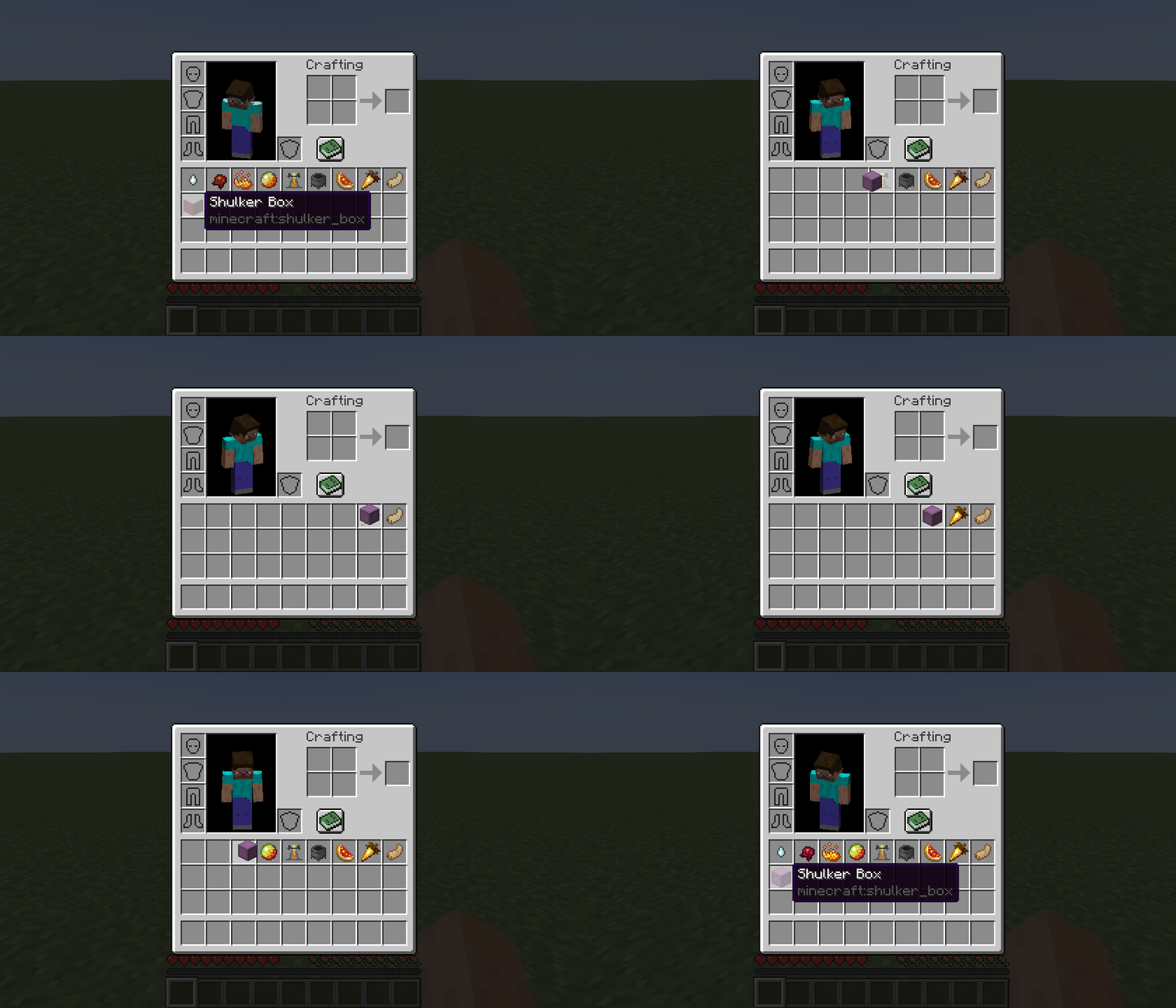
As mentioned earlier, inventory-providing items *(e.g., shulker boxes, ender chests, and any items registered via the Packed Inventory API)* automatically gain bundle-like functionality, allowing you to quickly move items into or out of them.
To store items inside an inventory-providing item, you can either:
- Pick up the inventory-providing item and press `k` on the item(s) to be stored, or
- Pick up the inventory-providing item and press `k` on the inventory-providing item(s) to be stored, or
- Pick up the item(s) to be stored and press `k` on the inventory-providing item.
To retrieve items from an inventory-providing item:
- Pick up the inventory-providing item and press `k` on the empty slot(s) to extract the item(s) to, or
- Pick up the inventory-providing item and press `l` or `ctrl + k` on the slot(s) to extract the item(s) to, or
- Press `l` or `ctrl + k` on the inventory-providing item(s) to extract the items from.
To dump all items from an inventory-providing item out into the world:
- Pick up the inventory-providing item, move it outside of the inventory frame, and press `k`.
### Tooltips
Here are some tooltip examples for you:
- Container tooltip
- Colored container tooltip
- Compact container tooltip
- Filled map tooltip
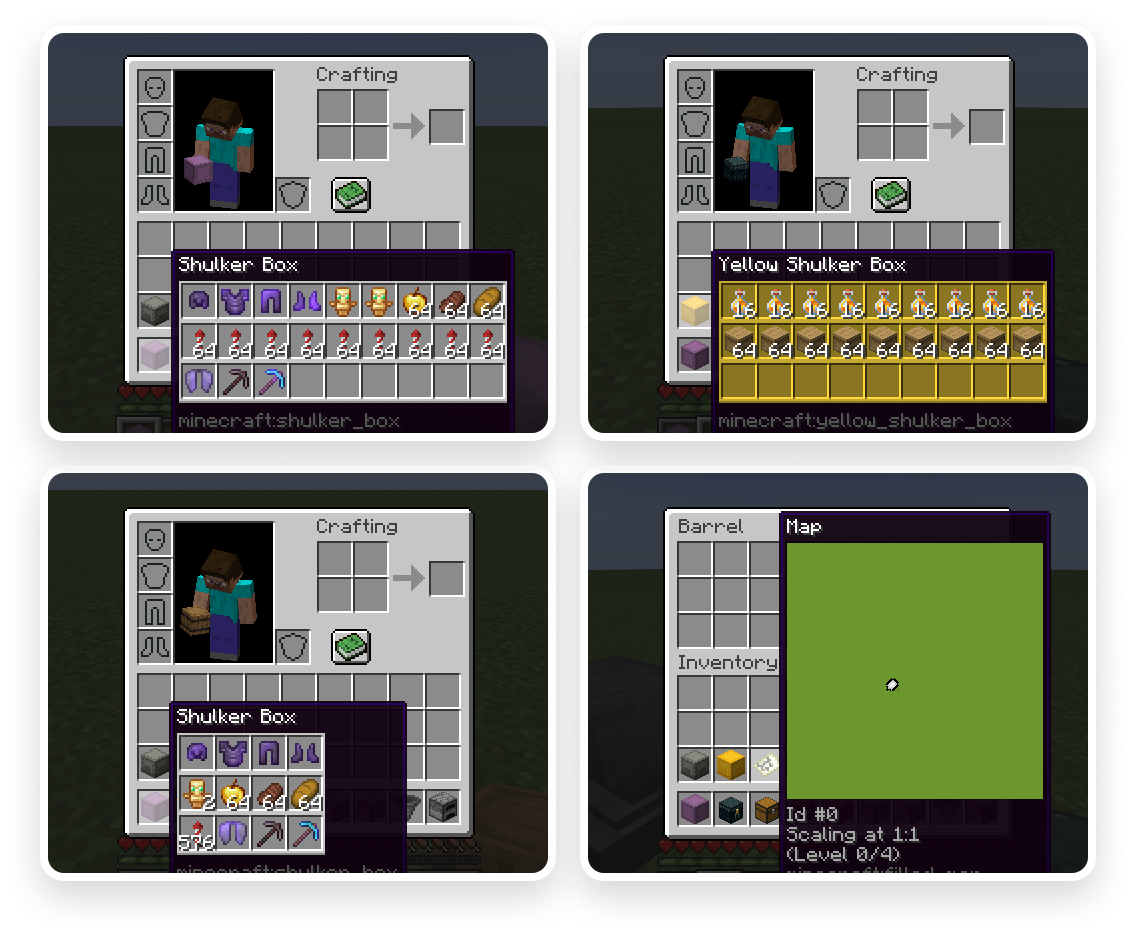
More screenshots can be found [here](https://modrinth.com/mod/packed-inventory/gallery).
----
## Key Binds
Key binds can be configured just like vanilla ones:
1) Go to `Options`.
2) Select `Controls`.
3) Then choose `Key Binds`.
4) Scroll down to the `Packed Inventory` section.
5) Configure the available key binds.
| Name | Description | Default |
| ---- | ----------- | ------- |
| `Interact with item` | Interacts with the item in the active hotbar slot. Alternatively, if the inventory screen is open, interacts with the item the mouse is hovering over. Depending on the context, this action can either:
- Open a screen associated with the selected item,
- Store an item inside the selected inventory-providing item,
- Retrieve an item from the selected inventory-providing item, or
- Dump all the items stored in the selected inventory-providing item out into the world
