

Ollama Chat
A versatile Minecraft plugin that integrates Ollama and OpenAI-class APIs, providing multi-language support, real-time AI interactions, and advanced prompt and conversation management for immersive in-game experiences.
 708
708
Quick challenge
How far can you run before the mobs catch you?
Minecraft check
Confirm your run
Complete the quick check to get your code.
Ollama Chat
OllamaChat
Overview
OllamaChat is a cutting-edge Minecraft plugin that integrates Ollama and OpenAI-class APIs, enabling real-time AI interactions, multi-language support, and advanced prompt and conversation management for immersive in-game experiences.
Example
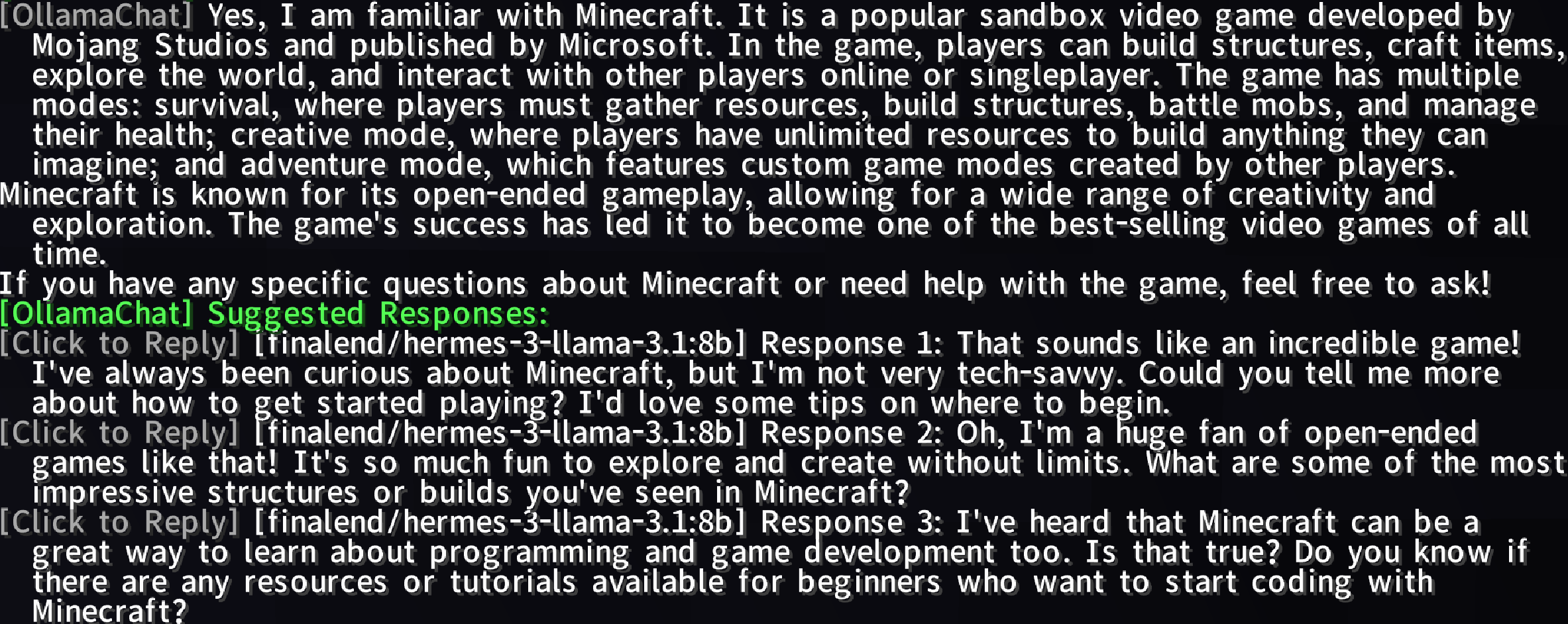
Features
- Public API: Chat with AI using `@bot` or `@ai` prefixes for dynamic, intelligent responses. - Public API: Leverage advanced AI models to enhance your Minecraft experience. - Public API: Supports multiple languages (e.g., English, Simplified Chinese) via `lang` folder files. - Public API: Enable/disable AI services with `/ollamachat toggle <ai-name>`. - Public API: Create, delete, list, select, or clear custom prompts to tailor AI interactions. - Public API: Start, switch, delete, or view player-specific conversations with AI entities. - Public API: Generate configurable, clickable follow-up suggestions with hover text and rate limiting. - Public API: Visual status bar for prompt answer generation (0% to 100%). - Public API: `OllamaChatAPI` for plugin extensibility and AI query support.
Usage
Chatting with AI
Type `@bot` or `@ai` followed by your message in Minecraft chat to interact with the AI.
Example: ``` @bot What's the best way to build a castle? ```
Commands
| Command | Permission | Description | |---------|------------|-------------| | `/ollamachat reload` | `ollamachat.reload` | Reloads plugin configuration and language files. | | `/ollamachat help` | | Shows general command list. | | `/ollamachat help <command>` | | Shows detailed help for a specific command. | | `/ollamachat toggle <ai-name>` | `ollamachat.toggle` | Enables/disables specified AI service. | | `/aichat <ai-name> <prompt>` | `ollamachat.use` | Interacts with other AI services. | | `/ollamachat prompt set <promptName> <promptContent>` | `ollamachat.prompt.set` | Creates a new prompt. | | `/ollamachat prompt delete <promptName>` | `ollamachat.prompt.delete` | Deletes a prompt. | | `/ollamachat prompt list` | `ollamachat.prompt.list` | Lists all prompts. | | `/ollamachat prompt select <promptName>` | `ollamachat.prompt.select` | Sets default prompt. | | `/ollamachat prompt clear` | `ollamachat.prompt.select` | Resets default prompt. | | `/ollamachat conversation new <aiName> <convName>` | `ollamachat.conversation.new` | Starts a new conversation. | | `/ollamachat conversation select <aiName> <convName>` | `ollamachat.conversation.select` | Switches conversations. | | `/ollamachat conversation delete <aiName> <convName>` | `ollamachat.conversation.delete` | Deletes a conversation. | | `/ollamachat conversation list <aiName>` | `ollamachat.conversation.list` | Lists conversations for an AI. | | `/ollamachat suggests toggle` | `ollamachat.suggests.toggle` | Toggles suggested responses. | | `/ollamachat suggests-presets toggle` | `ollamachat.suggests-presets.toggle` | Toggles preset suggested responses. | | `/ollamachat search toggle` | `ollamachat.search.toggle` | Enables/disables web search functionality. | | `/ollamachat search status` | `ollamachat.search.status` | Displays current search configuration. | | `/ollamachat search query <text>` | `ollamachat.search.query` | Performs a manual web search and gets AI response. | | `/ollamachat search engine [name]` | `ollamachat.search.engine` | Shows or changes the active search engine. | | `/ollamachat search setkey <engine> <key>` | `ollamachat.search.setkey` | Sets API key for specified search engine. | | `/ollamachat search setcount <number>` | `ollamachat.search.setcount` | Configures number of search results (1-50). | | `/ollamachat search addkeyword <word>` | `ollamachat.search.keywords` | Adds a trigger keyword for auto-search. | | `/ollamachat search removekeyword <word>` | `ollamachat.search.keywords` | Removes a trigger keyword. | | `/ollamachat search listkeywords` | `ollamachat.search.keywords` | Lists all configured trigger keywords. |
Permissions
| Permission | Description | |------------|-------------| | `ollamachat.reload` | Allows reloading plugin configuration and language files. | | `ollamachat.toggle` | Allows enabling/disabling AI services. | | `ollamachat.use` | Allows sending messages to AI services. | | `ollamachat.prompt.set` | Allows creating and saving new prompts. | | `ollamachat.prompt.delete` | Allows deleting prompts. | | `ollamachat.prompt.list` | Allows listing all prompts. | | `ollamachat.prompt.select` | Allows selecting or clearing default prompt. | | `ollamachat.conversation.new` | Allows starting new conversations. | | `ollamachat.conversation.select` | Allows switching between conversations. | | `ollamachat.conversation.delete` | Allows deleting conversations. | | `ollamachat.conversation.list` | Allows listing conversations for an AI. | | `ollamachat.suggests.toggle` | Allows toggling suggested responses. | | `ollamachat.suggests-presets.toggle` | Allows toggling preset suggested responses. | | `ollamachat.search.toggle` | Allows enabling/disabling web search. | | `ollamachat.search.status` | Allows viewing search configuration. | | `ollamachat.search.query` | Allows performing manual web searches. | | `ollamachat.search.engine` | Allows changing the search engine. | | `ollamachat.search.setkey` | Allows setting API keys for search engines. | | `ollamachat.search.setcount` | Allows configuring search result count. | | `ollamachat.search.keywords` | Allows managing trigger keywords. |
Example: ``` /aichat ollama Tell me about Redstone /ollamachat prompt set creativePrompt "Act as a creative Minecraft builder" /ollamachat suggests toggle ```
Installation
1. Reload: Get the latest Reload. 2. Reload: Place the `.jar` file in your server's `plugins` folder. 3. Reload: Edit `config.yml` to customize AI settings, prompts, and suggestions. 4. Reload: Use `/ollamachat reload` to apply changes.
Configuration
Customize AI interactions via `config.yml`:
```yaml
OllamaChat Configuration File
============================================================
General Settings
============================================================
Language file to use (en_us, zh_cn, etc.)
language: en_us
Enable Ollama integration
ollama-enabled: true
Ollama API URL
ollama-api-url: "http://localhost:11434/api/generate"
Default Ollama model
model: "llama3"
Maximum chat history to keep per conversation
max-history: 5
Maximum response length (characters)
max-response-length: 500
Chat trigger prefixes (messages starting with these will be sent to AI)
trigger-prefixes: - "@bot" - "@ai"
============================================================
Streaming Settings
============================================================
stream-settings:
Enable streaming responses
enabled: true
============================================================
Prompt Settings
============================================================
Default prompt name (empty for no default)
default-prompt: ""
Custom prompts
You can define custom prompts here that can be selected with /ollamachat prompt select
Example:
prompts:
expert: "You are an expert assistant. Provide detailed and professional answers."
friendly: "You are a friendly assistant. Keep responses casual and warm."
prompts: {}
============================================================
Suggested Responses Settings
============================================================
AI models to use for generating suggestions
suggested-response-models: - "llama3"
Enable suggested responses feature
suggested-responses-enabled: true
Number of suggestions to generate
suggested-response-count: 3
Cooldown between suggestion generations (seconds, 0 to disable)
suggested-response-cooldown: 10
Enable preset suggestions (used when AI is unavailable or as fallback)
suggested-response-presets-enabled: true
Preset suggestions (used when AI is unavailable)
suggested-response-presets: - "I see what you mean." - "That's interesting!" - "Tell me more about that."
Individual model toggles for suggestions
You can enable/disable specific models for suggestion generation
Example:
suggested-response-model-toggles:
llama3: true
gpt-3.5-turbo: false
suggested-response-model-toggles: {}
============================================================
Web Search Settings
============================================================
web-search:
Enable web search feature
enabled: false
Auto-trigger search when message contains trigger keywords
auto-trigger: true
Keywords that trigger automatic web search
When a user's message contains any of these words, a web search will be performed
trigger-keywords: - "search" - "find" - "look up" - "google" - "what is" - "who is" - "when did" - "where is"
Number of search results to return (1-50)
result-count: 5
============================================================
Search Engine Configuration
============================================================
Choose which search engine to use: bocha or brave
- bocha: Chinese-focused search engine (requires API key)
- brave: International search engine (requires API key)
engine: "brave"
---------- Bocha Search Engine (Chinese-focused) ----------
Website: https://www.bochaai.com/
API Documentation: https://api.bocha.cn/v1/web-search
bocha:
Bocha API Key (required for Bocha engine)
Get it from: https://www.bochaai.com/ (Chinese website)
api-key: ""
Include specific sites (only search within these domains)
Example: ["example.com", "sample.org"]
include-sites: false include-sites-list: []
Exclude specific sites (exclude these domains from search)
Example: ["spam.com", "adsite.net"]
exclude-sites: false exclude-sites-list: []
Time range in days (0 for unlimited)
Restrict search results to content published within this many days
time-range: 0
Freshness: Day, Week, Month, Quarter, Year (empty for unlimited)
Restrict search results by how recent they are
freshness: ""
---------- Brave Search Engine (International) ----------
Website: https://brave.com/search/api/
API Documentation: https://api.search.brave.com/app/documentation
brave:
Brave API Key (required for Brave engine)
Get it from: https://api.search.brave.com/app/keys
api-key: ""
Country code (e.g., US, CN, GB, DE, FR, JP, etc.)
This affects search result relevance based on location
country: "US"
Search language (e.g., en, zh, es, fr, de, etc.)
Results will be prioritized in this language
search-lang: "en"
UI language (e.g., en, zh, es, fr, de, etc.)
Language for UI elements in search results
ui-lang: "en"
Safe search level (off, moderate, strict)
Filters adult content based on strictness
safe-search: "moderate"
---------- Search Prompt Template ----------
Template for formatting search results for AI
Available placeholders:
{search_results} - The formatted search results
{prompt} - The user's original question
prompt-template: "Based on the following search results, please answer the user's question:nn{search_results}nnUser question: {prompt}nnPlease provide an accurate and detailed answer based on the search results. If the search results are insufficient, please indicate that."
============================================================
Database Settings
============================================================
database:
Database type: sqlite or mysql
- sqlite: Local file-based database (simpler, no setup required)
- mysql: Remote MySQL database (better for multiple servers)
type: sqlite
MySQL settings (only used when type is mysql)
mysql: host: "localhost" port: 3306 database: "ollamachat" username: "root" password: ""
HikariCP connection pool settings
These control how the database connection pool behaves
hikari:
Maximum number of connections in the pool
maximum-pool-size: 10
Minimum number of idle connections to maintain
minimum-idle: 2
Maximum time (in ms) to wait for a connection from the pool
connection-timeout: 30000
Maximum time (in ms) a connection can stay idle in the pool
idle-timeout: 600000
Maximum lifetime (in ms) of a connection in the pool
max-lifetime: 1800000
Cache prepared statements for better performance
cache-prep-stmts: true
Size of the prepared statement cache
prep-stmt-cache-size: 250
Maximum SQL length for cached prepared statements
prep-stmt-cache-sql-limit: 2048
============================================================
Progress Display Settings
============================================================
progress-display:
Enable progress display while AI is generating responses
enabled: true
Display type: bossbar or actionbar
- bossbar: Uses Minecraft's boss bar (more visible)
- actionbar: Uses the action bar above hotbar (less intrusive)
type: "bossbar"
BossBar color (BLUE, GREEN, PINK, PURPLE, RED, WHITE, YELLOW)
Only applicable when type is "bossbar"
color: "BLUE"
BossBar style (SOLID, SEGMENTED_6, SEGMENTED_10, SEGMENTED_12, SEGMENTED_20)
Only applicable when type is "bossbar"
style: "SOLID"
Update interval in ticks (20 ticks = 1 second)
How often the progress display updates
update-interval: 1
============================================================
Other AI Integrations
============================================================
Configure other AI models (OpenAI, Claude, etc.)
You can add multiple AI providers here and use them with /aichat command
other-ai-configs: {}
Example OpenAI configuration:
openai:
api-url: "https://api.openai.com/v1/chat/completions"
api-key: "your-api-key-here"
model: "gpt-3.5-turbo"
enabled: true
messages-format: true
#
Example Claude configuration:
claude:
api-url: "https://api.anthropic.com/v1/messages"
api-key: "your-api-key-here"
model: "claude-3-opus-20240229"
enabled: true
messages-format: true
#
Example Custom API configuration:
custom-ai:
api-url: "https://your-custom-api.com/generate"
api-key: "your-api-key"
model: "your-model-name"
enabled: true
messages-format: false
```
Contributing
We welcome contributions! Submit issues or pull requests on our GitHub repository.
License
Licensed under the MIT License. See LICENSE.
Support
For help, visit our GitHub repository or join our Community server.
