

OgiPlayerStats
All-rounder gui for displaying user statistics
 208
208
Quick challenge
How far can you run before the mobs catch you?
Minecraft check
Confirm your run
Complete the quick check to get your code.
OgiPlayerStats

OgiPlayerStats
A modern, powerful, and 100% free player statistics GUI for Minecraft servers.
Built with performance and versatility in mind.


---
📖 Table of Contents
- A Note From The Developer - About the Plugin - ✨ Key Features - 🚀 Installation - ⚙️ Configuration - Adding a Built-in Stat - Adding a PlaceholderAPI Stat - 📝 Commands & Permissions - 🧩 PlaceholderAPI Integration - 🤝 Contributing - 🐛 Bug Reports
---
💬 A Note From The Developer
I was tired of seeing essential, high-quality server plugins locked behind a paywall. I believe powerful tools should be accessible to everyone in the Minecraft community. That's why I created OgiPlayerStats—to provide a premium, feature-rich experience for free. I hope you enjoy it!
---
🌟 About the Plugin
OgiPlayerStats provides a beautiful and intuitive in-game menu to display player statistics. Unlike other stat plugins, it's built from the ground up to be 100% configurable via a simple `config.yml` file. You can display anything from vanilla Minecraft stats (`PLAYER_KILLS`, `DIAMONDS_MINED`) to custom data from other plugins like Vault or EssentialsX using the powerful PlaceholderAPI integration.
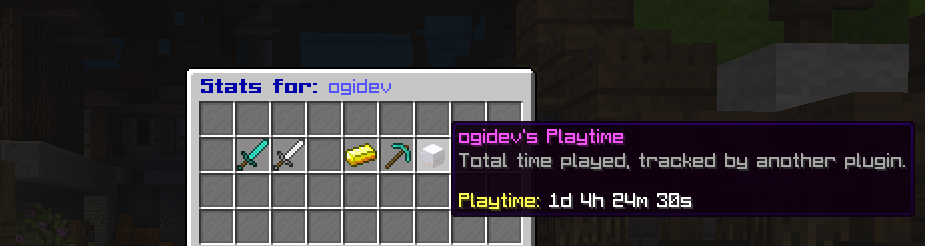
*An example of the default stats GUI.*
✨ Key Features
- 1.16.5 to 1.21+: No premium versions, no hidden costs. All features are available to everyone. - 1.16.5 to 1.21+: Control the title, size, items, names, lore, and slot for every stat. - 1.16.5 to 1.21+: Track any vanilla statistic, including those with subtypes (Blocks, Entities). - 1.16.5 to 1.21+: - 1.16.5 to 1.21+: Display placeholders from *any* other PAPI-enabled plugin. - 1.16.5 to 1.21+: Creates dynamic placeholders for every stat you configure (e.g., `%ogiplayerstats_player_kills%`). - 1.16.5 to 1.21+: Use `PLAYER_HEAD` material with a `skull-owner` to display player-specific skins. - 1.16.5 to 1.21+: Lightweight and designed to ensure minimal server impact. - 1.16.5 to 1.21+: A single JAR file supports all server versions from 1.16.5 to 1.21+.
🚀 Installation
1. Download the latest release from the (Optional but Recommended), %%MD1%%, or %%MD2%%. 2. Place the `OgiPlayerStats-X.X.X.jar` file into your server's `/plugins` directory. 3. (Optional but Recommended) Install %%MD3%% to unlock the full potential of the plugin. 4. Restart your server. The default configuration file will be generated at `/plugins/OgiPlayerStats/config.yml`.
⚙️ Configuration
All configuration is handled in the `config.yml` file. You can add, remove, or modify any stat in the `displayed-stats` list.
🚀 Installation
1. Download the latest release from the (Optional but Recommended), %%MD1%%, or %%MD2%%. 2. Place the `OgiPlayerStats-X.X.X.jar` file into your server's `/plugins` directory. 3. (Optional but Recommended) Install %%MD3%% to unlock the full potential of the plugin. 4. Restart your server. The default configuration file will be generated at `/plugins/OgiPlayerStats/config.yml`.
⚙️ Configuration
All configuration is handled in the `config.yml` file. You can add, remove, or modify any stat in the `displayed-stats` list.
Adding a Built-in Stat
To display a statistic native to Minecraft, use the `statistic` key. For stats that need a subtype (like breaking a specific block), also include `type` and `sub-type`.
```yaml - slot: 14 material: "DIAMOND_PICKAXE" name: "&bDiamonds Mined" lore: - "&7Diamond ore blocks broken." - "" - "&aValue: &f{value}" statistic: "MINE_BLOCK" type: "BLOCK" sub-type: "DIAMOND_ORE" ```
Adding a PlaceholderAPI Stat
To display a value from another plugin, simply use the `placeholder` key instead of `statistic`. The `{value}` in the lore will be replaced by the placeholder's output.
```yaml - slot: 13 material: "GOLD_INGOT" name: "&ePlayer Balance" lore: - "&7Your current balance." - "" - "&aValue: &f{value}" placeholder: "%vault_eco_balance_formatted%" ```
To display a statistic native to Minecraft, use the `statistic` key. For stats that need a subtype (like breaking a specific block), also include `type` and `sub-type`.
> For a full list of available statistics and material names, please refer to the Spigot Javadocs.
📝 Commands & Permissions
| Command | Permission | Description | | -------------------- | ------------------------------ | -------------------------------------------- | | `/stats [player]` | `ogiplayerstats.view` / `ogiplayerstats.view.others` | View your own or another player's statistics. | | `/stats reload` | `ogiplayerstats.reload` | Reloads the plugin's configuration file. |
🧩 PlaceholderAPI Integration
OgiPlayerStats automatically generates its own placeholders based on the `name` field of each stat in your configuration. The name is converted to lowercase, stripped of color codes, and spaces are replaced with underscores.
Example: A stat with `name: "&bPlayer Kills"` becomes `%ogiplayerstats_player_kills%`. A stat with `name: "&ePlayer Balance"` becomes `%ogiplayerstats_player_balance%`.
You can use these placeholders in any plugin that supports PlaceholderAPI, such as scoreboards, chat formatters, or holograms.
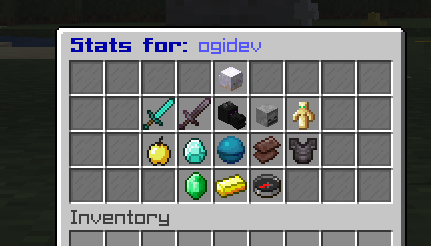
Example Config for GUI
```yaml
displayed-stats:
--- Player Info (Top Center) ---
- slot: 4 material: "PLAYER_HEAD" skull-owner: "{player}" name: "&b{player}'s Stats" lore: - "&7An overview of player's journey." - "" - "&ePlaytime: &f%statistic_time_played%" - "&eJoin Date: &f%player_first_join_date%"
--- Core PvP Stats (Row 2) ---
- slot: 11 material: "DIAMOND_SWORD" name: "&aPlayer Kills" lore: - "&7Foes vanquished in battle." - "" - "&eValue: &f{value}" statistic: "PLAYER_KILLS"
- slot: 12 material: "NETHERITE_SWORD" name: "&cDeaths by Player" lore: - "&7Times player was bested by another." - "" - "&eValue: &f{value}" statistic: "ENTITY_KILLED_BY" type: "ENTITY_TYPE" sub-type: "PLAYER"
- slot: 13 material: "DRAGON_HEAD" name: "&5Ender Dragon Kills" lore: - "&7How many times player've conquered" - "&7the Ender Dragon." - "" - "&eKills: &f{value}" statistic: "KILL_ENTITY" type: "ENTITY_TYPE" sub-type: "ENDER_DRAGON"
- slot: 14 material: "SKELETON_SKULL" name: "&cTotal Deaths" lore: - "&7Every time player've met end." - "" - "&eValue: &f{value}" statistic: "DEATHS"
- slot: 15 material: "TOTEM_OF_UNDYING" name: "&eTotems Popped" lore: - "&7How many times player've defied death." - "" - "&eValue: &f{value}" statistic: "USE_ITEM" type: "ITEM" sub-type: "TOTEM_OF_UNDYING"
--- Lifesteal & Resources (Row 3) ---
- slot: 20 material: "GOLDEN_APPLE" name: "&6Golden Apples Eaten" lore: - "&7The fruit of PvP champions." - "" - "&eValue: &f{value}" statistic: "USE_ITEM" type: "ITEM" sub-type: "GOLDEN_APPLE"
- slot: 21 material: "DIAMOND" name: "&bDiamonds Mined" lore: - "&7The foundation of wealth and power." - "" - "&eValue: &f{value}" statistic: "MINE_BLOCK" type: "BLOCK" sub-type: "DIAMOND_ORE"
- slot: 22 # Centerpiece Lifesteal Stat material: "HEART_OF_THE_SEA" name: "&c❤ Lifesteal Hearts" lore: - "&7Current maximum health." - "" - "&eHearts: &f{value}" placeholder: "%lifestealz_hearts%"
- slot: 23 material: "NETHERITE_SCRAP" name: "&8Ancient Debris Mined" lore: - "&7Forging the strongest armor." - "" - "&eValue: &f{value}" statistic: "MINE_BLOCK" type: "BLOCK" sub-type: "ANCIENT_DEBRIS"
- slot: 24 material: "NETHERITE_CHESTPLATE" name: "&6Mob Kills" lore: - "&7Creatures slain for loot and XP." - "" - "&eValue: &f{value}" statistic: "MOB_KILLS"
--- Economy & Server Info (Bottom Row) ---
- slot: 30 material: "EMERALD" name: "&aRevived" lore: - "&7How many times was a player revived" - "" - "&eValue: &f{value}" placeholder: "%lifestealz_revived%"
- slot: 31 # Bottom Centerpiece material: "GOLD_INGOT" name: "&ePlayer Balance" lore: - "&7Current wealth." - "" - "&eBalance: &f{value}" placeholder: "%vault_eco_balance_formatted%"
- slot: 32 material: "COMPASS" name: "&bOnline Status" lore: - "&7Is currently online?" - "" - "&eStatus: &f{value}" placeholder: "%player_online%"
```
🤝 Contributing
Contributions are welcome! If you'd like to contribute to the project, please follow these steps:
1. Fork the repository. 2. Create a new branch (`git checkout -b feature/YourAmazingFeature`). 3. Make your changes. 4. Commit your changes (`git commit -m 'Add some amazing feature'`). 5. Push to the branch (`git push origin feature/YourAmazingFeature`). 6. Open a new Pull Request.
🐛 Bug Reports
If you find a bug, please open an issue on the GitHub Issues page.
Please include the following information in your report: - Server version (e.g., Paper 1.21.5) - Plugin version - A detailed description of the bug - Steps to reproduce the bug - Any relevant errors from your console log
---
Developed by Ogi.
