

MoreMaces
This plugin adds 3 new maces to your server!
 1,71k
1,71k
Quick challenge
How far can you run before the mobs catch you?
Minecraft check
Confirm your run
Complete the quick check to get your code.
MoreMaces

Plugin Info

A Minecraft plugin that adds three special mace variants with unique abilities and crafting recipes.
Mace Variants
WARDEN MACE 🟣
A powerful mace imbued with the essence of the Warden, capable of unleashing devastating sonic attacks and sculk-based abilities.
Primary Ability: Sculk Resonance
- Sound: Right-click (place button) - Sound: Massive sculk shockwave affecting all entities in range - Sound: - Slowness III (8 seconds) - Darkness (8 seconds) - Mining Fatigue III (8 seconds) - Nausea (8 seconds) - Sound: 15 blocks radius - Sound: 5 minutes (300 seconds) - Sound: Expanding sculk particles with soul fire effects and dark energy waves - Sound: Warden sonic boom + enderman scream + deep cave ambience
Secondary Ability: Sonic Beam
- Sound: Double shift click - Sound: Targeted sonic beam at entities in line of sight - Sound: - Slowness III (6 seconds) - Weakness II (6 seconds) - Sound: 30 blocks with line-of-sight targeting - Sound: 4 minutes (240 seconds) - Sound: Sculk soul beam with shockwave particles and impact effects - Sound: Warden sonic boom + warden roar
General Properties:
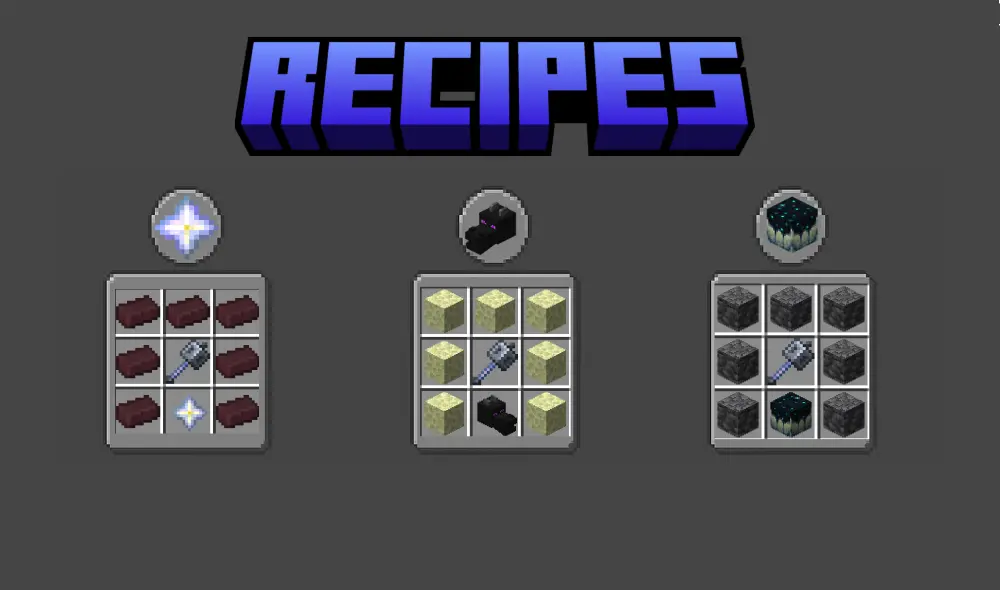
- Crafting Recipe: Warden-like texture with dark colors - Crafting Recipe: Warden shockwave effect with entity pushback - Crafting Recipe: Deepslate + Mace + Sculk Sensor
NETHER MACE 🔴
A mace forged in the depths of the Nether, harnessing the infernal power of fire and destruction.
Primary Ability: Infernal Wrath
- Sound: Right-click (place button) - Sound: Devastating meteor shower from the nether - Sound: - Fire Damage (continuous) - High knockback impact - Temporary lava pools - Sound: 20 blocks radius - Sound: 4 minutes (240 seconds) - Sound: Fire particles, smoke, and falling meteor effects with explosions - Sound: Ghast scream + explosion sounds + lava bubbling
Secondary Ability: Fire Tornado
- Sound: Double shift click - Sound: Spinning fire tornado that follows the player - Sound: - Continuous fire damage (15 seconds) - Area control with mobile tornado - Sound: 8 blocks radius, 10 blocks height - Sound: 6 minutes (360 seconds) - Sound: Spinning fire particles and smoke in tornado formation - Sound: Lava pop + ghast scream + fire crackling
General Properties:
- Crafting Recipe: Nether-like texture with red/orange colors - Crafting Recipe: Automatic Fire Aspect 4 + extra fire damage - Crafting Recipe: Nether Brick + Mace + Nether Star
END MACE 🟣
A mace infused with the power of the End dimension, capable of manipulating void energy and controlling the forces of the End.
Primary Ability: Void Rift
- Sound: Right-click (place button) - Sound: Creates a void rift that damages enemies - Sound: - Slow Falling (applied to all affected entities) - Blindness (2 seconds) - Void damage (6 hearts) - Sound: 30 blocks radius - Sound: 5 minutes (300 seconds) - Sound: Swirling portal particles with end rod effects and void energy - Sound: Enderman teleport + End portal spawn
Secondary Ability: Ender Storm
- Sound: Double shift click - Sound: Summons falling end crystals that explode - Sound: - 4 hearts damage per crystal explosion - Continuous void damage - Blindness (2 seconds) - Sound: 25 blocks radius - Sound: 5 minutes (300 seconds) - Sound: Falling crystals with end rod trails and massive explosions - Sound: Ender Dragon growl + Crystal explosions + Portal sounds
General Properties:
- Crafting Recipe: End-like texture with purple colors - Crafting Recipe: Slow falling effect with void energy explosion (Players & Mobs) - Crafting Recipe: End Stone + Mace + Ender Dragon Head
Passive Abilities:
- Ender Sight: Reduces fall damage by 80% with void particles - Ender Sight: See players through walls within 20 blocks
Crafting Recipes
Mechanics
Crafting System
- Status Tracking: Each mace has a unique shaped recipe - Status Tracking: Only one of each mace type can be crafted in total - Status Tracking: The system tracks which maces have already been crafted
Durability
- Recovery: Maces cannot break from normal damage - Recovery: Only void damage can destroy maces - Recovery: Lava and cactus damage is blocked - Recovery: If a mace is destroyed, a new one can be crafted
Cooldown System
- Feedback: All abilities have a 3-minute cooldown - Feedback: Cooldowns are individual per player - Feedback: Cooldown is shown in the action bar (above the hotbar) - Feedback: No cooldown if no target is nearby - you can try again immediately - Feedback: Players receive messages about cooldown status and targeting
📋 Commands
📋 Commands
`/mace help` or `/moremace help`
Shows all available commands and information about the maces. Including: - All available commands - Language support information (English, Dutch, Spanish) - Mace variants and their abilities - Cooldown system explanation - Important notes about crafting and durability
`/mace status`
Shows the global mace crafting status and your cooldown information.
`/mace reload` (Admin only)
Reloads the plugin configuration and recipes. Including language files!
`/mace reset confirm` (Admin only)
Resets all mace data and cooldowns. Makes all maces available for crafting again. ⚠️ WARNING: This command resets ALL data! Use `/mace reset` first to see what will be reset.
`/mace debug` (Admin only)
Shows extensive debug information about plugin status, data file location and mace crafting status.
Data Reset Functionality
The reset command has a safety mechanism: 1. `/mace reset confirm` - Shows warning and list of what will be reset 2. `/mace reset confirm` - Actually performs the reset
🔍 Logging & Debugging
🔍 Logging & Debugging
The plugin has extensive logging for troubleshooting:
Console Logging
- Cooldown Tracking: Detailed information about plugin initialization - Cooldown Tracking: All ability activations and targeting - Cooldown Tracking: Mace crafting successes and failures - Cooldown Tracking: Status changes of maces - Cooldown Tracking: Cooldown activations and resets
Log Messages
- `=== MoreMaces Plugin Starting ===` - Plugin start - `Player [name] activated [Mace] ability` - Ability usage - `No players within range - no cooldown applied` - No target found - `Successfully crafted [Mace] - now marked as crafted globally` - Crafting success
🌍 Multi-Language Support
🌍 Multi-Language Support
The plugin now supports multiple languages: - Español (en) - Default language - Español (nl) - Dutch translation - Español (es) - Spanish translation
You can change the language in `config.yml` by modifying the `language` setting to `en`, `nl`, or `es`.
🔧 Installation
🔧 Installation
1. Send the plugin JAR file 2. Send the JAR in your server's `plugins` folder 3. Send your server 4. Send in `config.yml` (optional, default is English) 5. Send the resource pack from the plugin resources 6. Send the resource pack to players for custom textures
⚡ Requirements
- Java: 1.21 or higher - Java: Spigot/Paper - Java: Java 21 or higher
🎮 Usage
🎮 Usage
1. Use `/mace help` (optional) in `config.yml` with `language: "en|nl|es"` 2. Use `/mace help` one of the three mace variants with the correct recipe 3. Use `/mace help` the mace in your main hand 4. Use `/mace help` abilities with the correct input: - Right-click for first abilities - Double shift for End Mace second ability 5. Use `/mace help`: - View cooldown in action bar (above hotbar) - No target = no cooldown, try again - Successful ability = 3 minutes cooldown - End Mace flight stops automatically after 20 seconds (no fall damage) - Fly speed is only adjusted in survival/adventure mode 6. Use `/mace help` your mace from void damage 7. Use `/mace help` for extensive information in your chosen language
🐛 Troubleshooting
Mace doesn't work
- Try again if there's no target nearby
Commands don't work
- Check permissions: `moremaces.use` and `moremaces.admin` - Make sure the plugin is loaded correctly - Check the server console for errors - Use `/mace help` to see all available commands
Changing language
- Modify `language: "en|nl|es"` in `config.yml` - Restart the server or use `/mace reload` (admin) - All messages and commands are now shown in the chosen language
Data/Data File Problems
- Delete `mace_data.yml` to make all maces available again - Or use `/mace reset` (admin) to reset all data and cooldowns - Plugin automatically initializes all maces as "not crafted" on first start - Check console logs for data loading messages
🏷️ PlaceholderAPI
🏷️ PlaceholderAPI Integration
The plugin includes full PlaceholderAPI support for use in other plugins, scoreboards, and chat messages.
Status Placeholders
- `%moremaces_nether_mace_status%` - Shows if End Mace has been crafted (`crafted` or `not crafted`) - `%moremaces_nether_mace_status%` - Shows if Warden Mace has been crafted (`crafted` or `not crafted`) - `%moremaces_nether_mace_status%` - Shows if Nether Mace has been crafted (`crafted` or `not crafted`)
Cooldown Placeholders (Formatted)
- `%moremaces_end_breath_cooldown%` - Shows Warden Mace cooldown (formatted: `2:30` or `Ready`) - `%moremaces_end_breath_cooldown%` - Shows Nether Mace cooldown (formatted: `1:45` or `Ready`) - `%moremaces_end_breath_cooldown%` - Shows End Mace flight cooldown (formatted: `0:30` or `Ready`) - `%moremaces_end_breath_cooldown%` - Shows End Mace breath cooldown (formatted: `3:00` or `Ready`)
Cooldown Placeholders (Seconds Only)
- `%moremaces_end_breath_cooldown_seconds%` - Shows Warden Mace cooldown in seconds (`150` or `0`) - `%moremaces_end_breath_cooldown_seconds%` - Shows Nether Mace cooldown in seconds (`105` or `0`) - `%moremaces_end_breath_cooldown_seconds%` - Shows End Mace flight cooldown in seconds (`30` or `0`) - `%moremaces_end_breath_cooldown_seconds%` - Shows End Mace breath cooldown in seconds (`180` or `0`)
Ownership Placeholders
- `%moremaces_nether_mace_owner%` - Shows who owns the End Mace (`PlayerName` or `None`) - `%moremaces_nether_mace_owner%` - Shows who owns the Warden Mace (`PlayerName` or `None`) - `%moremaces_nether_mace_owner%` - Shows who owns the Nether Mace (`PlayerName` or `None`)
Usage Examples
```
In a scoreboard
End Mace: %moremaces_end_mace_status% Warden Cooldown: %moremaces_warden_cooldown%
In a chat message
The End Mace is owned by: %moremaces_end_mace_owner%
In a plugin configuration
message: "Your Warden Mace cooldown: %moremaces_warden_cooldown%" ```
Requirements
- PlaceholderAPI plugin must be installed on your server - Placeholders work automatically once both plugins are loaded - All placeholders are player-specific (cooldowns show individual player cooldowns)
👥 Credits
- Version: SnoepieMC - Version: MoreMaces - Version: 1.3.1
---
Have fun with the MoreMaces plugin!
If you are having some problems with the plugin klik here. If you have an cool idea for the plugin klik here.
