

Modpack Core Essentials
Change game window title and icon. Add a welcome message to the screen when you first start the game. Very light. Easy to customize. Zero bloat.
 21
21
Quick challenge
How far can you run before the mobs catch you?
Minecraft check
Confirm your run
Complete the quick check to get your code.
Modpack Core Essentials

A lightweight, client-side utility mod built for modpack creators.
Modpack Core Essentials gives modpack authors a clean set of tools to customize modpack without any performance overhead.
✨ Features ✨
🪟 Custom Game Window Title Set a custom title for the Minecraft window to match your modpack's branding. Players will see your modpack's name in their game window title.

🖼️ Custom Window Icon Replace the default Minecraft window icon with your own.

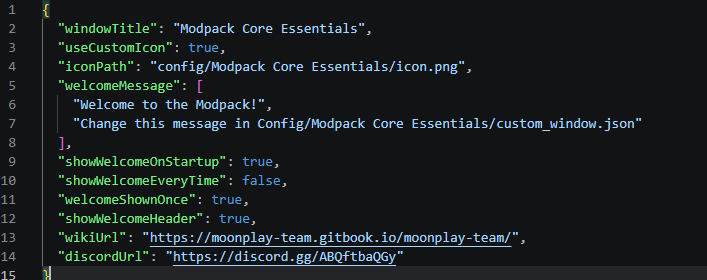
📋 Configurable Welcome Screen Display a welcome screen when players launch the game. You can configure it to appear only once (on first launch) or every time the game starts -> great for changelogs, server announcements, or greetings.

⚙️ Full ModMenu Integration Seamlessly integrates with ModMenu, providing an in-game config editor so you can tweak settings without leaving the game.

❤️ But also easy config file!
📦 Requirements
| Dependency | Version |
|---|---|
| Minecraft | 26.1.2 |
| Fabric Loader | 0.19.2+ |
| Fabric API | Any |
| Java | 25 |
Recommended: ModMenu (for in-game configuration)
In the future, we will support more versions, as well as NeoForge.
🔧 FAQ:
- Is this mod Client-Side Only?
- This mod runs entirely on the client. No need to install it on server.
- Why doesn't the icon load when I click the reload button?
- Because you can't “reload” a window icon. You need to restart the game.
- What size should the icon be?
- 64x64 or 32x32
🔗 Links
Built with ❤️ by the MoonPlay Team.
