

Minecraft Statistics
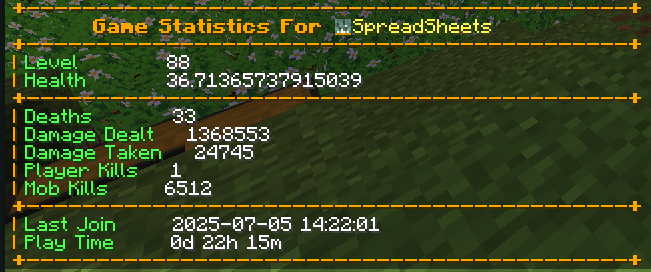
Player Statistics is a Minecraft server plugin that tracks and syncs player statistics to MySQL database also providing useful commands and features for both players and server administrators.
 178
178
Quick challenge
How far can you run before the mobs catch you?
Minecraft check
Confirm your run
Complete the quick check to get your code.
Minecraft Statistics
🎮 Player Statistics Minecraft Plugin
Player Statistics is a Minecraft server plugin that tracks and manages player statistics, providing useful commands and features for both players and server administrators.
---
✨ Features
- 💾 Integrates with MySQL for persistent data storage - ⚡ Provides commands to view and sync player stats - 📊 Tracks player statistics automatically - 🔧 Easy to configure and extend
---
📷 Screenshots
---
🚀 Getting Started
1. Installation
1. Download the latest compiled `.jar` file from the Releases section. 2. Place the `.jar` file into your server's `plugins` directory. 3. Restart your Minecraft server.
2. Configuration
1. After the first run, a `config.yml` file will be generated in the plugin's folder. 2. Open `config.yml` and update the MySQL database settings and other options as needed:
```yaml mysql: host: localhost port: 3306 database: minecraft username: root password: yourpassword ```
3. Save the file and restart the server to apply changes.
---
🕹️ Commands
| Command | Description | Permission | |-----------------|------------------------------------|-----------------------------| | `/stats` | View your statistics | `playerstatistics.stats` | | `/syncplayers` | Sync all player data with database | `playerstatistics.sync` | | `/debugger` | Debug plugin operations (admin) | `playerstatistics.debug` |
---
🛠️ Building from Source
> Note: Most users do not need to build from source. Download the pre-built `.jar` from the releases if you just want to use the plugin.
1. Make sure you have Java 17+ and Maven installed. 2. Clone this repository:
```sh git clone https://github.com/yourusername/PlayerStatistics.git cd PlayerStatistics ```
3. Build the plugin:
```sh mvn clean compile mvn clean package ```
4. The compiled `.jar` will be in the `target/` directory.
---
🤝 Contributing
Contributions are welcome! To contribute:
1. Fork this repository and create your feature branch (`git checkout -b feature/AmazingFeature`) 2. Commit your changes (`git commit -m 'Add some AmazingFeature'`) 3. Push to the branch (`git push origin feature/AmazingFeature`) 4. Open a Pull Request
Please follow the existing code style and include clear commit messages.
---
💬 Support
For issues or feature requests, please open an issue on GitHub.
