

LsKillGui
Simple GUI-based kill confirmation plugin for survival servers
 11
11
Quick challenge
How far can you run before the mobs catch you?
Minecraft check
Confirm your run
Complete the quick check to get your code.
LsKillGui
LsKillGui
A lightweight and fully configurable confirmation GUI for `/kill` on Minecraft servers.
LsKillGui prevents accidental deaths by showing a confirmation menu when players use `/kill`. Server owners can fully customize the menu items, names, lore, and behavior through the configuration.
The plugin is designed to be simple, lightweight, and modern Paper-compatible.
---
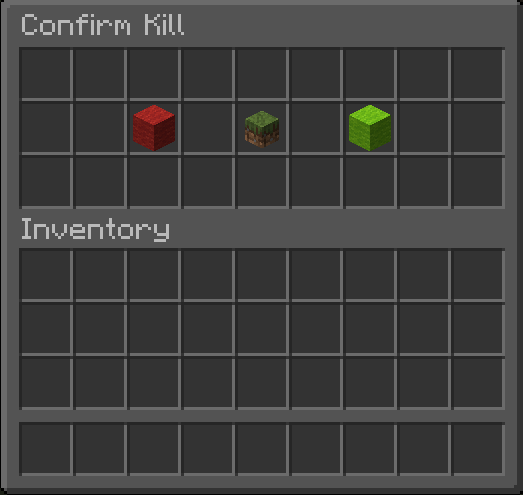
---
Features
* Confirmation GUI when using `/kill` * Optional GUI for `/kill <player>` * Fully configurable GUI items * Support for hex colors in the GUI * Supports hex colors (`&#ffffff`) and normal color codes (`&`) * Placeholder support for `%player%` and `%target%` * Tab completion for commands * Lightweight and dependency-free * Clean and simple configuration
---
Commands
`/kill`
Opens the confirmation GUI to kill yourself.
`/kill <player>`
Kills another player (requires permission).
`/killgui reload`
Reloads the plugin configuration.
---
Permissions
| Permission | Description | Default | | ---------------- | ------------------------ | ------- | | `killgui.use` | Allows use of `/kill` | OP | | `killgui.other` | Allows `/kill <player>` | OP | | `killgui.reload` | Allows `/killgui reload` | OP |
---
Configuration
The GUI is fully customizable through `config.yml`.
Example:
```yaml
=========================================================
LsKillGui - config-guide.yml
=========================================================
#
This file explains every option in the normal config.yml.
#
ITEM NAMES:
Use valid Bukkit / Paper Material names such as:
LIME_WOOL
RED_WOOL
PAPER
#
Full material list:
https://jd.papermc.io/paper/1.21.11/org/bukkit/Material.html
#
SPECIAL CUSTOM ITEM VALUES SUPPORTED BY THIS PLUGIN:
SELF_HEAD -> shows the head of the player opening the menu
TARGET_HEAD -> shows the head of the target player in /kill <player>
#
PLACEHOLDERS:
%player% -> the player opening the GUI
%target% -> the target player in /kill <player>
#
OTHER NOTES:
- Names and lore support normal color codes with & and also Hex codes like: 7ff55Hello
- Lore can have as many lines as you want
=========================================================
If enabled, a confirmation GUI opens for /kill <player>.
If disabled, /kill <player> instantly kills the target player.
other-gui: true
menus: self: items: cancel:
The item shown on the left side.
Valid examples: RED_WOOL, BARRIER, GRAY_STAINED_GLASS_PANE
item: RED_WOOL
Display name of the item.
name: "&c&lCancel"
Lore lines under the item name.
lore: - "&7Close this menu."
info:
Special value:
SELF_HEAD = head of the player opening the menu
You can also replace this with a normal item like PAPER
item: SELF_HEAD
name: "&e&lConfirm Suicide"
lore: - "&7You are about to kill yourself." - "&7Click &aYes &7to continue." - "&7Click &cCancel &7to go back."
confirm: item: LIME_WOOL name: "&a&lYes" lore: - "&7Kill yourself instantly."
This menu is only used when:
other-gui: true
other: items: cancel: item: RED_WOOL name: "&c&lCancel" lore: - "&7Close this menu."
info:
Special value:
TARGET_HEAD = head of the target from /kill <player>
You can also replace this with a normal item like PAPER
item: TARGET_HEAD
name: "&6&lKill %target%"
lore: - "&7You are about to kill &f%target%&7." - "&7Click &aYes &7to confirm." - "&7Click &cCancel &7to go back."
confirm: item: LIME_WOOL name: "&a&lYes" lore: - "&7Instantly kill &f%target%&7." ```
---
Special Item Types
The plugin supports special item placeholders:
| Item value | Result | | ------------- | --------------------------------------------- | | `SELF_HEAD` | Shows the head of the player opening the menu | | `TARGET_HEAD` | Shows the head of the target player |
---
Placeholders
| Placeholder | Description | | ----------- | --------------------------------- | | `%player%` | Player opening the GUI | | `%target%` | Target player in `/kill <player>` |
---
Compatibility
* Paper * Spigot * Purpur * Minecraft 1.21+
---
Installation
1. Download the plugin `.jar` 2. Place it in your server's `plugins` folder 3. Restart the server 4. Configure `config.yml` if desired
---
Support
If you encounter issues or have suggestions, feel free to open an issue or contact the developer.
