

LPC Minimessage - Chat Formatter
A chat formatting with Minimessage Support plugin for LuckPerms.
 49,59k
Quick challenge
How far can you run before the mobs catch you?
Minecraft check
Confirm your run
Complete the quick check to get your code.
LPC Minimessage - Chat Formatter

<a href="https://modrinth.com/plugin/vsit"> 


LPC – LuckPerms Chat Formatter ✨
A flexible chat formatting plugin with MiniMessage support for LuckPerms
> Modern chat formatting powered by MiniMessage, full LuckPerms metadata support, group/track formats, and PlaceholderAPI!
---
🔧 Requirements
- LuckPerms *(Required)* – Permissions plugin - PlaceholderAPI *(Optional)* – Additional placeholders
---
✅ Features
- Full MiniMessage formatting support - Group and track-specific chat formats - Optional support for PlaceholderAPI - Supports `[ITEM]` placeholder in chat - Customizable reload message - No legacy color codes – modern MiniMessage only
---
🧑💼 Permissions
| Command / Feature | Permission Node | Description | |--------------------------|------------------------|--------------| | `/lpc reload` | `lpc.reload` | Reloads the configuration | | MiniMessage colors | `lpc.colorcodes` | Allows using MiniMessage color codes | | `[ITEM]` Placeholder | `lpc.itemplaceholder` | Enables the `[ITEM]` placeholder in chat |
---
⚙️ Configuration (`config.yml`)
```yaml
LPC Configuration
Main chat format (MiniMessage!)
chat-format: "{prefix}{name}<dark_gray> »<reset> {message}"
Format per group (optional)
group-formats:
default: "<gray>[User]</gray> {name}<dark_gray> »<reset> {message}"
admin: "<red>[Admin]</red> {name}<dark_gray> »<reset> {message}"
Format per track (optional)
track-formats:
staff_track: "<gold>[Staff]</gold> {name}<dark_gray> »<reset> {message}"
donator_track: "<aqua>[Donator]</aqua> {name}<dark_gray> »<reset> {message}"
Enable the [ITEM] placeholder
use-item-placeholder: true
Reload message
reload-message: "<green>LPC configuration reloaded successfully!" ```
---
🪄 Available Placeholders
| Placeholder | Description | |-------------------------|-------------| | `{message}` | The chat message | | `{name}` | Player's name | | `{displayname}` | Display name / nickname | | `{world}` | Player's current world | | `{prefix}` | Highest priority prefix | | `{suffix}` | Highest priority suffix | | `{prefixes}` | Sorted list of all prefixes | | `{suffixes}` | Sorted list of all suffixes | | `{username-color}` | Username color from meta | | `{message-color}` | Message color from meta |
> ℹ️ MiniMessage format All color values (prefix, suffix, etc.) must be in MiniMessage format – no legacy codes (`&a`, `§b`, etc.)
---
📸 Previews
Chat Format Example

[ITEM] Placeholder Example
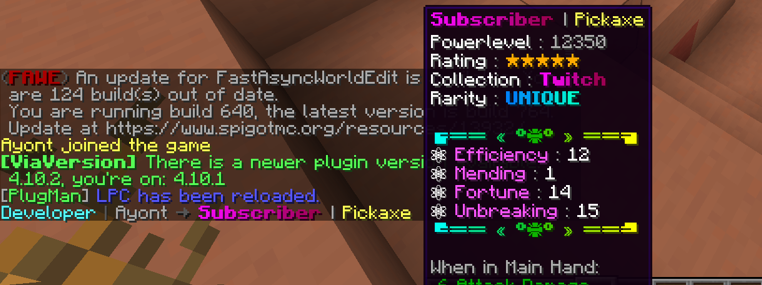
---
🚀 Installation
1. Stop your server 2. Place the `LPC.jar` into your `/plugins` folder 3. Start the server to generate configuration files 4. Edit the `config.yml` to your liking 5. Use `/lpc reload` to apply your changes ✅
---
📌 Notes
- Not affiliated with LuckPerms – Please do not contact the LuckPerms author for support! - Legacy version available at: Not affiliated with LuckPerms
🛟 Need Help?
Join our Discord for support, updates, or to report bugs:

