LoginTo
A complete authentication solution for Minecraft servers, providing secure login and database storage with secure BCrypt hashing and premium Autologin
 48,97k
Quick challenge
How far can you run before the mobs catch you?
Minecraft check
Confirm your run
Complete the quick check to get your code.
LoginTo

What is LoginTo?
LoginTo is a fully customizable authentication plugin for your Minecraft servers or network. It offers complete control over messages, along with a feature-rich configuration file that allows you to easily adjust and personalize every aspect of the plugin.
Why choose LoginTo?
LoginTo is simple to set up while still providing powerful features, including: - Premium authentication (auto-login) - Secure password hashing using BCrypt - Detailed login and registration logging - Advanced configuration options
It is built to help you keep your Minecraft server or network secure without sacrificing ease of use.
Updates
LoginTo is actively maintained and regularly updated with bug fixes and new features. For version 3.x, updates will primarily focus on stability improvements and performance optimizations.
Plugin
Configuration
```Yaml ConfigVersion: "1.9" # DO NOT CHANGE THIS
-------------------------------------------------------------------------------------------------- #
#
LoginTo Configuration #
#
-------------------------------------------------------------------------------------------------- #
commands-settings:
Put here the plugin that will be allowed before the login end (the commands /login and /register will be always present, the aliases like /l and /r will not)
pre-login-allowed-commands: - "l" - "r"
auth-security:
Kick the player if they provide an incorrect password during /login?
kick-on-invalid-password: true
Maximum login attempts before getting kicked
max-login-attempts: 3
Kick players who stay unauthenticated for too long?
kick-on-auth-timeout: true
Seconds allowed to authenticate before the kick occurs
auth-timeout-seconds: 10
password-requirements:
Require specific special characters in the password during registration?
require-special-chars: false
List the characters required if the setting above is true
required-char-list: ''
Define password length constraints
length-check: enabled: true min-length: 8 max-length: 32
World and teleportation
spawn-settings:
Enable automatic teleportation to a specific location on join?
teleport-on-join: false
Target dimension for the teleport (e.g., world, world_nether, world_the_end)
target-dimension: 'world'
Exact coordinates for the teleportation point
spawn-coordinates: x: 0 y: -64 z: 0
Return the player to their last known location after a successful login?
restore-previous-location: true
Integrations and webhooks
integrations:
proxy:
Specify the server where players should be sent after logging into your network (e.g., 'lobby-1').
If you are not using a proxy or wish to disable this feature, leave this field empty.
server-post-login: ""
discord:
Webhook URLs and custom messages (Supports Discord Markdown & PAPI)
Variables: %playerName%, %targetPlayer%
register-webhook-url: '' register-message: "%playerName% completed the registration"
login-webhook-url: '' login-message: "%playerName% completed the login"
delete-account-webhook-url: '' delete-account-message: "%targetPlayer% deleted %targetPlayer%'s account"
password-change-webhook-url: '' password-change-message: "%playerName% changed his password"
Storage
storage:
Storage Methods: sqlite, mysql, postgre, h2
Changing this requires a full server reboot
storage-type: "sqlite"
database:
Connection details for the database (for sqlite or h2, you will need to change only the name)
host: "localhost" port: 3306 name: "LoginTo_DB" user: "" password: ""
Premium system
premium:
Enables AutoLogin, /premium, /cracked commands and make unusable the proxy command unless the user is logged.
Requires a Proxy (Velocity/Bungee) with the plugin installed, and if you are running the proxy and the server on
two different machines or you are running in a dedicated host that uses pderodactyl, use mysql
enable-premium-features: false
storage:
Database type for cross-server communication (mysql or h2), it's raccomanded mysql if you can
database-type: "h2"
database: host: "localhost"
If the port is 0, it will be the database's default port (3306 for mysql and 9092 for h2)
port: 0 user: "sa" password: ""
Only used for MySQL; H2 defaults to 'LoginTo_Sharing'
database-name: "LoginTo_Sharing"
logging:
This feature is for logging all the players that joins in the server
logging: true
The time format for showing the current date
Do not use the space " " for the time, you can do this "hh-mm-ss dd-MM-yyyy", but not "hh mm ss dd MM yyyy", if you want, tell your staff to use only /getlogs <user> without the day
You can change the time (ss:mm:hh) and not using the space, but if you use the /getlogs command with the time selector, the date must remain "dd/MM/yyyy"
date-format: "HH:mm:ss dd/MM/yyyy"
plugin-utility:
Check for new updates on startup and notify the console?
enable-update-checker: true
Show the 'Service offered by LoginTo' watermark?, if you want to support me, consider leaving this on
show-watermark: true
If set to false, the plugin will require PacketEvents to be installed as a separate plugin on the server.
If set to true, the plugin will use the built-in PacketEvents API.
Disclaimer: If possible, I recommend setting this to 'false' and installing the PacketEvents plugin.
Doing so will help prevent any compatibility issues regarding PacketEvents within this plugin.
use-built-in-packetevents-api: true ```
Messages
```Yaml MessageVersion: "1.6" # DO NOT CHANGE THIS
-------------------------------------------------------------------------------------------------- #
#
LoginTo Messages Config #
#
-------------------------------------------------------------------------------------------------- #
register:
Messages sent during the registration process
error:
When a player use the /register command, but they are already registered
already-registered: "You are already registered!"
When a player types a password, but it doesn't contains the required characters
register-character-error: "Your password must contain these characters: %characters%"
When the password is too long or too short
password-length: "Your password must be between %min_length% and %max_length% characters long"
When a player use the /register command, but the first password is not equal to the second
password-mismatch: "The passwords do not match!"
When a player types wrong the command
register-usage: "Error: Use /register <password> <confirm_password>"
Prompt when a player joins the server and need to make an account
register-prompt: "Welcome! Use /register <password> <confirm_password> to register."
Prompt when a player joins the server and need to make an account + the password must contain those character
register-prompt-characters: "Welcome! Use /register <password> <confirm_password> to register. Make sure to include one of these characters: %characters%"
When a player succesfully sing in
register-success: "Registration completed, have fun in the server"
login:
Messages sent during the login process
error:
when a player use the /login command, but they are not registered
not-registered: "You are not registered yet!"
When a player use the /login command, but they are not registered
already-logged-in: "You are already logged in."
When a player types wrong the command
login-usage: "Error: Use /login <password>"
When the password is wrong
wrong-password: "Incorrect password"
When a player joins the server after the registration, this message will appear
login-prompt: "Please use /login <password> to authenticate."
When a player successfully sing up
login-success: "Login successful! Welcome back."
delacc:
Messages for the account deletion command
error:
The target player doesn't exists
player-doesnt-exist: "That player does not exist."
When the admin doesn't confirm the command execution
delacc-not-confirmed: "Error: Please type 'confirm' after the player name."
When the admin types wrong the command
delacc-usage: "Usage: /delacc <username> <confirm>"
When an admin successfully deletes an account (Admin pov)
account-deleted: "Account deleted successfully."
When the player's account gets deleted (User pov)
admin-deleted-account: "Your account was deleted by an administrator. Please rejoin to create a new one."
changepassword:
Messages for changing the account password
error:
When the player types wrong the command
changepassword-usage: "Usage: /changepassword <old_password> <new_password>"
When the player uses the command, but the old password for the account is not correct
old-password-wrong: "The old password is incorrect. If you forgot it, please contact an admin."
When the password changes successfully and the player gets disconnected
password-changed: "Your password has been changed. Please rejoin and log in again."
cracked:
Messages for the cracked status command
error:
When the player execute the /cracked command, but they are already a cracked/premium user
already-cracked: "You are already marked as a cracked or premium user."
Warning that will popup when this command is executed
cracked-warn: "§l§6WARNING:§c You are using the cracked command. This means you will join this network as a cracked user. This protects your account from premium users trying to claim your name.nType §2/cracked§c to confirm."
When the cracked command is executed successfuly
cracked-done: "You are now a cracked user."
premium:
Messages for the premium status command
error:
When the player execute the /premium command, but they are already a premium user
already-premium: "You are already a premium user."
Warning that will popup when this command is executed
premium-warn: "§l§6WARNING:§c If you have a cracked account and switch to premium, you might lose access to your current progress if the names don't match perfectly.nType §2/premium§c to confirm."
When the premium command is executed successfuly
premium-done: "You are now a premium user."
loginto-command:
System and console messages
error:
When the player use the /loginto command for something, but that option is console-only
player-execute-console-command: "This command can only be executed from the console."
errors:
Errors that aren't related to commands or are general errors
Used for error that aren't related to any event or command
general:
When a player executes a command, but they don't have enought permission for that
no-permission: "You do not have permission to execute this command."
When a player uses a feature, but it is not enabled
feature-not-enabled: "This feature is currently disabled."
Errors for activity before login or registration
activity-before-login:
When a player executes a command when they are not logged in
oncommand-when-not-authenticated: "Please authenticate yourself before using commands."
When a player chat when the are not logged in
chatting-before-login: "You must log in before you can chat."
Errors related to failed authentication
login-fail:
When a player tries the login too many times
onkick-for-failed-login: "Too many failed login attempts. Please rejoin and try again."
When a player joins and doesn't complete the authentication in time
onkick-for-long-waiting: "Authentication timed out. Please rejoin and try again."
Kick message when someone joins the server but another player with the same name is already online. (This message uses PAPI for the player already in the server, not for the joining player)
onkick-for-joining-with-same-name: "Another player with your name is already on this server" ```
Commands
<pre>/register <password> <confirmPassword></pre>
Registers a new account.
Aliases: /r, /reg
<pre>/login <password></pre>
Logs into your account.
Aliases: /l
<pre>/delacc <player> <confirm></pre>
Deletes a player's account.
Permission: OP (by default)
<pre>/changepassword <oldPassword> <newPassword></pre>
Changes your account password.
<pre>/premium [player]</pre>
Sets yourself or another player as a premium user.
<pre>/cracked</pre>
Sets your account as cracked (disables premium validation).
<pre>/getlogs <player> [date: dd/MM/yyyy]</pre>
Displays login and registration logs for a player.
Permissions
<pre>loginto.register</pre>
Allows players to use the <code>/register</code> command.
Default: Everyone
<pre>loginto.login</pre>
Allows players to use the <code>/login</code> command.
Default: Everyone
<pre>loginto.delacc</pre>
Allows players to delete accounts using <code>/delacc</code>.
Default: OP
<pre>loginto.changepassword</pre>
Allows players to change their password with <code>/changepassword</code>.
Default: Everyone
<pre>loginto.premium.me</pre>
Allows players to set their own account as premium.
Default: Everyone
<pre>loginto.premium.other</pre>
Allows setting other players as premium using <code>/premium <player></code>.
Default: OP
<pre>loginto.cracked</pre>
Allows players to switch their account to cracked mode.
Default: Everyone
<pre>loginto.getlogs</pre>
Allows viewing login and registration logs with <code>/getlogs</code>.
Default: OP
<pre>loginto.flag-banned-client</pre>
For the players with this permission, they will receive a message with the specific client of a player (if that client is flagged).
Proxy permission
Images
Register command prompt

Login command prompt

100% fully customizable messages, from text to colors, also the plugin do %%MD0%% require a reload for applying this message, you will just need to save the file

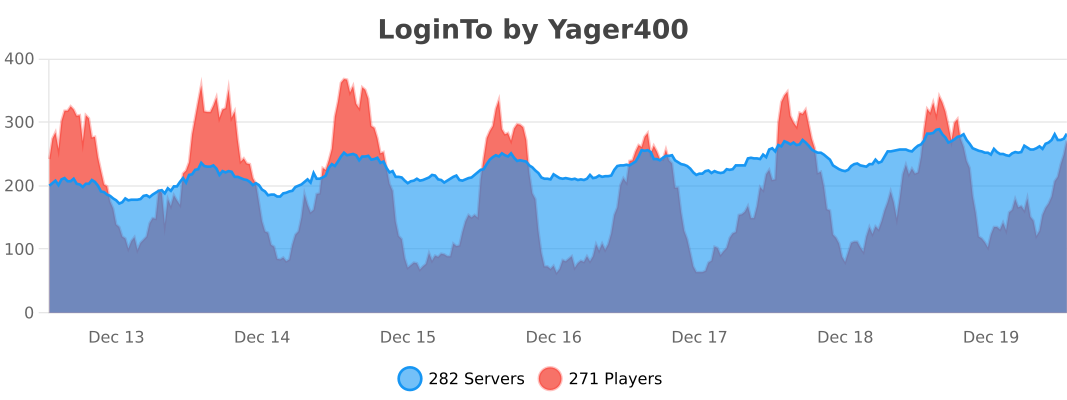
Bstats from version 2.1