

Load Support
Shows when the user has too less Java memory allocated, and plays a sound when the game has loaded.
 1,1M
1,1M
Quick challenge
How far can you run before the mobs catch you?
Minecraft check
Confirm your run
Complete the quick check to get your code.
Load Support
Shows when the player has plays a sound allocated, and plays a sound when the game has finished loading.
It is fully configurable in `config/loadsupport.toml`.
Config 🚀
The config in `config/loadsupport.toml` is pretty self explainatory: ```toml loadFinishSound = "minecraft:ui.toast.challenge_complete" minMemory = 4.0 errorTitle = "Error: Not enough Java memory!" errorMinMemory = "Please allocate at least {minMemory} GB of Java memory to your Minecraft instance!" errorCurrentMemory = "You have currently {currentMemory} GB allocated." memoryInfoLink = "https://github.com/vaporvee/LoadSupport/wiki/How-to-allocate-more-memory-to-your-Minecraft-instance" ``` `{minMemory}` and `{currentMemory}` get replaced by their actual values.
Planned Features 👀
- 🪛 Ingame settings (Modlist support) - 🧩 More features letting the player know why Minecraft is not loading
Features
Directly show a warning when too less Java Memory was selected 🚨
The player doesn't need to wait just to know that they selected the wrong amount of Java Memory.
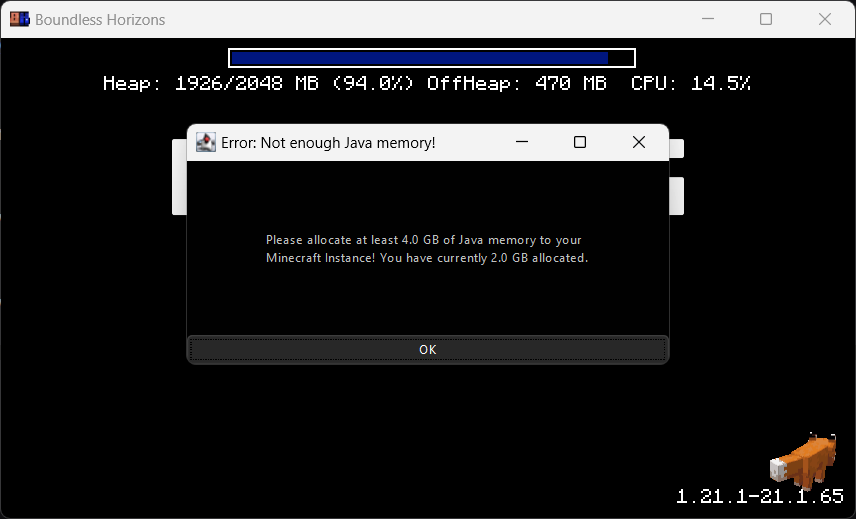
Blocks the game window🚧
Make sure the player gets the correct performance experience.
---
Play a sound when Minecraft finished loading 🔊
Directly know when Minecraft started when beeing in the background.
