

Labelling Containers
A multiplayer compatible mod that allows players to set icons and label chests, shulker boxes, barrels and other containers without the need of signs.
 78,20k
Quick challenge
How far can you run before the mobs catch you?
Minecraft check
Confirm your run
Complete the quick check to get your code.
Labelling Containers

> ### A mod that makes easy labelling *chests*, *shulker boxes*, *barrels* and other containers without the use of signs.
Check out my Discord Server to suggest features and add compatibility with other mods!
How to use
This mod adds a Label printer which is an item that can set a label and an icon to a container.
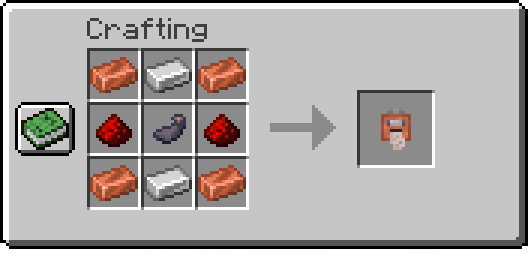
Printing labels:
To use the paper, right-click while holding it, and it'll open a menu where you can set your icon and label. Finally, have paper in your inventory and shift-right-click a chest or compatible container to set them.
Copying labels from existing ones:
When holding the Label Printer, shift-right-click to switch to *Copy mode*. Then shift-right-click on a container that has a label already set to copy its icon and text.
Commands
`/labelposition`
Sets the current player's HUD position. Available positions are:
- `center-right` (default) - `center-left` - `left` - `top` - `top-left`
Examples:
- Set the current HUD position to `left`: ```minecraft /labelposition left ```
`/setlabel`
Requires *admin* permissions. Sets the label / icon of the selected container.
Examples:
- Setting the label of a block at <x> <y> <z> coordinates: ```minecraft /setlabel <x> <y> <z> label I'm a dirt chest! ``` - Setting the icon of a block at <x> <y> <z> coordinates: ```minecraft /setlabel <x> <y> <z> icon minecraft:dirt ```
`/labelconfig`
Requires *admin* permissions. Adds/removes blocks that can be labeled from the config.
> NOTE: All blocks that have a Block Entity associated with them can be labeled. >
To check if a block can be added to the config and used correctly try *shift-right-clicking* on it with the *Label Printer* item, > and if it displays something like "You can't tag this block", that block can be added to the config
Examples:
- Add the Bell block to the config: ```minecraft /labelconfig add-item minecraft:bell ``` - Add the Bell block to the config (while having the block in player's hand): ```minecraft /labelconfig add-hand ``` - Remove the Bell block from the config: ```minecraft /labelconfig remove-item minecraft:bell ``` - Remove the Bell block from the config (while having the block in player's hand): ```minecraft /labelconfig remove-hand ```
