

Kiosk
A modpack that makes escaping Minecraft difficult. Only supports Windows 11 and Prism Launcher derivatives.
 645
645
Quick challenge
How far can you run before the mobs catch you?
Minecraft check
Confirm your run
Complete the quick check to get your code.
Kiosk
 <font color='e67a3e'><b>⚠ Warning</b></font>
Do not use on personal computers.
Do not install as a regular modpack.
Follow instructions carefully.
About
Kiosk is a modpack that makes escaping Minecraft difficult. It does so by removing UI elements and keyboard shortcuts (like pressing <kbd>Alt</kbd> + <kbd>F4</kbd> or holding <kbd>F3</kbd> + <kbd>C</kbd> for ten seconds). This modpack also hides onboarding (the "Welcome to Minecraft!" screen), warnings (e.g. the "Third-Party Online Play" warning), tutorial hints, and Minecraft Realms notifications. By default, Music, the Narrator, and its keyboard shortcut are turned off.
Mods (5)
Fabric API - Required by FancyMenu, Konkrete, Melody, and RebindAllTheKeys. FancyMenu - Enables custom menus. Konkrete - Required by FancyMenu. Melody - Required by FancyMenu. RebindAllTheKeys - Adds keybinds to keys that aren't rebindable.
Installation
Requirements
- Windows 11 - ‖ ⚠ or a %%MD1%% <font color='e67a3e'> ‖ ⚠ </font> Don't pirate. Use derivatives with caution. - No peripheral monitors
Steps
Uninstall apps/programs that have their own keyboard shortcuts (e.g. Snipping Tool or Game Bar)
Disable screen and touchpad gestures in settings as shown in the following images:
<picture> <source srcset='//cdn.modrinth.com/data/cached_images/aabc9ee3b8859e9738b8fe325fa67206c0a24fb9.png' media='(prefers-color-scheme: dark)' >  </picture>
<picture> <source srcset='//cdn.modrinth.com/data/cached_images/30d50410fbbf2eebce68ca6698d375a48fbd62fb.png' media='(prefers-color-scheme: dark)' >  </picture>
Create and open the following `.reg` files to disable task manager and screen edge swipe: ```reg Windows Registry Editor Version 5.00
[HKEY_LOCAL_MACHINESOFTWAREMicrosoftPolicyManagerdefaultLockDownAllowEdgeSwipe] "value"=dword:00000000
[HKEY_CURRENT_USERSOFTWAREPoliciesMicrosoftWindowsEdgeUI] "AllowEdgeSwipe"=-
[HKEY_LOCAL_MACHINESOFTWAREPoliciesMicrosoftWindowsEdgeUI] "AllowEdgeSwipe"=dword:00000000 ```
 <font color='e67a3e'><b>⚠ Warning</b></font>
Only do this if you know what you are doing.
Get permission before doing this.
```reg Windows Registry Editor Version 5.00
[HKEY_CURRENT_USERSOFTWAREMicrosoftWindowsCurrentVersionPoliciesSystem] "DisableTaskMgr"=dword:00000001
[HKEY_LOCAL_MACHINESOFTWAREMicrosoftWindowsCurrentVersionPoliciesSystem] "DisableTaskMgr"=dword:00000001 ``` Use `https://github.com/ThatBlueEnder/Kiosk/releases/latest/download/Minecraft.zip` as the URL when importing a Minecraft instance as shown in the following image:
<picture> <source srcset='//cdn.modrinth.com/data/cached_images/126ad8ed87d9fccbcbf95484e68da8279ca1f3e9.png' media='(prefers-color-scheme: dark)' >  </picture>
Update the imported Minecraft instance as shown in the following image:
<picture> <source srcset='//cdn.modrinth.com/data/cached_images/48d02daea22c29cb62559c7e0bfb0107d0062bc7.png' media='(prefers-color-scheme: dark)' > 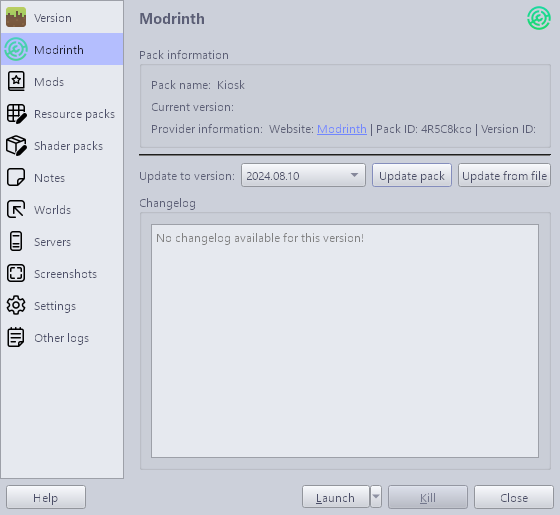 </picture>
Notes
Keyboard shortcuts not specific to Minecraft (e.g. <kbd>Alt</kbd> + <kbd>F4</kbd>) are blocked by a compiled AutoHotkey executable that runs while the Minecraft instance is open. The intended method to escape Minecraft is by pressing <kbd>Ctrl</kbd> + <kbd>Shift</kbd> + <kbd>\</kbd>. If a different method to escape Minecraft is found, please create an issue. Below is the `.ahk` that was compiled by AutoHotkey: ```ahk #NoTrayIcon #SingleInstance Force Persistent *LWin::Return *RWin::Return *!F4::Return *!Space::Return *!Tab::Return *^Esc::Return *^+Esc::Return *^!Tab::Return *!Esc::Return *AppsKey::Return *PrintScreen::Return *CtrlBreak::Return *Pause::Return *Help::Return *Sleep::Return *Browser_Back::Return *Browser_Forward::Return *Browser_Refresh::Return *Browser_Stop::Return *Browser_Search::Return *Browser_Favorites::Return *Browser_Home::Return *Volume_Mute::Return *Volume_Down::Return *Volume_Up::Return *Media_Next::Return *Media_Prev::Return *Media_Stop::Return *Media_Play_Pause::Return *Launch_Mail::Return *Launch_Media::Return *Launch_App1::Return *Launch_App2::Return *XButton1::Return *XButton2::Return *WheelLeft::Return *WheelRight::Return ^+::!F4 ```
