
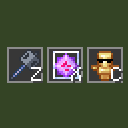
ItemKeybind
Quickly select any item from your hotbar by pressing a configured key
 22
22
Quick challenge
How far can you run before the mobs catch you?
Rotate your phone
Dino Mine is ready when your screen is landscape.
Minecraft check
Confirm your run
Complete the quick check to get your code.
Your code
Expires in 5 hours
ItemKeybind
Features
Instant hotbar selection — press a key, the slot with that item gets selected immediately Unlimited binds — configure as many item→key pairs as you need HUD overlay — shows all your binds as item slots with key labels, just like the vanilla hotbar Draggable HUD — reposition the overlay anywhere on screen
How to use
1. Open Mod Menu and click Config on ItemKeybind 2. Add a bind: enter an item ID (e.g. minecraft:end_crystal) and a key (e.g. key.keyboard.z) 3. Press Save & Close 4. In-game, press your configured key to instantly switch to that item in your hotbar. If the item is not in your hotbar, nothing happens.
