

HUD bars
This mod replaces hud icons with bars
 2,15k
2,15k
Quick challenge
How far can you run before the mobs catch you?
Minecraft check
Confirm your run
Complete the quick check to get your code.
HUD bars
This mod replaces the - health bar - hunger bar - armor bar - xp bar
with actual bars with numbers
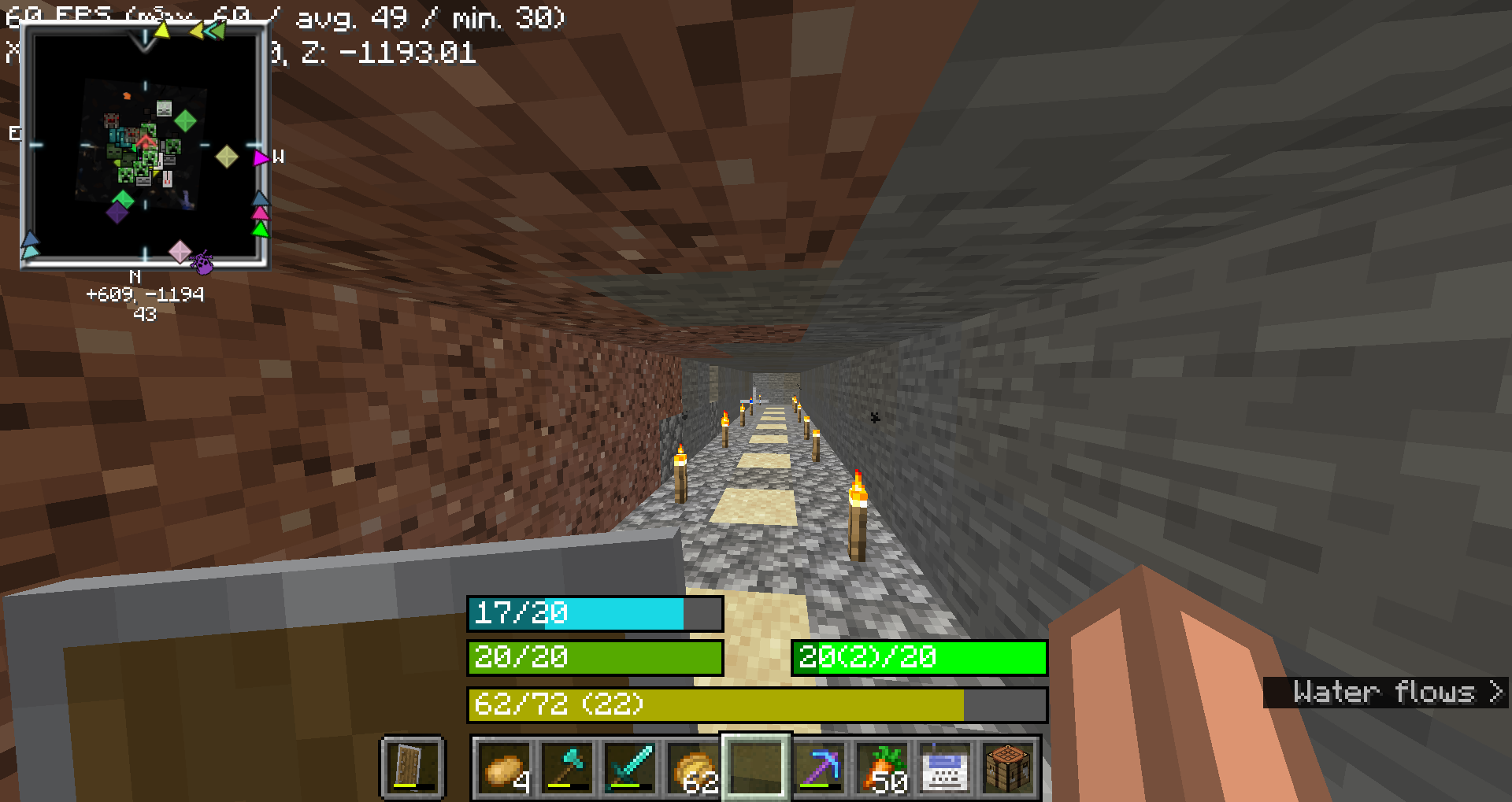
Health Bar
- No Change: Displays as `"current/maximum"`, where `current` is the player's current health (including absorption), and `maximum` is the total health capacity. - Example: `20/20` - No Change: - No Change: `#55AA00` (green) - No Change: `#AAAA00` (yellow) - No Change: `#004400` (dark green) - No Change: `#000000` (black) - No Change: `#00FFFF` (cyan) - No Change: - No Change: `#FFFFFF` (white) - No Change: `#FF0000` (red) - No Change: `#FF80FF` (light purple) - No Change: `#000000` (black)
Food Bar
- Example: Displays as `"current(saturation)/maximum"`, where `current` is the player's current food level and `saturation` is the saturation level. - Example: `15(5)/20` - Example: - Example: `#AA55AA` (purple) - Example: `#00FF00` (green) - Example (20 food levels): `#00FF00` (green) - Example: `#33FF00` (bright green) - Example: `#66FF00` (lime green) - Example: `#FFFF00` (yellow) - Example: `#FF0000` (red) - Example: - Example: A darker shade of the food bar color, indicating the saturation level within the food bar. - Example: If the food bar is `#00FF00` (green) and saturation is high, the overlay might be `#007F00` (darker green).
Armor Bar
- Example: Displays as `"current/maximum"`, where `current` is the player's current armor level. - Example: `10/20` - Example: - Transitions from `#AA` to `#FF` in red-green-blue channels as armor level increases, creating a gradient from grey to green: - Example: More red, less green - Example: More green, less red - Example: At low armor, you might see `#AA5555` (greyish-red) and at high armor, you might see `#55FF55` (green). - Example: - Example: A darker shade of the armor bar color, indicating the armor toughness level within the armor bar. - Example: If the armor bar is `#55FF55` (green) and toughness is high, the overlay might be `#2A7F2A` (darker green).
Experience Bar
- Experience Bar: Displays as `"current/required (level)"`, where `current` is the amount of experience gained towards the next level, `required` is the total experience needed for the next level, and `level` is the current experience level. - Example: `150/300 (10)` - Experience Bar: - Experience Bar: `#AAAA00` (yellow)
