

HitColor X
[26.1.x SUPPORT IS HERE!] Fully Custom Hit Color - Toggle Armor Tint - up to 100% Opacity - Hex Support - Presets, lightweight client-side Fabric mod for Minecraft 1.21.11 that lets you fully customize the hurt flash color when entities are hit.
 760
760
Quick challenge
How far can you run before the mobs catch you?
Minecraft check
Confirm your run
Complete the quick check to get your code.
HitColor X
◼️ HitColor X ◼️
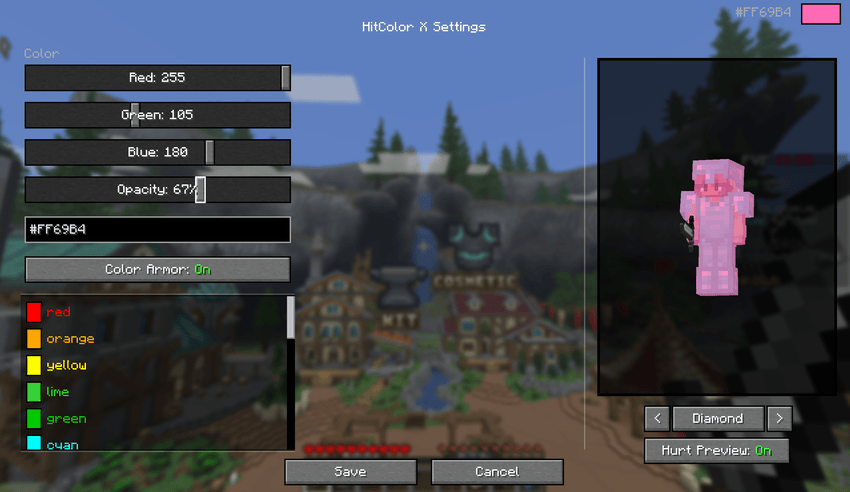
Fully customize the hurt flash color on entities INCLUDING their ARMOR. Built for PvP players who want clear, personalized visual feedback during combat.
---
Features
◼️ Custom Hit Color
Set any color you want using: - Preset colors: precise control over red, green, and blue channels - Preset colors: Paste any hex color directly - Preset colors: Red, Orange, Yellow, Green, Cyan, Blue, Purple, Pink, Magenta, White, Black
◼️ Armor Tinting
Toggle armor color too. When an entity is hit, their armor flashes the same color as their body. Supports all armor types.
◼️ Opacity Control
Adjust the intensity of the hit flash from 0% (no hit color) to 100% (fully solid). Find the perfect balance.
◼️ In-Game Settings Screen
Open the settings screen from Mod Menu to configure everything visually: - Live player preview with your actual skin (You have to be in a world/server for this feature to function) - Cycle through armor sets (Current, None, Leather, Gold, Chainmail, Iron, Copper, Diamond, Netherite) with enchantment glint - Toggle hurt preview on/off to compare with and without the effect - All changes update in real time

---
◼️ In-Game Commands
> No ModMenu? No problem. Configure everything via chat commands:
| Command | Description | |---------|-------------| | `/hitcolorx rgb <r> <g> <b>` | Set color by RGB values | | `/hitcolorx hex <#RRGGBB>` | Set color by hex code | | `/hitcolorx color <preset>` | Use a preset color | | `/hitcolorx opacity <0-100>` | Adjust opacity | | `/hitcolorx armor <on/off>` | Toggle armor recoloring | | `/hitcolorx reset` | Reset to vanilla defaults | | `/hitcolorx status` | Show current settings |
---
◼️ Available Preset Colors
| Color | Name | Color | Name | Color | Name | |-------|------|-------|------|-------|------| | 🔴 | `red` | 🟠 | `orange` | 🟡 | `yellow` | | 🟢 | `lime` | 🟩 | `green` | 🩵 | `cyan` | | 🔵 | `lightblue` | 💙 | `blue` | 🌑 | `navy` | | 🟣 | `purple` | 🫐 | `darkpurple` | 💗 | `hotpink` | | 🌸 | `pink` | 💜 | `magenta` | 🪻 | `lavender` | | ❤️ | `crimson` | 🩸 | `darkred` | 🪸 | `coral` | | 🏅 | `gold` | 🩴 | `teal` | 🩵 | `turquoise` | | 🌿 | `lightgreen` | 🌲 | `darkgreen` | 🔷 | `darkblue` | | 🩶 | `silver` | ⬜ | `white` | ⬛ | `black` | ---
◼️ Dependencies
- Optional: Fabric API - Optional: Mod Menu (for the config screen)
---
◼️ Compatibility
- Minecraft 1.21.11-26.1.x - Fabric Loader 0.18.4+ - Client-side only
