

Dark GUI
Dark mode gui for modern minecraft versions
 2,33k
2,33k
Quick challenge
How far can you run before the mobs catch you?
Minecraft check
Confirm your run
Complete the quick check to get your code.
Dark GUI
Dark GUI – Minimal Dark Mode Interface
Version: 1.20+ Resolution: 16x Category: GUI / Interface Style: Dark Mode, Minimal, Vanilla Friendly
---
Description
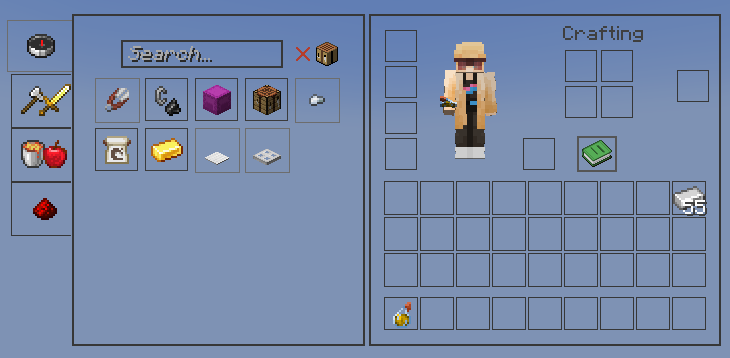
Dark GUI replaces Minecraft’s bright default menus with a clean and modern dark interface. The pack keeps the familiar vanilla layout while introducing a minimal black and dark gray design that improves readability and reduces eye strain.
It is designed for players who prefer a darker aesthetic without changing the overall feel of Minecraft. All menus, containers, and interface elements are adjusted to create a consistent dark theme while remaining simple and functional.
Dark GUI works well for long play sessions, night gameplay, PvP, building, and general survival worlds.
---
Features
• Complete dark GUI overhaul • Dark inventory, crafting, chest, and menu interfaces • Minimal and modern design that stays close to vanilla • Improved icon contrast for better visibility • Supports Minecraft 1.20+ interfaces • Compatible with OptiFine, Fabric, Sodium, and most mods • Lightweight 16x resolution with no performance impact
---
Why Use Dark GUI
Minecraft’s default interface is very bright, especially during nighttime gameplay. Dark GUI provides a darker alternative that is easier on the eyes while keeping menus clear and readable.
This pack is ideal for players who want a simple dark mode UI without changing textures, items, or blocks.
---
Screenshot
---
Installation
1. Download the .zip file 2. Move the file into the following folder:
.minecraft/resourcepacks
3. Open Minecraft 4. Go to Options → Resource Packs 5. Enable Dark GUI
---
Compatibility
Minecraft 1.20+ OptiFine / Fabric / Forge / Sodium Compatible with most resource packs
---
