

FRSpawnProtection
Prohibits interaction with blocks within a certain radius until you have played the required number of minutes.
 934
934
Quick challenge
How far can you run before the mobs catch you?
Minecraft check
Confirm your run
Complete the quick check to get your code.
FRSpawnProtection
FRSpawnProtection
It is a _within the spawn radius until players accumulate a certain amount of playtime_ and _within the spawn radius until players accumulate a certain amount of playtime_ plugin designed to _within the spawn radius until players accumulate a certain amount of playtime_ on your Minecraft server. It restricts player interaction with blocks and containers (chests, shulker boxes, furnaces, etc.) _within the spawn radius until players accumulate a certain amount of playtime_. This plugin is perfect for servers where protecting the starting area from griefing and theft is crucial.
> There might be mistakes in the English localization!
> Official RU localization: Copy & Download
Key Features
- Spawn Area Protection: Restricts interaction with blocks and containers within the spawn radius.
- Customizable Settings: All parameters can be configured via the config file.
- Support for All Container Types: Works with chests, shulker boxes, furnaces, hoppers, and more.
- Special Stick: Admins can use a special stick to remove protection from specific containers.
- Auto-Save Data: Player playtime and exclusion data are saved automatically.
- Multi-World Support: The plugin works across all worlds on your server.
- Localization: All messages can be customized via the configuration file.
Player's view

Special Stick (/frsp stick)

Special Stick using messages

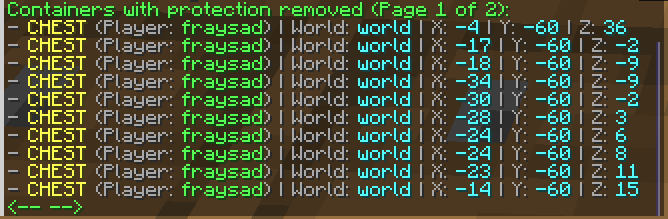
List of containers with protection removed (/frsp show)
Plugin Configuration
All plugin settings are located in the ```config.yml``` file. You can configure:
- Protection radius. - Required playtime to lift restrictions. - Auto-save interval. - Player messages. - Types of protected containers.
```
Number of blocks in each direction from the spawn point (/setworldspawn) within which protection is active
protection-radius: 200
Time required to play to remove restrictions (default 120 minutes = 2 hours)
required-play-time: 120
Auto-save interval for plugin data in minutes (default 120 minutes = 2 hours)
auto-save-interval: 120
Protection settings for each container type
protected-containers: CHEST: true TRAPPED_CHEST: true BARREL: true SHULKER_BOX: true BLACK_SHULKER_BOX: true BLUE_SHULKER_BOX: true BROWN_SHULKER_BOX: true CYAN_SHULKER_BOX: true GRAY_SHULKER_BOX: true GREEN_SHULKER_BOX: true LIGHT_BLUE_SHULKER_BOX: true LIGHT_GRAY_SHULKER_BOX: true LIME_SHULKER_BOX: true MAGENTA_SHULKER_BOX: true ORANGE_SHULKER_BOX: true PINK_SHULKER_BOX: true PURPLE_SHULKER_BOX: true RED_SHULKER_BOX: true WHITE_SHULKER_BOX: true YELLOW_SHULKER_BOX: true HOPPER: true DROPPER: true DISPENSER: true FURNACE: true BLAST_FURNACE: true SMOKER: true
General setting for all blocks (except containers)
protect-all-blocks: true
And lots of messages settings
```
##
Commands and Permissions
### | Commands | Permissions | Description | |---------------------|:---------------------:|---------------------:| | /frsp reload | frsp.reload | Reloads the plugin configuration | | /frsp stick | frsp.getstick | use a special stick for removing container protection | | - | frsp.usestick | Allows the use of the special stick | | /frsp show | frsp.show | Displays a list of containers with removed protection | | -| frsp.bypass | Allows players to bypass plugin restrictions. | |- | frsp.notify | Allows players to receive interaction restriction notifications. |
Installation
- Download the plugin from this page. - Place the ```.jar``` file in your server's plugins folder. - Restart the server. - Configure the plugin via the ```config.yml``` file.
Links
- Discord: link - Mail: [email protected]
