

EnderVault
Better Enderchest
 4,42k
4,42k
Quick challenge
How far can you run before the mobs catch you?
Rotate your phone
Dino Mine is ready when your screen is landscape.
Minecraft check
Confirm your run
Complete the quick check to get your code.
Your code
Expires in 5 hours
EnderVault
# 🌌 EnderVault - Supercharged Ender Chest Plugin
**EnderVault** upgrades the basic Minecraft ender chest into a powerful, fully customizable storage system. Give your players more space based on their rank or permission, while keeping everything safe and easily accessible—even when they’re offline!
---
## ✨ What Makes EnderVault Awesome?
- 🧱 Custom Slot Sizes
Let players unlock bigger ender chests with permissions.
From 3 rows (27 slots) up to 6 rows (54 slots).
Example:
Admins can open and edit offline players’ chests using SQLite or MySQL storage. - 💬 Easy Commands
Simply right-click a vanilla ender chest block to open your personalized EnderVault. ---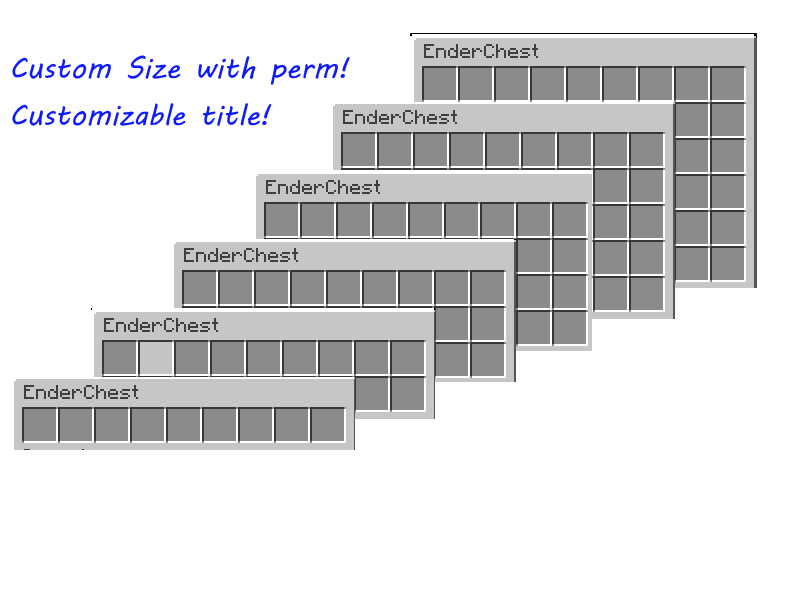 ## 💡 Why Choose EnderVault?
EnderVault gives your server flexibility and reliability that vanilla chests just can’t match.
✅ Scales with your server size.
## 💡 Why Choose EnderVault?
EnderVault gives your server flexibility and reliability that vanilla chests just can’t match.
✅ Scales with your server size.
✅ Easy setup and config.
✅ Perfect for survival, factions, SMPs, or donor perks! --- ## 🔧 How to Install 1. Download the latest
Example:
Let players unlock bigger ender chests with permissions.
From 3 rows (27 slots) up to 6 rows (54 slots).
Example:
endervault.rows.5 gives 5 rows!
- 💾 Choose How Data Is Saved- PDC – Lightweight per-player storage (best for small servers).
- SQLite – Local database with great performance.
- MySQL – Sync storage across servers or large networks.
- Online: Uses UUIDs for player tracking.
- Offline: Uses player names for compatibility.
Admins can open and edit offline players’ chests using SQLite or MySQL storage. - 💬 Easy Commands
/ev- Open your custom ender chest./ev <player>- Open someone else’s ender chest (requires permission).
Simply right-click a vanilla ender chest block to open your personalized EnderVault. ---
## 💡 Why Choose EnderVault?
EnderVault gives your server flexibility and reliability that vanilla chests just can’t match.
✅ Scales with your server size.✅ Easy setup and config.
✅ Perfect for survival, factions, SMPs, or donor perks! --- ## 🔧 How to Install 1. Download the latest
EnderVault.jar.
2. Place it in your server’s plugins folder.
3. Restart your server.
4. Edit the config file to choose your storage type.
---
## ⚙️ Configuration Example
```yaml
storage:
type: "sqlite" # Options: pdc, sqlite, mysql
sqlite:
file: "endervault.db"
mysql:
url: "jdbc:mysql://localhost:3306/database"
username: "user"
password: "password"
config:
OnlineMode: true
```
---
## 🔐 Permissions
- endervault.use – Open your own ender chest (default: true)
- endervault.viewothers – Open others’ chests (default: OP only)
- endervault.rows.<1-6> – Set how many rows a player getsExample:
endervault.rows.4 = 4 rows
--- 