

DuraBlock
A Minecraft plugin that generates custom blocks with unique durabilities.
 165
165
Quick challenge
How far can you run before the mobs catch you?
Minecraft check
Confirm your run
Complete the quick check to get your code.
DuraBlock

DuraBlock - Custom Block Durability Plugin
DuraBlock is a Minecraft plugin, inspired by the Metin Stones from Metin2, that allows server owners to create custom blocks with configurable durabilities. Players can race to break these blocks and earn rewards!
🌟 Features
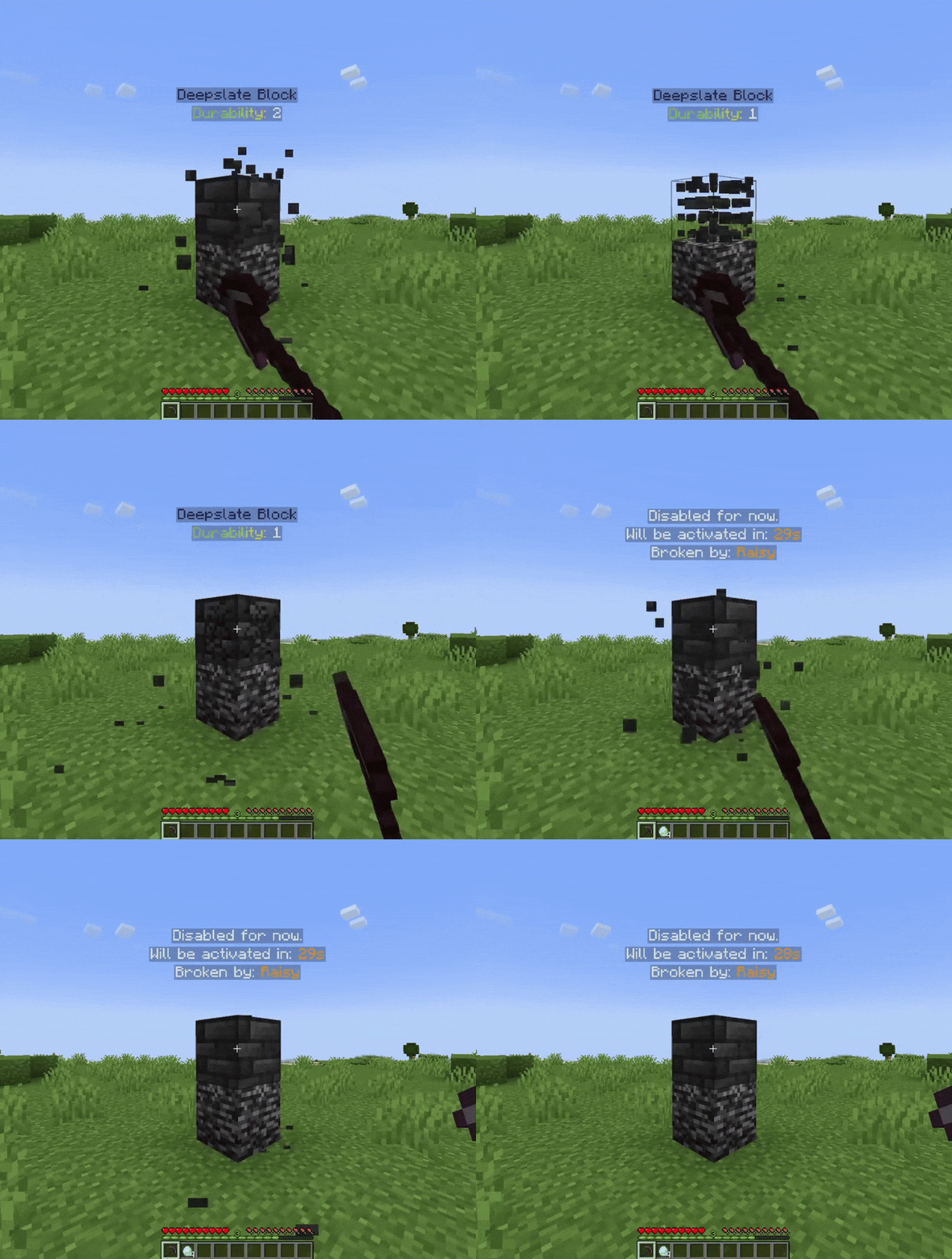
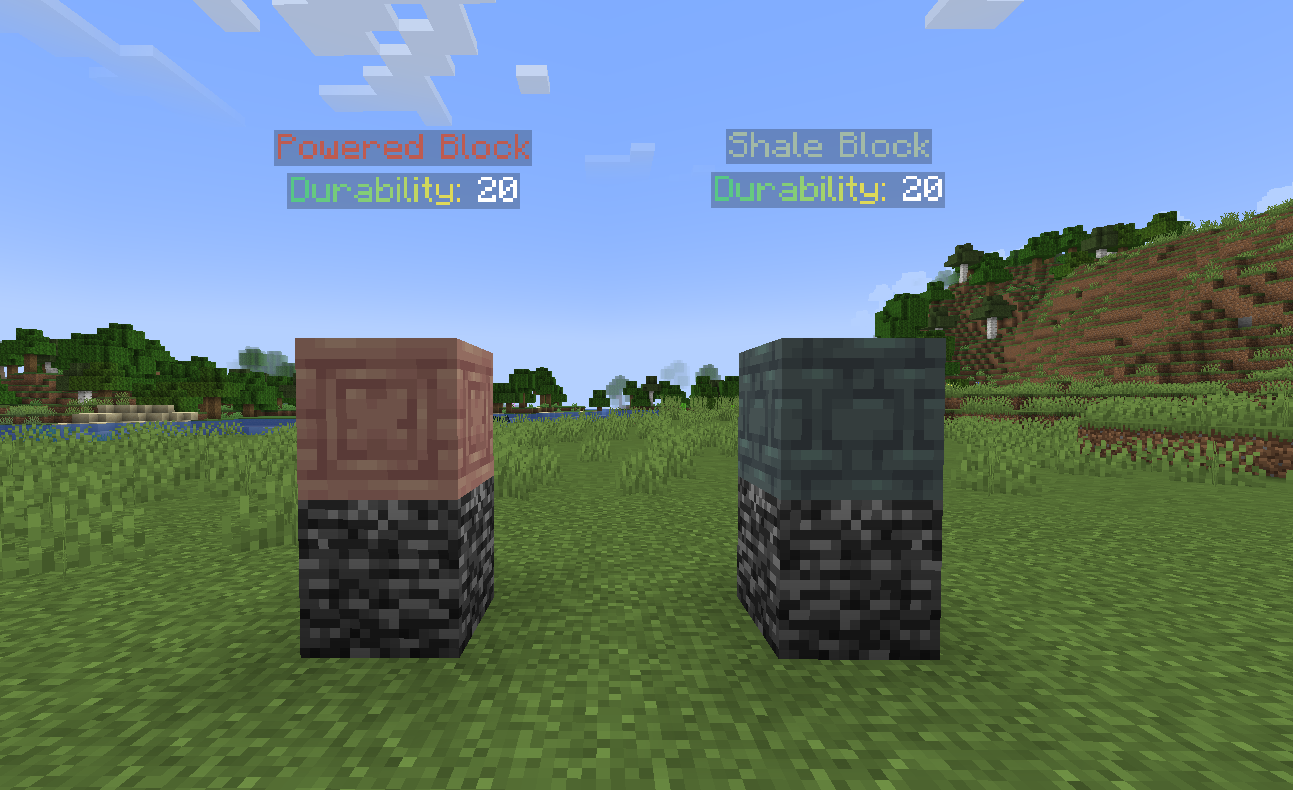
* MiniMessage Support: Set how many times a block needs to be hit before breaking. * MiniMessage Support: Display custom holograms above blocks, both when active and inactive. * MiniMessage Support: Specify permissions required to break each block. * MiniMessage Support: Play a sound and broadcast a message when a block is broken. * MiniMessage Support: Give rewards with customizable chances when a block is broken. * MiniMessage Support: Blocks automatically reappear after a configurable interval. * MiniMessage Support: You can add custom blocks from plugins like ItemsAdder, Nexo and Oraxen. * MiniMessage Support: DuraBlock supports MiniMessage for rich text formatting in config and language files.
📦 Requirements
* Java 17 or higher * Minecraft 1.19 or higher * PaperMC or a fork (e.g., Purpur) * DecentHolograms Plugin
🛠️ Installation
1. Download the latest release of DuraBlock. 2. Place the `.jar` file in your server's `plugins` folder. 3. Restart the server to generate the default configuration. 4. Edit the `config.yml` to customize your blocks. 5. Reload the plugin `/durablock reload` to apply changes.
🌍 Language Support
* The plugin supports two languages by default:
* tr_tr (English) * tr_tr (Turkish) * You can create your own language file by creating a `lang.yml` file in the `languages` directory.
📝 Default Configuration
Click to view config.yml
```yaml language: en_us
prefix: "<#874CCC><bold>DuraBlock</bold> <gray>» "
blocks: test-block: durability: 20
Time in seconds before the block gets restored after being broken
restore-interval: 30
Vertical offset for the hologram above the block (in blocks)#
y-level: 2
Permission required to break this block
permission: durablock.break.test-block
Text lines displayed in the hologram when the block is active/enabled
Refer to the DecentHolograms wiki for formatting and color options:
https://wiki.decentholograms.eu/general/format-and-colors/
enabled-hologram-lines: - "<#6DE1D2>Test Block" - "<#FF0000>Durability: {durability}</#00FF00>"
Text lines displayed in the hologram when the block is disabled
disabled-hologram-lines: - "Disabled for now." - "Will be activated in: <#FFA725>{restore}" - "Broken by: <#FFA725>{last_player}"
List of commands executed with a certain probability when the block's durability is above 0
rewards: - command: "give {player} diamond 1" chance: 0.1 # %10 chance - command: "give {player} emerald 2" chance: 0.3 # %30 chance
Actions to perform when the block is broken
on-break: sound: enabled: true
https://minecraft.wiki/w/Sounds.json/Java_Edition_values for sound list
sound-type: "minecraft:entity.player.levelup"
Whether the sound should play for everyone or only the player who broke it
play-to-everyone: true broadcast: enabled: true
Message broadcast to all players when the block is broken
message: "<red>{player} broke the test-block"
Commands executed when the block is broken
commands: - "give {player} diamond 16"
Warning: Adjusting these values may impact server performance or cause unexpected behavior.
Only change them if you understand the potential consequences.
Interval for updating hologram (in seconds)
hologram-update-interval: 1
Interval for checking if blocks needs to be enabled (in seconds)
block-restore-interval: 1 ```
🚀 Usage
* Create custom blocks by adding them to the `config.yml` file. * Customize block durability, holograms, sounds, and rewards. * Use permissions to control who can break specific blocks.
📜 Commands and Permissions
| Command | Description | | -------------------------------- | --------------------------------------------------- | | `/durablock reload` | Reloads the configuration | | `/durablock add <block-type>` | Adds a new custom block of the specified type | | `/durablock list` | Lists all configured custom blocks | | `/durablock remove <block-id>` | Removes a specific custom block by ID | | `/durablock restore <block-id>` | Manually restores a block by ID | | `/durablock info` | Displays information about the plugin |
| Permission | Description | | ------------------------------ | ---------------------------------------- | | `durablock.commands.main` | Allows using /durablock command | | `durablock.notify.update` | Allows receiving update notifications |
💡 Placeholders
Hologram Placeholders
* `{last_player}` - Displays the name of the player who last broke the block. * `{restore}` - Displays the remaining time (in seconds) until the block is restored. * `{durability}` - Shows the current durability of the block.
Command Placeholders
* `{player}` - Represents the name of the player who broke the block.
💡 Examples
To create a new block named "diamond-block" with 50 durability and a 20-second restore time, add this to your `config.yml`:
```yaml blocks: diamond-block: durability: 50 restore-interval: 20 permission: durablock.break.diamond-block enabled-hologram-lines: - "Diamond Block - {durability} hits left" disabled-hologram-lines: - "Regenerating in: {restore} seconds" rewards: - command: "give {player} diamond 1" chance: 0.1 # %10 chance on-break: sound: enabled: true sound-type: "minecraft:entity.player.levelup" play-to-everyone: true broadcast: enabled: true message: "<red>{player} broke the diamond block and earned 16 diamonds!" commands: - "give {player} diamond 16" ```
💬 Support
If you encounter any issues or have feature suggestions, feel free to open an issue on GitHub or join my Discord Server.
📝 License
This project is licensed under the MIT License - see the LICENSE.md file for details.
Enjoy making your server more dynamic with DuraBlock!
