

Discord Webhook Wizard
send game chat messages into your server's webhook
 1,22k
1,22k
Quick challenge
How far can you run before the mobs catch you?
Minecraft check
Confirm your run
Complete the quick check to get your code.
Discord Webhook Wizard
dchook
Send Minecraft chat messages to Discord server channels with ease! dchook is a lightweight and simple mod for the fabric mod loader, and newer Minecraft versions (more supported versions coming soon).
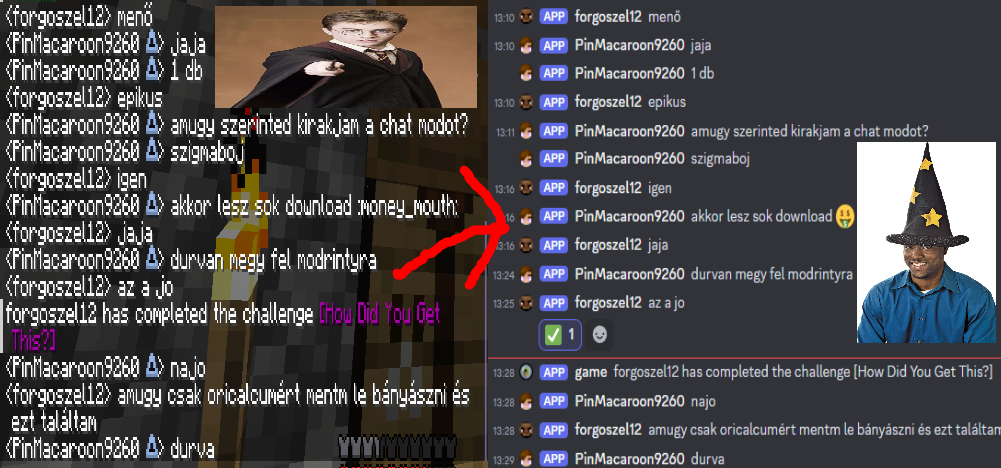
Features
This mod offers:
- One-way chat message proxying or two-way if desired; - Simple configuration; - Straightforward features; - Server-side, Discord Bot-less architecture.
Configurable and toggleable messages
Toggle server status messages such as: server staring, server started, server stopping, server stopped.
Toggle whether users can make their messages unproxyable (ignored by the mod) by applying two forward slashes (`//`) at the end of their chat messages.
Easy setup
Setting this mod up is just a matter of following the steps on the documentation page
"HELP, IT AINT WORKIN', WHAT AM I SUPPOSD' TO DO?"
Calm down, we'll go step by step.
Check the config file.
- Did I paste the URL to the right place? - Is it the right URL? - Did I delete an `=`? - Did I put an extra space somewhere? - Did I accidentally turn the mod off?
Check the console of the server.
- Did my server say something about the webhook not being a valid API endpoint? - Did my server say something about the webhook not being found or not having connection to Discord?
Still doesn't work? Well, I (pin, the one who made this mod) am also a "human", so I make mistakes too. If you think I made one, report it to me! See the sidebar for links!
Credits
- This mod uses simple-config for configuration file management. - This mod uses crafthead's API for player chat icons.
