CustomCommands

A velocity plugin to create custom commands

2,04k

Quick challenge

How far can you run before the mobs catch you?

CustomCommands

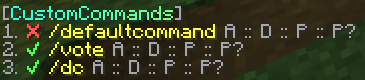
# CustomCommands for Velocity This is a Velocity plugin that allows you to create custom commands. It offers you a simple way to create commands that can be executed by players. These commands can be customized to your liking. ## Installation 1. Download the latest release from [modrinth](https://modrinth.com/plugin/customcommandsvelocity/versions). 2. Put the jar file in `plugins/`. 3. Restart your server. ## Usage | Command | Description | Permission | |---------------------------|-----------------------------------------------------------|--------------------------| | `/customcommands reload` | Reload the configuration file and all the custom commands | `customcommands.reload` | | `/customcommands list` | List all custom commands | `customcommands.list` | | `/customcommands help` | Show the help page | `customcommands.help` | | `/customcommands version` | Show the plugin's version | `customcommands.version` | | `/customcommands` | Show the help page | `customcommands.help` | All these commands require their respective permissions or the `customcommands.admin` permission. They can also be executed via `/cc`. ### `/customcommands list` This command displays a list of all custom commands, which looks like this:
![https://raw.githubusercontent.com/thevalleyy/CustomCommands/refs/heads/master/img.png](https://raw.githubusercontent.com/thevalleyy/CustomCommands/refs/heads/master/img.png)
  • The ✔/❌ indicates whether the command is enabled or disabled.
  • The yellow string is the command name. Click to suggest the command in the chat input.
  • Hover A to see an array of all the aliases.
  • Hover D to see the description.
  • Hover P to see the permission.
  • Hover P? to see whether the prefix should be added to the response message.
## Configuration ### `config.toml` The config is located at `plugins/customcommands/config.toml`.
Content of config.toml ```toml # CustomCommands Configuration # This is the prefix that will be displayed in front of all messages # Only supports MiniMessage, see https://docs.advntr.dev/minimessage/format.html and https://webui.advntr.dev/ for more information Prefix = "[CustomCommands]" # This is the default message that will be displayed when a player does not have permission to execute a command No-Permission = "You do not have permission to execute this command." # This is the default message that will be displayed when a command is run from the console, but the command is not allowed to be run from the console No-Console-Command = "This command cannot be run from console!" # This is the default message that will be displayed when a command has been executed successfully Command-Executed = "Command executed successfully." # Do not change this Config-Version = 1.0 ```
### Custom Commands Create your custom commands in `plugins/customcommands/Commands/`. Each command is saved in a separate toml file.
Content of the default command file (DefaultCommand.toml) ```toml # Command Configuration # Enabled? Enabled = true # This is the command name that will be used to call the command in the chat Name = "defaultcommand" # These are the aliases. Empty the array if you don't need any aliases, like so: Aliases = [] Aliases = ["default", "defaultcmd"] # This is the description of the command that will be displayed in the help command Description = "This is the default command of CustomCommands" # This is the permission required to use the command. Leave empty for no permission Permission = "customcommands.defaultcommand" # This is the response that will be sent when the command is called. Leave empty for no response # Only supports MiniMessage, see https://docs.advntr.dev/minimessage/format.html and https://webui.advntr.dev/ for more information Response = "Command executed successfully!" # Add the plugins Prefix configured in config.toml to the response message UsePrefix = true # This is the cooldown of the command in seconds Cooldown = 0 # Proxy command to execute. This code is run on console, without any permission checks. Leave empty for no proxy command # To view all placeholders, see https://github.com/thevalleyy/CustomCommands?tab=readme-ov-file#placeholders # Example: ProxyCommand = "send %player% hub" ProxyCommand = "" ```
## Placeholders * `%player%` - The player who executed the command

ADS