
ChatImage
Show Image In Chat Line
 167,92k
Quick challenge
How far can you run before the mobs catch you?
Minecraft check
Confirm your run
Complete the quick check to get your code.
ChatImage
ChatImage
✨ Show image in Minecraft chat ✨



📖Docs · 🐛Submit Suggestion/Bug . 📃Chinese . ⬇️CurseForge · ⬇️Modrinth
Quick Start
Enter `[[CICode,url=https://blog.kituin.fun/img/bg.png,name=Image]]` in the chat line
> 1.2.0 Could Transfer Http-Url To Image Directly
than it will transfer to image
Support display local image (need ServerSide Mod) and GIF
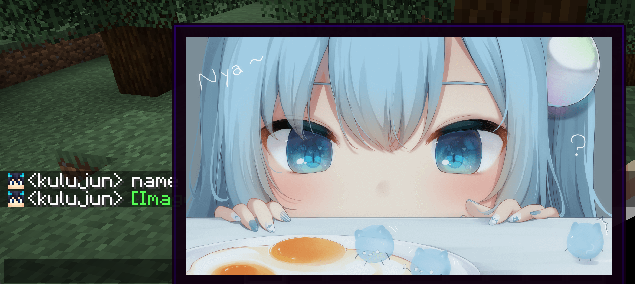
(image from 甘城なつき)
Compatibility
- ✅Chat Heads (Mod) - ✅McBot🔗 (Mod) - ✅ChatBridge - CQCode - ✅NoChatReports
Support input method
- Manual Input `CICode` - Send `CICode` With Command - Drag Image Into Chat Screen
Specification
It use `ChatImageCode` (`[[CICode,<arg>=<value>]]`)
| Arg | Require | Type | Remark | |------|---------|---------|-------------------------------------------------------| | url | true | String | Image address (please use `file:///` for local files) | | nsfw | false | boolean | Is it an nsfw image | | name | false | String | The name displayed in the chat | | pre | false | String | prefix(default:`[`)(can't be`,`) | | suf | false | String | suffix(default:`]`)(can't be`,`) |
`nsfw` will determine whether to display the image directly
if it is set to `true`, you need to click to view it (or open the nsfw mode in the configuration file to view it directly)
Example:
- Web Image `[[CICode,url=<Web Url>,name=Image]]` - example: `[CICode,url=https://blog.kituin.fun/img/bg.png,name=Image]]`
- Local Image `[[CICode,url=file:///<absolute file path>,name=Image]]` - example: `[[CICode,url=file:///C:blogkituinfunimgbg.png,name=Image]]`
Use Command to send [[CICode]]
`/chatimage send <display name> <url>`
Send CICode with display name and url
`/chatimage url <url>`
Send CICode with url (use default display name)
Config Settings
- manual configure - The configuration file is located at: `.minecraft/conifg/fabric/chatimageconfig.json` - After modifying the configuration file, please use `/chatimage reload` to reload the configuration file - Use key binding (default `End` key) - Use Mod Menu, click the configuration button to configure
Support Image Type
- png - jpg/jpeg - jfif - gif - ico - bmp
